
 Fair Value Gap
 False Breakout Scanner
 Heiken Ashi Trend
 Stock Volatility Box
 Futures Volatility Box
 ORB Setups
 Squeeze Setups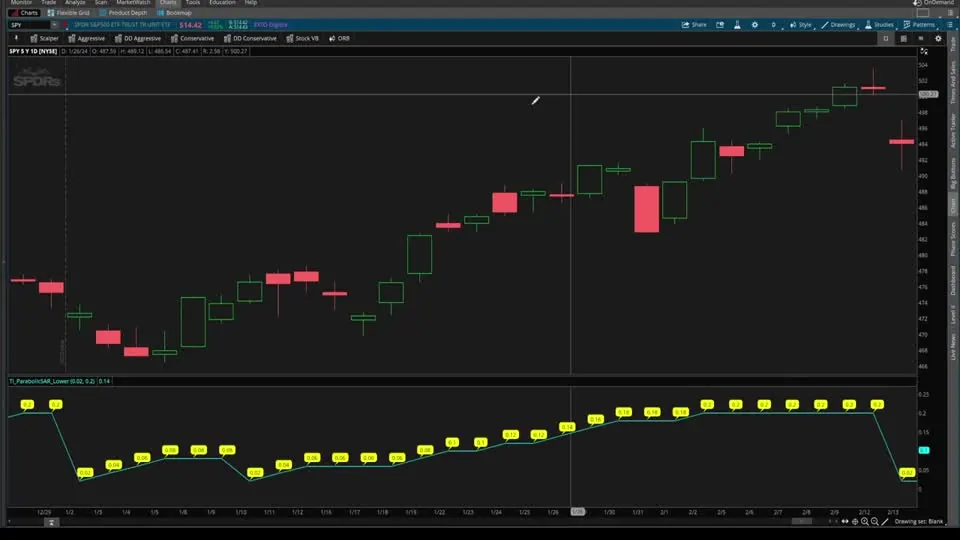
On this page
Overview
This Parabolic SAR series for thinkorswim takes the built-in indicator apart and builds on it in 4 parts. In Part 1 I walk through the code behind the dots line by line and color them by trend. In Part 2 I add an early reversal signal for the moment the acceleration hits its limit and RSI turns.
In Part 3 I turn that signal into bullish and bearish scans, and in Part 4 I build a backtester to see how the signals did on SPY, NVIDIA and Tesla. It's for traders who use the dots and want to know what drives them before they trade them. The download is the Part 2 indicator.
Key Takeaways
- The Parabolic SAR plots dots below price in a long state and above price in a short state. SAR stands for stop and reverse, and a switch of sides marks a possible trend reversal.
- thinkorswim's Parabolic SAR has 2 inputs: an acceleration factor of 0.02, the starting speed, and an acceleration limit of 0.2, the top speed.
- The Part 2 signal fires when the acceleration sits at its 0.2 limit and RSI gives a down or up signal, an early sign the trend may be exhausting before the dots flip.
- In Part 3, the bullish scan on daily bars returned 2 stocks, Canopy Growth and Paramount Global, and the bearish scan returned 3.
- In the Part 4 backtester, which exits when the dots flip, the SPY daily long side showed 2 winners and 1 loser (the video gives no date range), and NVIDIA's long side was positive over 10 trades on a 5-minute chart over 30 days.
What Is the Parabolic SAR?
The Parabolic SAR is a trend indicator, built into thinkorswim, that plots a series of dots above or below price. SAR stands for stop and reverse. It started out as a trend reversal indicator, and the switch of the dots from one side of price to the other was its original purpose.
You can also use it for trend continuation. As long as the dots keep printing on the same side, the existing trend is still healthy and building on itself.
I find that most traders don't know what the Parabolic SAR is calculated from, much less how to use it correctly, so the series starts with the code.
How to Read the Parabolic SAR Dots
Parabolic SAR dots below price action show a bullish, long-side bias, and dots above price action show a bearish, short-side bias. The table covers the 4 things to watch.
| What you see | State in the code | How to read it |
|---|---|---|
| Dots below price | state.long | Bullish bias: longs only |
| Dots above price | state.short | Bearish bias: short side |
| Dots switch sides | The state flips | The stop and reverse: a trend might be changing |
| Dots keep printing on one side | The state holds | The existing trend is continuing |
For other warning signs that a trend is running out of steam, such as momentum divergence and volume patterns, see our research on how to recognize when a trend reverses.
The Inputs and Variables Behind the Dots
The Parabolic SAR code in thinkorswim starts with 2 inputs, the only variables you control from the study settings menu. In Part 1 I explain them with a car analogy.
| Input | Default | In the car analogy | What it controls |
|---|---|---|---|
| accelerationFactor | 0.02 | The gas pedal | The starting value of acc, and how much acc grows each time the trend makes a new extreme |
| accelerationLimit | 0.2 | The car's top speed | The highest value acc can reach |
input accelerationFactor = 0.02;
input accelerationLimit = 0.2;
Two assert checks guard these inputs. The factor must be positive, and the limit must be greater than or equal to the factor, or the code won't compile and the study shows an error. If that happens, our guide on how to fix bugs in thinkScript code can help.
Next, the code defines 4 key variables that the rest of the study uses:
- state decides where the dots plot. It starts at init, the initialization state that gets the ball rolling, then moves back and forth between long and short.
- extreme is a carry variable: the highest high in a long state, or the lowest low in a short state, since the last change of state.
- SAR is the stop and reverse value: the price where the dot plots on your chart.
- acc is the acceleration. It takes over from the acceleration factor and works the gas pedal, which controls how sensitive the SAR is to price movement.
def state = {default init, long, short};
def extreme;
def SAR;
def acc;
The first line lists the 3 values state can take, with init as the default.
When I plotted acc in a lower panel in Part 1, it started at 0.02, built up speed with a brief flat stretch, and stayed at 0.2 once it hit the limit. When the state changed from long to short, it reset to 0.02.
How the Code Decides Where Each Dot Goes
The Parabolic SAR does most of its calculation inside one switch statement on the previous bar's state. The switch has 3 cases: init, short and long.
switch (state[1]) {
case init:
    state = state.long;
    acc = accelerationFactor;
    extreme = high;
    SAR = low;
The init case kicks everything off. It assumes a long state, sets acc to the starting speed of 0.02, sets extreme to the high, and plots the first SAR at the low, below price.
The Short Case
case short:
    if (SAR[1] < high)
    then {
        state = state.long;
        acc = accelerationFactor;
        extreme = high;
        SAR = extreme[1];
The short case first checks whether the downtrend is losing steam. If the previous SAR is below the current high, the study anticipates a reversal and switches to long. It resets acc to 0.02, sets extreme to the high, and moves the SAR to the previous extreme: the lowest low of the downtrend.
} else {
    state = state.short;
    if (low < extreme[1])
    then {
        acc = min(acc[1] + accelerationFactor, accelerationLimit);
        extreme = low;
    } else {
        acc = acc[1];
        extreme = extreme[1];
    }
    SAR = max(max(high, high[1]), SAR[1] + acc * (extreme - SAR[1]));
With no flip, the bearish bias holds.
A new low presses the gas pedal: acc grows by the acceleration factor, capped at the limit, and extreme moves to that low. With no new low, the SAR coasts at its current speed.
The new SAR is the highest of the current high, the previous high, or the previous SAR moved toward the extreme by acc. At 0.02 that step is 2% of the distance, and at 0.2 it's 20%, so the SAR gets more responsive to price.
The Long Case
The long case is the inverse. If the previous SAR is above the current low, the uptrend may be exhausting, so the state switches to short and the SAR moves to the highest high of the uptrend. Otherwise new highs press the gas pedal, and the SAR is the lowest of the current low, the previous low, or the previous SAR moved toward the extreme.
Put together, the Parabolic SAR tracks price, marks the extreme high or low of each trend, checks which state it's in, and places each dot for that state.
On the Altria Group chart in Part 1, I circled each reversal in yellow. At the first circle, the low dropped below the SAR, so the state switched to short. That downtrend held until the high broke above the SAR and switched the state back to long.
How to Color the Parabolic SAR Dots by Trend
The built-in Parabolic SAR in thinkorswim plots its dots with one default color, which is a little bare bones. Once you know the state variable holds long or short, coloring the dots by direction takes one changed line. Here's how I did it at the end of Part 1:
- Copy all of the code from the built-in Parabolic SAR study.
- Click Create to start a new study, paste in the code, and give it a name that's easy to find. I called mine Parabolic SAR Upper.
- Replace the formatting line that sets the default color with an AssignValueColor line that checks the state.
- Click OK and Apply, then remove the built-in Parabolic SAR from the chart.
plot parSAR = SAR;
parSAR.SetPaintingStrategy(PaintingStrategy.POINTS);
parSAR.AssignValueColor(if state == state.long then color.cyan else if state == state.short then color.pink else color.current);
The new line colors the dot cyan in a long state and pink in a short state. I find this far easier on the eyes than the built-in version.
The Early Reversal Signal (Part 2)
The early reversal signal in Part 2 (watch Part 2 on YouTube) looks for a Parabolic SAR trend running out of steam before the dots flip. Once acc hits the 0.2 limit, the speed can't go higher, and all that can happen next is a reset.
My hypothesis: when acc is at max speed and price starts to lose momentum, showing overbought or oversold signs, a flip may be close. In the preview, the arrow printed 1 bar before the state flipped, after acc had climbed from 0.02 through 0.14, 0.16 and 0.18 to the limit.
The Plot Inputs
I started from the Part 1 color-coded version and added 2 inputs. plotMethod chooses arrows or chart bubbles, handy if you already have a lot of indicators that plot arrows. arrowThickness picks an arrow weight from 1 to 5.
input plotMethod = {default "Arrows", "Chart Bubbles"};
input arrowThickness = {default "1", "2", "3", "4", "5"};
The inputs do nothing until they're connected, so two switch statements turn them into variables the plots can use.
def plotChoice;
switch(plotMethod){
case "Arrows":
    plotChoice = 1;
case "Chart Bubbles":
    plotChoice = 2;
}
plotChoice is 1 for arrows and 2 for chart bubbles, a simple key.
thinkorswim doesn't allow formatting code inside if-else statements, and this key gets around that. A second switch carries the thickness you pick into arrowWeight.
Coding the Pattern
def maxSpeedReached = acc == accelerationLimit;
def upSignal = RSI().upSignal;
def downSignal = RSI().downSignal;

def upTrendExhausting = maxSpeedReached and downSignal;
def downTrendExhausting = maxSpeedReached and upSignal;
maxSpeedReached compares acc to the accelerationLimit input instead of a hard-coded 0.2, so if you change the limit, the condition follows.
For momentum, I used the most classic overbought and oversold indicator, the RSI, with its built-in UpSignal and DownSignal plots as the cues. An uptrend is exhausting when max speed is reached and RSI gives a down signal. A downtrend is exhausting when max speed is reached and RSI gives an up signal.
To see how RSI stacks up against other confirmation signals, our test of 5 overbought and oversold indicators measures them against each other.
Arrows and Chart Bubbles
AddChartBubble(plotChoice == 2 and upTrendExhausting, close, "Likely Downtrend \nPSAR Reversal", color.light_red);

plot sellSignal = plotChoice == 1 and upTrendExhausting;
sellSignal.setPaintingStrategy(PaintingStrategy.Boolean_Arrow_Down);
sellSignal.setLineWeight(ArrowWeight);
sellSignal.SetDefaultColor(Color.Light_Red);
The bubble prints only when plotChoice is 2, and the arrow only when it's 1.
Each bubble sits at the closing price: "Likely Downtrend PSAR Reversal" in light red for an exhausting uptrend, and "Likely Uptrend PSAR Reversal" in light green for an exhausting downtrend. The arrows use the same colors, with arrowWeight as the line weight. In the video, moving the weight from 3 to 4 made the arrows bigger right away.
What the Signals Looked Like on SPY
On the SPY daily chart in Part 2, the signals were a mix: some really nice ones, some false breakouts and some in the middle. A 1-minute SPY chart had only 1 signal in 2 days, and the 5, 15 and 30-minute charts showed more.
On one symbol the signals aren't frequent, so on the S&P 500 alone you could spend a lot of time waiting. That's the reason for the scan in Part 3.
How to Import the Download
The Parabolic SAR download is this Part 2 indicator: a .zip with one study file, TI_ParabolicSAR_UpperSTUDY.ts, the same code as the Code tab. The scan and the backtester from Parts 3 and 4 are not in the zip. You build them from this code, as shown below.
- Download the .zip from this page and unzip it.
- Import the .ts file as a study. Our guide on how to import a study into thinkorswim shows each step.
- In the study settings, choose Arrows or Chart Bubbles and an arrow thickness. The download defaults to 1. I used 3 in the video.
How to Turn the Indicator Into a Scan (Part 3)
The Parabolic SAR scan in Part 3 (watch Part 3 on YouTube) searches for the Part 2 arrows, so thinkorswim does the heavy lifting. The same steps turn almost any indicator into a scan.
- Copy the Part 2 indicator's code down to the
buySignalformatting lines. - In the Scan tab, click Add filter, choose Study, and pick Custom from the dropdown. When I recorded, custom study filters worked only in the live money version of thinkorswim, not in paper trading.
- Paste in the code. thinkorswim shows an error that says exactly one plot expected.
- Keep the inputs and every switch statement. Change
plot parSARtodef parSAR, and delete all of the formatting and AddChartBubble lines. - Drop the plotChoice check from both signals, keep
buySignalas the one plot, and comment outsellSignal.
def parSAR = SAR;

plot buySignal = downTrendExhausting;
#plot sellSignal = upTrendExhausting;
These scan lines are rebuilt from the Part 3 video. The download doesn't include the scan, so you make it from the indicator code.
Every other variable is now an input, a def or part of a switch, so buySignal is the one plot the scan searches for. For the bearish scan, swap which of the two lines is commented out.
What the Scans Found
I ran both scans on daily bars. The bullish scan returned 2 stocks, Canopy Growth (CGC) and Paramount Global, and both charts showed the green up arrow: a sign the dots may switch from the short state to the long state.
The bearish scan returned 3: Medical Properties Trust, C4 Therapeutics and Coupang, each with the red down arrow. These lists come from the day I recorded, so yours will differ. You'll find more free scans on our scans page.
How to Build the Parabolic SAR Backtester (Part 4)
The Parabolic SAR backtester in Part 4 (watch Part 4 on YouTube) turns the Part 2 arrows into a thinkorswim strategy, so you get real metrics: a P&L graph, every trade, and the drawdown along the way. It's the same indicator code with a few lines added at the bottom.
- Copy all of the Part 2 indicator code.
- Click the Strategies tab, then Create. Delete the default AddOrder code, paste in the indicator code, and name the strategy.
- Add the inputs and order lines below.
input longEntries = yes;
input shortEntries = no;
input quantity = 1;

AddOrder(OrderType.BUY_TO_OPEN, longEntries and buySignal, close, quantity);
AddOrder(OrderType.SELL_TO_CLOSE, state == state.short and state[1] != state.short, close, quantity);

AddOrder(OrderType.SELL_TO_OPEN, shortEntries and sellSignal, close, quantity);
AddOrder(OrderType.BUY_TO_CLOSE, state == state.long and state[1] != state.long, close, quantity);
This block is rebuilt from what I type in the video, with the input names as I say them.
Each AddOrder line takes an order type, a true or false condition, a price and a quantity. The long entry is BUY_TO_OPEN on buySignal at the close, and the exit is SELL_TO_CLOSE on the first bar the state turns short. The short side mirrors it. Our moving average crossover backtester uses the same AddOrder approach.
I set longEntries to yes and shortEntries to no, because one side stepping on the other's toes often leads to errors. The quantity input sets the size. The copied signals still include plotChoice == 1, so leave plotMethod on Arrows.
The order fills at the close of the arrow candle, and thinkorswim draws it on the next bar. Exits work the same way on the bar where the dots flip.
Reading the Results
To see the stats in this free version, right-click the strategy's text on the chart and choose Show Report for every trade and the P&L. If you don't see the floating P&L graph, open the study settings, go to Global strategy settings, and turn on Display floating P&L.
Volatility Box members also get a pro version with labels in the top-left corner for winners, losers, the average winner and the average loser. You can read about the membership on our Volatility Box page.
Parabolic SAR Backtest Results From the Video
The Parabolic SAR backtest results in Part 4 are small samples from the charts I tested on the day I recorded. They're historical results from the video. Only the NVIDIA and Tesla tests have a stated period, 30 days of 5-minute bars. The video gives no date range for the SPY daily, Dow and pro-label tests.
| Chart | Period | Side | Result in the video |
|---|---|---|---|
| SPY (S&P 500), daily | Not stated | Long | 2 winners, 1 loser |
| Dow | Not stated | Not stated | 2 trades |
| Pro version labels, demo chart | Not stated | Long | 2 winners, 1 loser. Average winner 6.35%, average loser -1.8% |
| Pro version labels, demo chart | Not stated | Short | 2 winners, 5 losers |
| NVIDIA (NVDA), 5-minute | 30 days | Long | Positive P&L over 10 trades |
| NVIDIA (NVDA), 5-minute | 30 days | Short | Positive, but less effective than the long side over nearly the same number of trades |
| Tesla (TSLA), 5-minute | 30 days | Short | Positive P&L over 7 trades |
| Tesla (TSLA), 5-minute | 30 days | Long | Negative P&L |
NVIDIA had a strong run, so a high long-side P&L there makes sense. The short side still came out positive, a reason to dig deeper with the average winner and loser. On Tesla, the long side was not a strategy to follow.
How I Use the Parabolic SAR Tools
The Parabolic SAR tools in this series work as a chain. The dots give the trend bias, the arrows flag a trend that may be exhausting, the scan finds them, and the backtester shows whether a symbol and timeframe look worth trading.
Treat an arrow or a flip as a read on the trend, and confirm it on the chart before you trade it. Samples this small, 2 to 10 trades, are a starting point for more testing. Decide where your stop goes before you enter, and size the position so a stop-out costs a small, fixed share of your account.
For a reversal study built on a different classic indicator, see our Bollinger Bands reversal indicator, which plots arrows when price reverses after breaking outside the bands. You'll find more free studies on our indicators page.
Full thinkScript code
# Parabolic SAR for ThinkOrSwim# TOS Indicators# Full tutorial: tosindicators.com/indicators/parabolic-sar## TD Ameritrade IP Company, Inc. (c) 2008-2024#input accelerationFactor = 0.02;input accelerationLimit = 0.2;input plotMethod = {default "Arrows", "Chart Bubbles"};input arrowThickness = {default "1", "2", "3", "4", "5"};#Plot Choice == 1, then the user has selected Arrows. If Plot Choice == 2, then the user has selected Chart Bubbles.def plotChoice;switch(plotMethod){case "Arrows": plotChoice = 1;case "Chart Bubbles": plotChoice = 2;}def arrowWeight;switch(arrowThickness){case "1": arrowWeight = 1;case "2": arrowWeight = 2;case "3": arrowWeight = 3;case "4": arrowWeight = 4;case "5": arrowWeight = 5;}assert(accelerationFactor > 0, "'acceleration factor' must be positive: " + accelerationFactor);assert(accelerationLimit >= accelerationFactor, "'acceleration limit' (" + accelerationLimit + ") must be greater than or equal to 'acceleration factor' (" + accelerationFactor + ")");def state = {default init, long, short};def extreme;def SAR;def acc;switch (state[1]) {case init: state = state.long; acc = accelerationFactor; extreme = high; SAR = low;case short: if (SAR[1] < high) then { state = state.long; acc = accelerationFactor; extreme = high; SAR = extreme[1]; } else { state = state.short; if (low < extreme[1]) then { acc = min(acc[1] + accelerationFactor, accelerationLimit); extreme = low; } else { acc = acc[1]; extreme = extreme[1]; } SAR = max(max(high, high[1]), SAR[1] + acc * (extreme - SAR[1])); }case long: if (SAR[1] > low) then { state = state.short; acc = accelerationFactor; extreme = low; SAR = extreme[1]; } else { state = state.long; if (high > extreme[1]) then { acc = min(acc[1] + accelerationFactor, accelerationLimit); extreme = high; } else { acc = acc[1]; extreme = extreme[1]; } SAR = min(min(low, low[1]), SAR[1] + acc * (extreme - SAR[1])); }}plot parSAR = SAR;parSAR.SetPaintingStrategy(PaintingStrategy.POINTS);parSAR.AssignValueColor(if state == state.long then color.cyan else if state == state.short then color.pink else color.current);def maxSpeedReached = acc == accelerationLimit;def upSignal = RSI().upSignal;def downSignal = RSI().downSignal;def upTrendExhausting = maxSpeedReached and downSignal;AddChartBubble(plotChoice == 2 and upTrendExhausting, close, "Likely Downtrend \nPSAR Reversal", color.light_red);plot sellSignal = plotChoice == 1 and upTrendExhausting;sellSignal.setPaintingStrategy(PaintingStrategy.Boolean_Arrow_Down);sellSignal.setLineWeight(ArrowWeight);sellSignal.SetDefaultColor(Color.Light_Red);def downTrendExhausting = maxSpeedReached and upSignal;AddChartBubble(plotChoice == 2 and downTrendExhausting, close, "Likely Uptrend \nPSAR Reversal", color.light_green);plot buySignal = plotChoice == 1 and downTrendExhausting;buySignal.SetPaintingStrategy(PaintingSTrategy.Boolean_Arrow_Up);buySignal.SetDefaultColor(Color.Light_Green);buySignal.setLineWeight(ArrowWeight);
Download
Download the Parabolic SAR Indicator for thinkorswim. The download is a .zip with one study file, TI_ParabolicSAR_UpperSTUDY.ts: the Part 2 indicator, the same code as the Code tab on this page. It colors the dots cyan or pink by trend state and adds early reversal arrows or chart bubbles. The scan and backtester from Parts 3 and 4 are not in the zip; the tutorial shows how to build them from this code. If you haven't added a custom study before, here's how to import an indicator into your thinkorswim platform.
Questions
What does Parabolic SAR stand for?
SAR stands for stop and reverse. The Parabolic SAR started out as a trend reversal indicator: when its dots switch from one side of price to the other, the trend may be reversing. Dots that keep printing on the same side show the existing trend is still healthy.
How do you read Parabolic SAR dots?
Dots below price mean a long state and a bullish bias. Dots above price mean a short state and a bearish bias. When the dots switch sides, the state has flipped and a trend might be changing. When they keep printing on one side, the existing trend is continuing.
What are the default Parabolic SAR settings in thinkorswim?
The built-in Parabolic SAR has 2 inputs: an acceleration factor of 0.02, the starting speed, and an acceleration limit of 0.2, the top speed. Each new extreme in the trend adds the factor to the acceleration until it reaches the limit, and each flip resets it to 0.02.
When do the Parabolic SAR dots flip?
In a short state, the dots flip to long when the bar's high rises above the previous SAR. In a long state, they flip to short when the bar's low drops below the previous SAR. On a flip, the acceleration resets and the new SAR starts at the previous trend's extreme.
What does the Parabolic SAR early reversal signal look for?
It looks for 2 things on the same bar. The acceleration has reached its 0.2 limit, so the trend can't speed up any more, and the built-in RSI gives a down signal in an uptrend or an up signal in a downtrend. In the Part 2 preview, the arrow printed 1 bar before the flip.
How do I turn the Parabolic SAR indicator into a scan?
Paste the indicator code into a custom study filter in the Scan tab, then cut it down to one plot. Change the SAR plot to def, delete the formatting and chart bubble lines, drop the plotChoice check, and keep buySignal as the one plot. Swap it for sellSignal to scan the bearish side.
How do I backtest Parabolic SAR signals in thinkorswim?
Create a strategy in the Strategies tab, paste in the indicator code, and add AddOrder lines. The long entry is BUY_TO_OPEN on buySignal at the close, and the exit is SELL_TO_CLOSE when the state turns short. Right-click the strategy and choose Show Report to see each trade and the P&L.
What did the Parabolic SAR backtest show in the video?
On the SPY daily chart, the long side had 2 winners and 1 loser, and the video gives no date range for that test. On 5-minute charts over 30 days, NVIDIA's long side was positive over 10 trades, and Tesla's short side was positive over 7 trades while its long side lost. These are small historical samples.
Related tools
 Moving Average Clouds
 Smarter MACD
 Volume Intensity
 Trend Squeeze
 Candle Counter
Get each new indicator by email
One email on Sundays with the week's new tool and its code. A free account also unlocks every .txt download.
No credit card. Unsubscribe anytime.