
 Fair Value Gap
 False Breakout Scanner
 Heiken Ashi Trend
 Stock Volatility Box
 Futures Volatility Box
 ORB Setups
 Squeeze Setups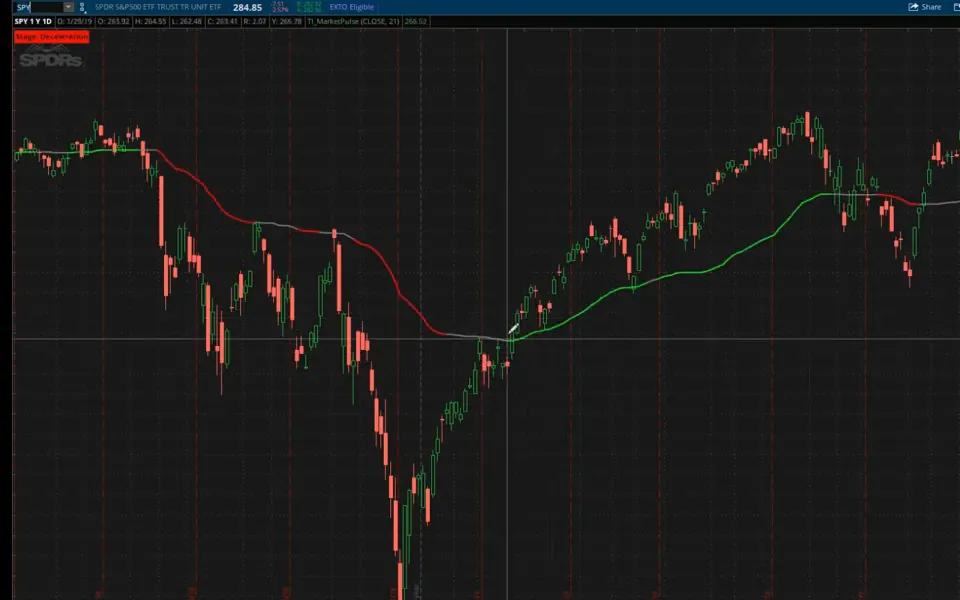
On this page
What you'll build
- Acceleration
- Deceleration
- Accumulation
- Distribution
- Type
- Indicator
- Runs as
- Chart study
- Inputs
- 3
- Code
- 42 lines
- Video
- 40 minutes
- Level
- Beginner
In this tutorial I build the Market Pulse, a free ThinkOrSwim indicator that tells you which of 4 market stages a chart is in: acceleration, deceleration, accumulation or distribution. It compares the 8, 21 and 34-bar volume-weighted moving averages and checks price against a variable moving average line, which turns green, red or gray as the stage changes.
The 40-minute video has 3 parts: the two moving averages, the stage indicator built from them, and the tools built on top. Those are 2 scans that find stocks switching into acceleration or deceleration, and Utility Labels that show the stage of SPY, QQQ and the sector ETFs, plus TRIN and put/call ratio readings, on any chart. It's for traders who want to match their strategy to the trend before they pick a trade.
Key takeaways
- The Market Pulse indicator sorts a ThinkOrSwim chart into 4 stages: acceleration, deceleration, accumulation and distribution.
- Acceleration needs the 8-bar volume-weighted moving average above the 21-bar and the 21 above the 34, with price at or above the variable moving average (VMA). Deceleration is the mirror image.
- When neither holds, price at or above the VMA is accumulation (yellow label) and price below it is distribution (orange label). The VMA line is gray in both.
- The VMA in the download uses a length of 10. Optional chart bubbles mark each switch into acceleration or deceleration.
- In the video, the accumulation to acceleration scan returned 2 symbols, WPM and the utilities ETF XLU, once it required that the averages weren't stacked bullishly on the bar before.
What it shows
What Is the Market Pulse Indicator?
The Market Pulse indicator is a free ThinkOrSwim study that labels the market stage of whatever symbol is on your chart. Each of its 4 stages points to a kind of strategy: aggressive in the two trending stages, conservative in the two choppy ones.
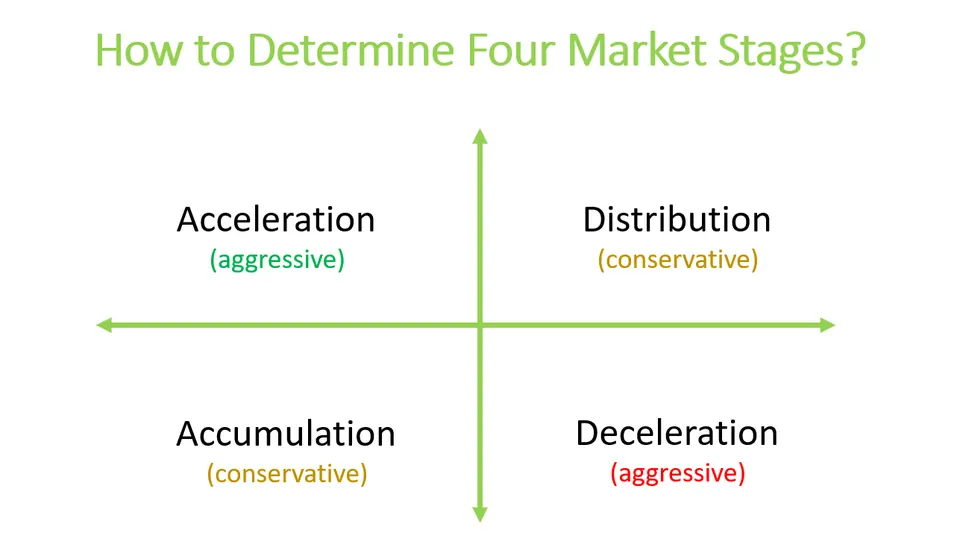
A member asked us to rebuild a market-stage workspace from a paid trading class, and the Market Pulse is our free version. According to that class's webinar, the biggest moves come at the switches, from accumulation into acceleration or from distribution into deceleration. The indicator and the scans both look for those switches.
The Two Moving Averages Behind the Market Pulse
The Market Pulse uses two moving averages: one weighs each close by its volume, and the other changes speed with volatility.
Volume-Weighted Moving Average (VWMA)
A volume-weighted moving average gives closes with higher volume more weight. If the S&P closes on 5 times its usual volume, that close pulls the VWMA harder than a quiet day does. The formula is the sum of volume times close over the length, divided by the sum of volume over the same length.
This step’s code is free with an account. Create one or sign in.
The Market Pulse uses 3 of them, the 8, 21 and 34-bar VWMAs. None of them plot. They only feed the stage logic.
Variable Moving Average (VMA)
The variable moving average is a built-in ThinkOrSwim study, VariableMA, that adjusts its smoothing constant to market volatility. The first 4 lines split each bar's change into an up-move or a down-move and add each kind up over the length.
This step’s code is free with an account. Create one or sign in.
The next lines turn those two sums into a speed for the line.
This step’s code is free with an account. Create one or sign in.
ad3 runs from -100 to 100. In a one-way market, coeff nears 2 / (length + 1), the weight an exponential average uses, and the line follows price closely. In chop, it nears 0 and the line flattens.
The VMA is the one line the indicator draws, and the download sets its length to 10. I set it to 21 when I first plotted the built-in study in the video. Our Utility Labels update moved those labels from 21 to 10 too, so both tools match.
How the Market Pulse Decides the Stage
The Market Pulse stage comes from two checks: whether the 3 VWMAs are stacked, and where price closes relative to the VMA line. The code turns the stack into true-or-false variables.
This step’s code is free with an account. Create one or sign in.
bullish is 1 when the 8 is above the 21 and the 21 is above the 34. bearish is the reverse.
That's the stacked moving average idea traders use for strong trends, built with volume-weighted averages. Our Stacked Moving Averages indicator uses exponential and simple averages instead. The table shows how the stack and the VMA combine.
| Stage | VWMA stack | Close vs VMA | VMA line | Label |
|---|---|---|---|---|
| Acceleration | Bullish: 8 above 21 above 34 | At or above | Green | Green |
| Deceleration | Bearish: 8 below 21 below 34 | At or below | Red | Red |
| Accumulation | Mixed, or bearish | At or above | Gray | Yellow |
| Distribution | Mixed, or bullish | Below | Gray | Orange |
Accumulation and distribution catch every bar the first two rows miss. A bullish stack with price below the VMA reads distribution, and a bearish stack with price above the VMA reads accumulation.
The label in the download checks price against the VMA for every stage, so it always agrees with the line. My first label in the 2019 video checked only the stack for acceleration and deceleration. The indicator was updated later so the two match.
Labels, Line Colors and Chart Bubbles
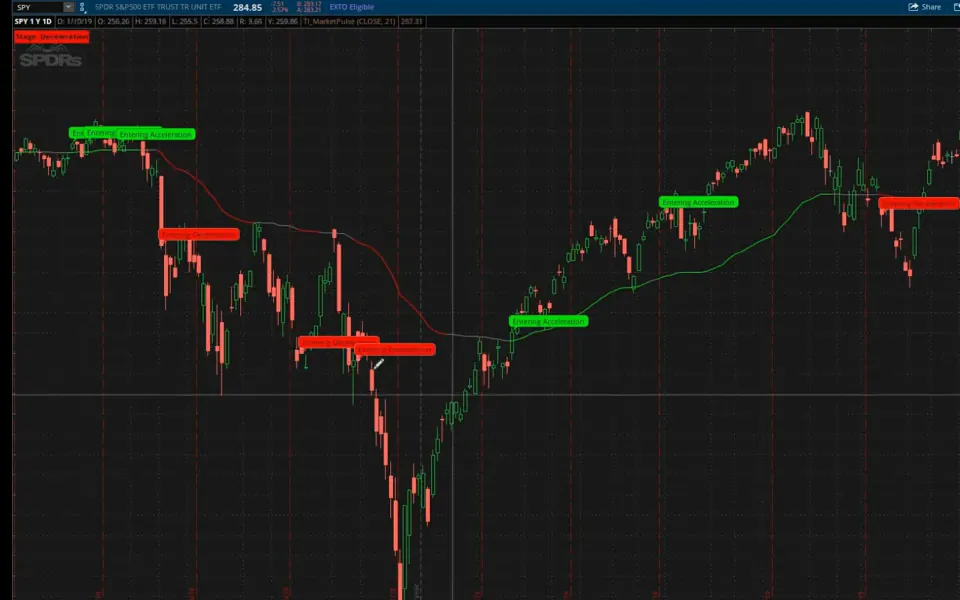
The Market Pulse shows the stage 3 ways: a label, the color of the VMA line, and optional chart bubbles where a switch happens.
The Stage Label
The stage label is one AddLabel line, in full in the Code tab. It tests acceleration, then deceleration, then accumulation, and calls anything left distribution, colored green, red, yellow and orange. Our AddLabel tutorial covers the function.
The Line Color
This step’s code is free with an account. Create one or sign in.
The VMA line needs 3 colors. Green and red match the label, and gray covers both choppy stages. Gray turning green is a move into acceleration, and gray turning red is a move into deceleration.
Chart Bubbles at Each Switch
This step’s code is free with an account. Create one or sign in.
The bubble prints when the stage is acceleration now and wasn't on the bar before, so you get one bubble at the start of each run. The deceleration bubble works the same way in red.
In the video I first labeled the bubble "buy out-of-the-money calls," then changed it to "Entering Acceleration." A bubble tells you a switch happened. It doesn't tell you the trade will work.
Settings
| Input | Default | What it does |
|---|---|---|
| ChartBubblesOn | no | Set to yes to show the Entering Acceleration and Entering Deceleration bubbles |
| price | close | The price the VMA follows |
| length | 10 | The number of bars the VMA uses to measure up-moves and down-moves |
The VWMA lengths of 8, 21 and 34 are fixed in the code itself.
Market Pulse on real charts
Drawn from real daily bars with the code on this page, through Oct 20, 2026. I picked each stock by a fixed rule, the most recent case that fits, not the best-looking one.
SPY in 2026: the four stages
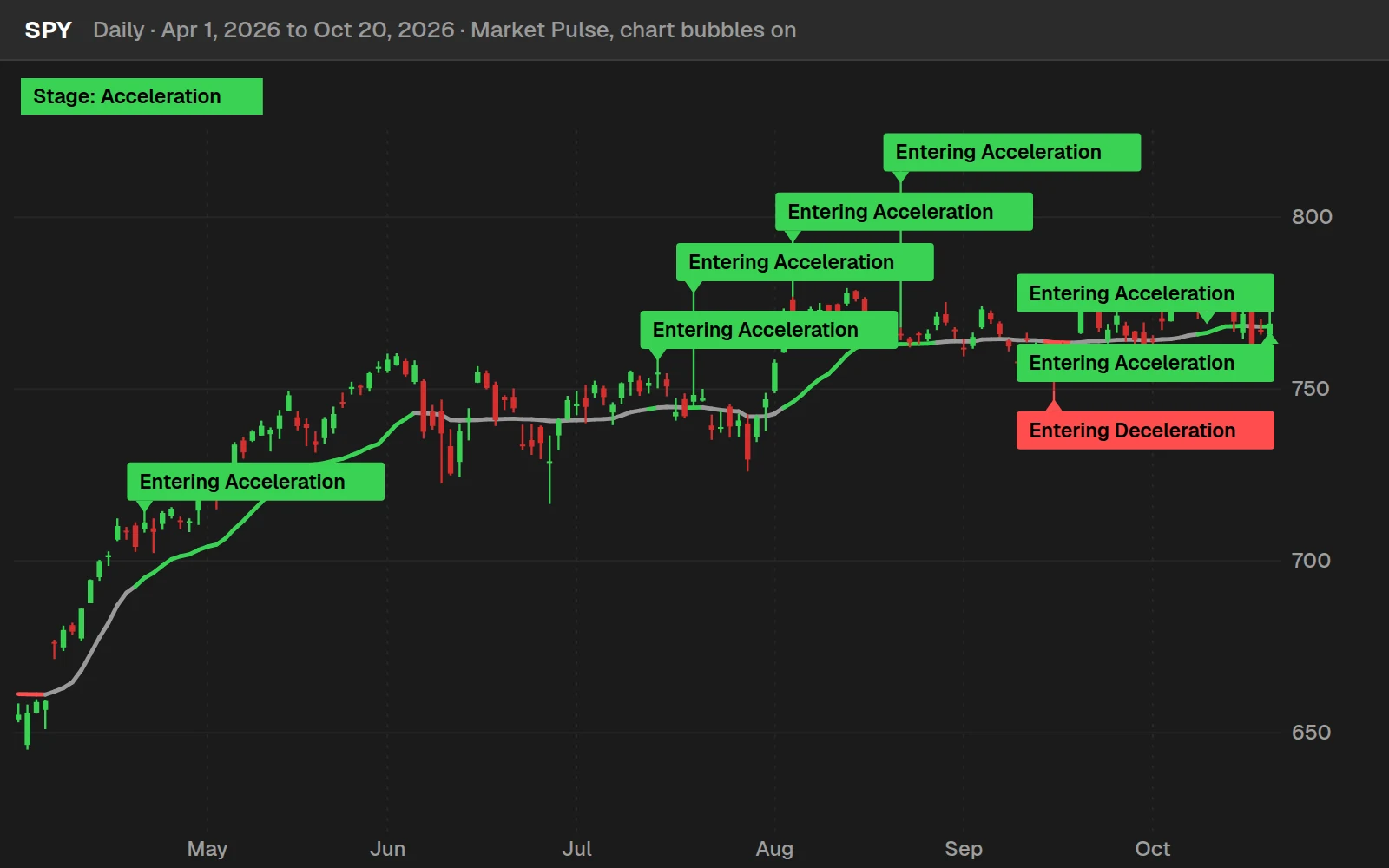
Since January 2, 2026, SPY has switched into Acceleration 9 times and into Deceleration 5 times. Out of 201 trading days it spent 73 in Acceleration, 66 in Accumulation, 31 in Distribution and 31 in Deceleration. On October 20 it switched into Acceleration again, closing at $769.05.
A switch that held: MSFT, Sep 28, 2026
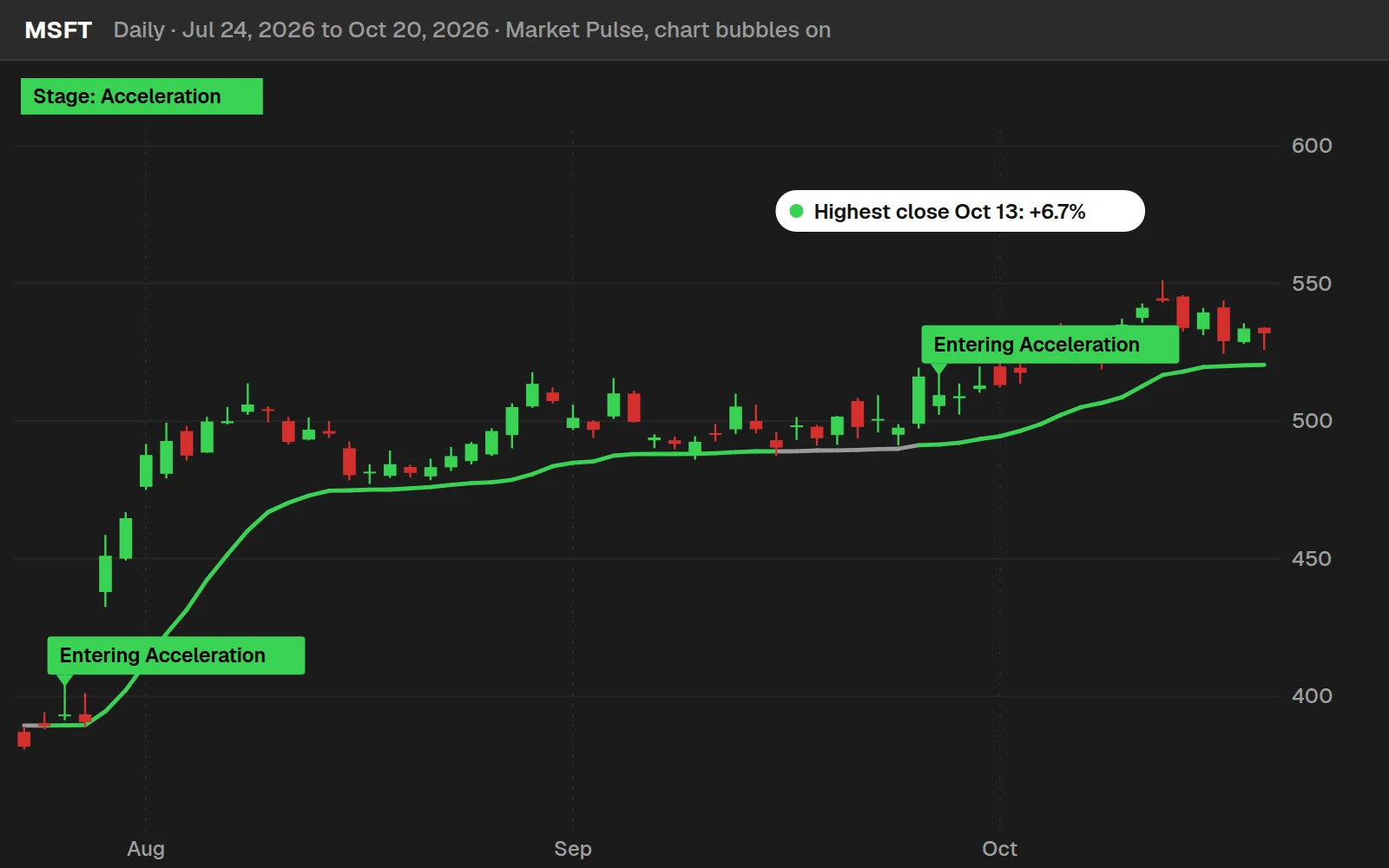
MSFT closed at $509.47 on Sep 28, 2026, the day the line turned green. It has been in Acceleration for 17 trading days since, and its highest close in that run was $543.73 on Oct 13, 2026, 6.7% above the switch. It was still in Acceleration at the Oct 20, 2026 close.
A switch that failed: WMT, Aug 18, 2026
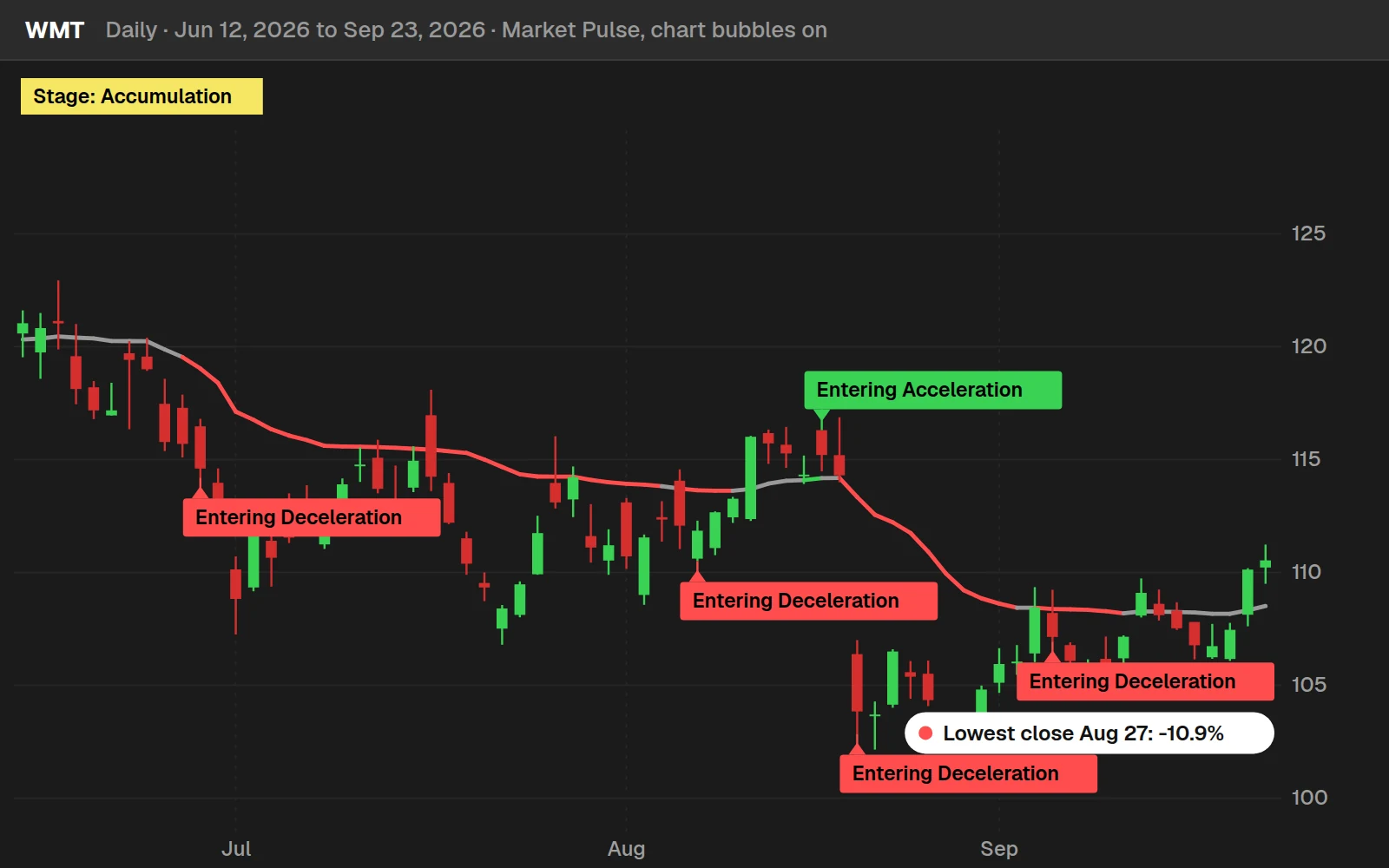
WMT switched into Acceleration on Aug 18, 2026 at $115.20. 2 trading days later, on Aug 20, 2026, it was in Deceleration, and its lowest close over the next 10 days was $102.63 on Aug 27, 2026, 10.9% below the switch. A switch is a reading of the moment, not a promise about the next one.
By the numbers
Daily bars for 648 stocks and ETFs through Oct 20, 2026: most stocks from July 2024, 14 ETFs from 2016. A run is how many days in a row a stock stayed in one stage (the median). Most of this history is a rising market.
Install it in ThinkOrSwim
Download the Market Pulse and Utility Labels indicators for ThinkOrSwim. The download is a .zip. The Market Pulse Indicator & Scans folder has TI_MarketPulseSTUDY.ts and a .txt with 2 shared scan links, one bullish and one bearish. The Utility Labels folder has 4 studies: the all-in-one TI_UtilityLabelsSTUDY.ts plus separate Indices, Sectors and Internals versions, and an Archive folder keeps the pre-November 2023 Utility Labels. Import the .ts files as studies. For the scans, click Setup, choose Open shared item and paste a link. If you haven't imported a study before, here's how to import into your ThinkOrSwim platform.
How to Build the Market Pulse in ThinkOrSwim
The Market Pulse build takes ThinkOrSwim's own VariableMA code as its starting point, so you don't type the VMA math yourself. These are the steps I follow in the video:
- Click the Studies icon, type variable in the search, and find VariableMA, the built-in variable moving average.
- Click the scroll icon next to it to open its source code, and copy all of it.
- Click Create, paste the code, name the study TI_MarketPulse, and delete the header comment that came with the built-in code.
- Below the VMA plot, add the 3 VWMA lines and the
bullish,bearishanddistributionvariables. - Add the stage label, the line color, the two chart bubbles and the
ChartBubblesOninput, shown in the next section. - Click OK and apply the study to a chart.
When I tested the label in the video, SPY read deceleration and Roku read acceleration. The finished study is TI_MarketPulseSTUDY.ts in the download, and our guide on how to import a study into ThinkOrSwim shows how to add it.
Full thinkScript code
Create a free account or sign in to copy all 42 lines and download the file.
Examples
Testing a Switch With thinkBack
ThinkOrSwim's thinkBack tool, in the Analyze tab, shows what an option was worth on past dates. I used it to test one Market Pulse switch: XLRE showed an Entering Acceleration bubble on January 30.
On January 30, a Delta 30 option had a bid of 20 cents and an ask of 35 cents, so I assumed a fill at the 27.5-cent midpoint. On February 14, it traded at 40 cents. The XLRE example is one trade from the video, and it says nothing about how often switches work.
How I Use the Market Pulse
The Market Pulse tells me which kind of strategy fits a chart. Acceleration is the aggressive bullish stage, and at the switch, the webinar behind the indicator favors out-of-the-money calls around Delta 30. Deceleration is the aggressive stage for puts.
Accumulation and distribution are the conservative stages. During distribution, price chops around the line, so an iron condor fits, or a spread if you have a directional bias. A run of bubbles that flips between deceleration and distribution is chop as well.
The stage is a read on trend, and a bubble marks a switch. Neither one is an entry by itself: in the video, one switch into acceleration faded into distribution and then deceleration. Before any trade, decide where your stop goes and size the position so a stop-out costs a small, fixed share of your account.
In our free Simple Breakout Tool tutorial, I use the Market Pulse stage to choose between buying an option and selling a spread. Members can plot a 15-minute or 30-minute Market Pulse on a 1-minute or 3-minute chart with the MTF Market Pulse. For a whole watchlist, use the free Market Pulse Dashboard.
Customize and troubleshoot
How to Scan for Market Pulse Stage Changes
The Market Pulse scans find symbols on the bar they switch into acceleration or deceleration. ThinkOrSwim scans can't draw labels, bubbles or colors, so the code needs trimming first:
- Copy the Market Pulse code. Open the Scan tab, click Add study filter, choose Custom and open the thinkScript Editor tab.
- Paste the code. ThinkOrSwim shows the error "AddLabel is not allowed in this context."
- Delete the
AddLabel,AddChartBubbleand color lines and theChartBubblesOninput, and changeplot VMAtodef VMA. - The next error is "At least one plot should be defined." Change
def accumulationToAccelerationtoplot accumulationToAcceleration. - Add the previous-bar check below, run the scan and save it.
My first run returned a long list, and the first chart I opened had been in acceleration for a while. The switch variable is true on every acceleration bar, so the scan also has to check the bar before. Rebuilt from the video, the plot line with that check is:
This step’s code is free with an account. Create one or sign in.
With that check, the scan returned 2 symbols: WPM and the utilities ETF, XLU. Both had moved from accumulation into acceleration.
The check makes the scan stricter than the chart bubble, because the VWMA stack itself has to be new. The deceleration scan is the mirror image, with distributionToDeceleration as the plot and !bearish[1] as the check. In the video it found Johnson & Johnson, among others.
The download also has 2 shared scan links, named Bullish and Bearish Trend Reversal/Continuation. To load one, click Setup in the top right corner of ThinkOrSwim, choose Open shared item and paste the link. More free scans are on our scans page.
The Utility Labels: Market Stages for SPY, Sectors and Internals
The Utility Labels study prints a row of colored labels with the Market Pulse stage of other symbols, so you can read the broad market from any chart. I build it in part 3 of the video, starting with TRIN and put/call ratio labels.
TRIN and Put/Call Ratio Labels
The TRIN label rounds the close of $TRIN to 2 decimals. At 2 or more it's overly bearish and green. At 0.5 or less it's overly bullish and red.
The two snippets below are the labels as I built them in the video, kept in the zip's Archive folder. The current download changed both, as the table further down shows.
This step’s code is free with an account. Create one or sign in.
My first try threw an error because I left the dollar sign off $TRIN.
The put/call label uses the 10-day simple moving average of $PCALL. At 1 or more it's overly bearish and green, at 0.85 or less it's overly bullish and red, and anything between is gray. Both labels read the crowd in reverse, as our article on the put/call ratio as a contrarian signal explains.
This step’s code is free with an account. Create one or sign in.
In the video, TRIN read 2.08 and its label was green. The put/call average read 0.97: gray, and 0.03 below the overly bearish level.
One Block of Code per Symbol
Each symbol gets its own copy of the Market Pulse code, with the symbol name in front of every variable and the close and volume taken from that symbol:
This step’s code is free with an account. Create one or sign in.
I built the SPY block in the video. The other symbols come from pasting that block into a text editor and replacing SPY with each one. The download covers QQQ, DIA, IWM, the 11 sector ETFs, the transports ($DJT) and semiconductors (SOXX).
Reading the Labels in the Video
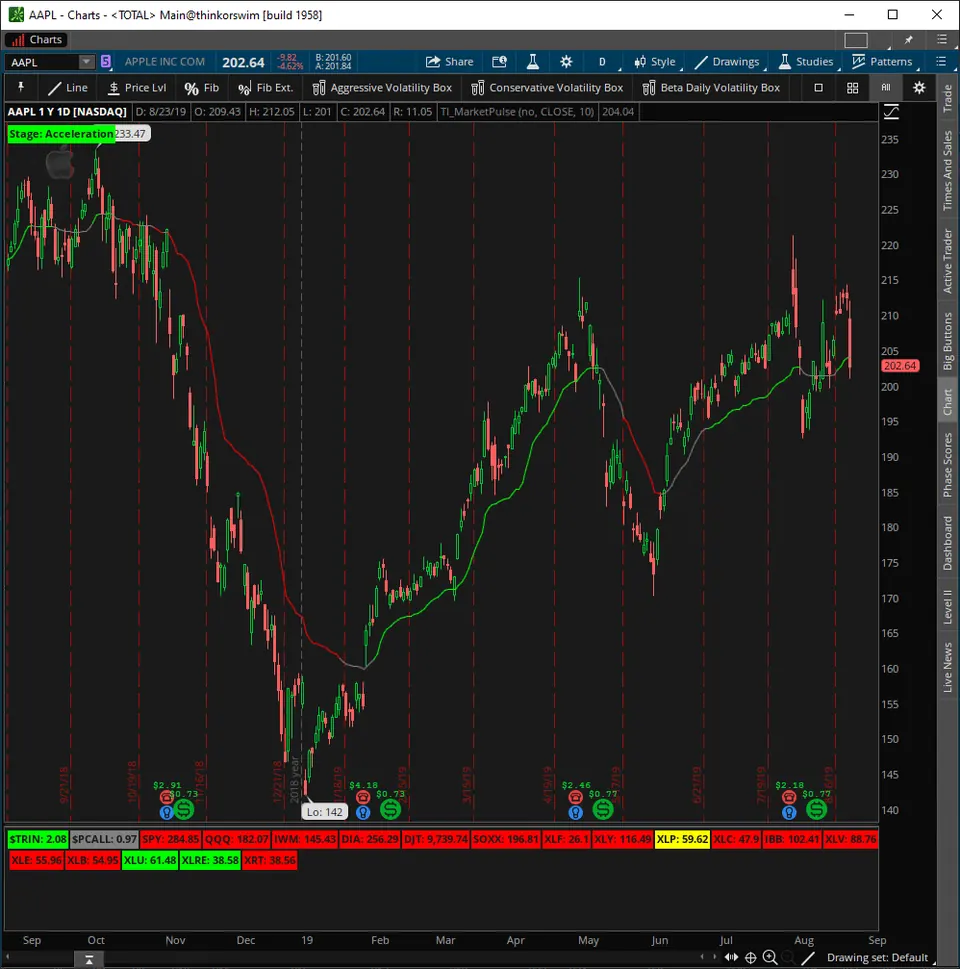
The Utility Labels in the video showed most sector ETFs in red deceleration, XLP in yellow chop, and XLU and XLRE in green acceleration. XLU had shown up in the acceleration scan. XLRE hadn't, because it had been accelerating for some time with no fresh switch.
From there, go one level down: look for bullish ideas in the top holdings of the green sectors and bearish ideas in the red ones.
What Changed in the Download
The Utility Labels download has changed since the 2019 video. The zip's Archive folder keeps the pre-November 2023 version, which still has the video's TRIN and put/call code.
| Item | 2019 video | Current download |
|---|---|---|
| VMA length | 21 | 10 |
| TRIN label | Close of 2 or more is green, 0.5 or less is red | Bar high of 2 or more is green, bar low of 0.5 or less is light red |
| Put/call red level | 0.85 or less | 0.75 or less (changed in November 2023) |
| Choppy stages | One yellow label | Yellow for accumulation, orange for distribution |
The all-in-one study has an on/off input for each group, with only the sectors on by default. Our Utility Labels tutorial on sector performance and internals shows the newer layout.
Common Problems and Fixes
- "AddLabel is not allowed in this context" in a scan. Delete the label, bubble and color lines, and change
plot VMAtodef VMA. - "At least one plot should be defined." Make the switch variable the plot.
- The scan returns stocks that have trended for weeks. Add the previous-bar check,
!bullish[1]or!bearish[1]. - The TRIN or put/call label shows an error. Index symbols need the dollar sign:
$TRINand$PCALL. - No bubbles on the chart.
ChartBubblesOndefaults to no. Set it to yes in the study settings. - Your line differs from an older copy. Check the length. The download uses 10, and the Utility Labels used 21 before their update.
Questions
What is the Market Pulse indicator?
The Market Pulse is a free ThinkOrSwim indicator from TOS Indicators that labels a chart with 1 of 4 market stages: acceleration, deceleration, accumulation or distribution. It compares the 8, 21 and 34-bar volume-weighted moving averages and checks price against a 10-period variable moving average.
What are the 4 market stages in the Market Pulse?
Acceleration is a bullish stack of the 8, 21 and 34-bar VWMAs with price at or above the VMA. Deceleration is a bearish stack with price at or below it. Otherwise, price at or above the VMA is accumulation and price below it is distribution. The first two call for aggressive strategies, the other two for conservative ones.
How do I add the Market Pulse indicator to ThinkOrSwim?
Download the free zip from this page and import TI_MarketPulseSTUDY.ts as a study. Our import tutorial shows the steps. To build it yourself, copy the built-in VariableMA code into a new study named TI_MarketPulse, then add the VWMAs, stage label, line color and chart bubbles from the Code tab.
What do the colors on the Market Pulse line mean?
Green means acceleration: the 3 VWMAs are stacked bullishly and price is at or above the line. Red means deceleration: they are stacked bearishly and price is at or below it. Gray covers the other two stages, and the label tells them apart: yellow for accumulation and orange for distribution.
How is a volume-weighted moving average calculated?
Multiply each bar's close by its volume, add those products over the length, and divide by the total volume over the same length. In thinkScript the 8-bar version is sum(volume * close, 8) / sum(volume, 8). A close on 5 times normal volume moves the average more than a quiet one does.
How do I scan for stocks entering acceleration in ThinkOrSwim?
Paste the Market Pulse code into a custom study filter in the Scan tab, delete the label, bubble and color lines, and change plot VMA to def. Make the accumulation to acceleration variable the plot and require that the averages were not stacked bullishly on the bar before. In the video it returned WPM and XLU.
Does the Market Pulse measure market breadth?
No. The Market Pulse reads the price and volume of one symbol at a time. For a wider view, the Utility Labels in the same download show the stage of SPY, QQQ, DIA, IWM and the sector ETFs, plus TRIN and put/call ratio labels, on any chart.
What timeframe does the Market Pulse work on?
The code has no timeframe setting, so it uses the bars on your chart. The charts in this video are daily. In our Market Pulse Dashboard tutorial I run the same logic as watchlist columns on daily and 30-minute bars, where the 8, 21 and 34 lengths count 30-minute bars.
Goes with
Related tools
 Market Pulse Dashboard
 Automated trading: "Buy the Dip" Script
 Commodities Tracker
 Simple Breakout Tool
 Smarter Earnings
 VScore
Get each new indicator by email
One email on Sundays with the week's new tool and its code. A free account also unlocks every .txt download.
No credit card. Unsubscribe anytime.