
 Fair Value Gap
 False Breakout Scanner
 Heiken Ashi Trend
 Stock Volatility Box
 Futures Volatility Box
 ORB Setups
 Squeeze Setups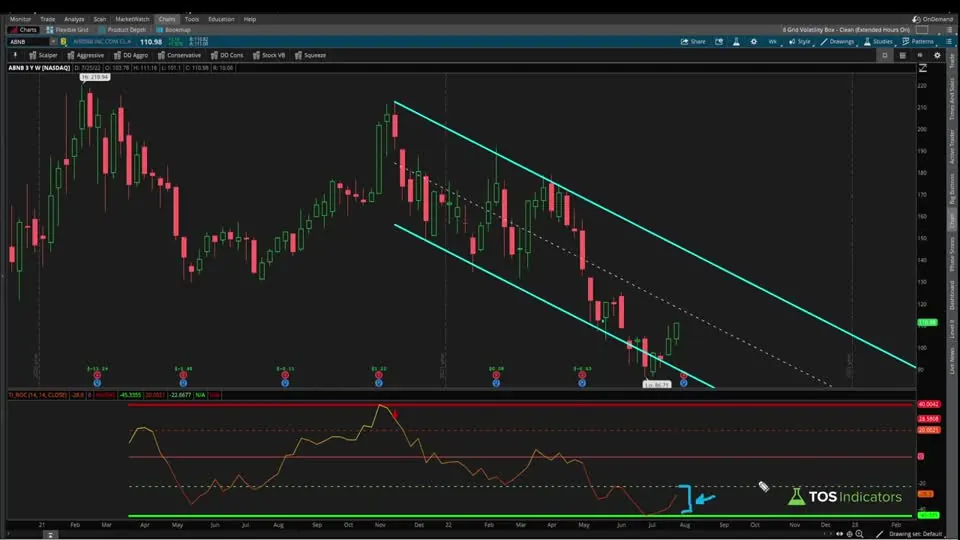
On this page
Overview
In this tutorial I turn our Rate of Change indicator into a rate of change scan for ThinkOrSwim. One of our users asked how to scan for the indicator's bull and bear signals, or for stocks sitting in one of its extreme zones, so I paste the indicator code into a custom scan filter and change which line is the plot.
The download has all 4 scans as shared links: bullish signal, bearish signal, lower extreme zone and upper extreme zone. I also show a catch with intraday scans. The Scan tab sees less history than most charts, so a scan result may not show its signal on your chart until you shorten the chart's time range.
Key Takeaways
- The rate of change scans run the code of our free Rate of Change indicator inside a ThinkOrSwim custom study filter. The download has 4 scans as tos.mx shared links.
- A scan filter accepts exactly one plot. Every other plot in the indicator code becomes a def, and the one you keep (bullSignal, bearSignal, extremeLow or extremeHigh) decides what the scan finds.
- In the video, a weekly bullish signal scan of the Weeklys watchlist returned silver, gold and metals ETFs plus BITO. SLV, BITO and GDX each showed the bull arrow on a weekly chart.
- The weekly lower extreme zone scan returned 113 stocks. Airbnb was one: its ROC sat in the lower extreme zone with no bull signal.
- The Scan tab sees less history than most charts. A 30-minute bearish result on Apple showed its arrow on the chart only after I cut the chart from 90 days to 15 days.
What the Rate of Change Scans Look For
The rate of change scans look for the 4 conditions our Rate of Change indicator draws on a chart. The indicator turns ThinkOrSwim's built-in ROC into a range-bound oscillator, with lines at its highest and lowest values and dashed lines halfway to each. Its arrows fire when the ROC turns inside an extreme zone on the same bar as an RSI breakout signal.
The Rate of Change indicator tutorial covers how each line is built. The table shows which line each scan keeps as its plot:
| Scan | Plot line | What it finds |
|---|---|---|
| Bullish Signal | bullSignal | The ROC in the lower extreme zone and higher than on the previous bar, while the RSI crosses above its oversold line on the same bar |
| Bearish Signal | bearSignal | The ROC in the upper extreme zone and lower than on the previous bar, while the RSI crosses below its overbought line |
| Lower Extreme Zone | extremeLow | The ROC between the lowest ROC on the chart and the lower halfway line, signal or not |
| Upper Extreme Zone | extremeHigh | The ROC between the upper halfway line and the highest ROC, signal or not |
The signal scans find the turn. The extreme zone scans find stocks where momentum is stretched, whether or not it has turned, so they return longer lists.
What You Need Before You Start
Building the rate of change scan takes two things:
- The indicator code. Download it free from our Rate of Change indicator page and import it. Our guide on how to import a study into ThinkOrSwim walks through each click.
- A live account. When I recorded the video, custom study filters were supported only in the live money version of ThinkOrSwim, not in the paper trading version.
The shared scans in the download are the shortcut. They load all 4 finished scans, so you can skip the build.
How to Build the Rate of Change Scan
Building the rate of change scan takes 6 steps in ThinkOrSwim:
- Open the code of the Rate of Change indicator, click inside it, press Ctrl+A to select everything and Ctrl+C to copy it.
- Go to the Scan tab, click Add filter and choose Study.
- In the study filter, scroll down the list of studies and select Custom. Choose the thinkScript Editor tab and paste in the code.
- ThinkOrSwim shows the error "Exactly one plot expected". Change
ROCandZeroLinefrom plot to def and delete their formatting lines. Do the same for the 4 range lines. - Change
bearSignalto def, keepbullSignalas the plot, and delete the arrow formatting lines. - Click OK, set the aggregation to W for a weekly scan, pick a watchlist and click Scan. I used the Weeklys list at the very bottom of the Public lists.
The Code tab of this page has the bullish scan rebuilt from these steps, with notes on switching it to the other 3 scans. The original scans are the shared links in the download.
The Rate of Change Scan Code
The rate of change scan code is the indicator code with every plot but one turned into a def. The snippets below are rebuilt from the steps in the video. A def is calculated but never drawn, so the conditions still work while the Scan tab sees a single plot.
This step’s code is free with an account. Create one or sign in.
The 4 range lines become defs. They still mark the highest and lowest ROC and the halfway points, and the extreme zones and signals are built on them.
This step’s code is free with an account. Create one or sign in.
bullSignal is the one plot left. It returns the ROC value on a signal bar and nothing on other bars, so the scan lists a symbol when its latest bar has a bull signal.
Switching to the Bearish Signal Scan
This step’s code is free with an account. Create one or sign in.
Swap plot and def on the last two lines. The bearish scan finds the ROC turning lower inside the upper extreme zone on the same bar the RSI crosses below its overbought line.
Switching to an Extreme Zone Scan
This step’s code is free with an account. Create one or sign in.
Change extremeLow from def to plot and set both signal lines to def. The scan then ignores the signals and returns every symbol whose ROC sits in the lower extreme zone. Use extremeHigh the same way for the upper zone.
What the Scans Found in the Video
The rate of change scans returned these results on the day I recorded, so your lists will differ:
- Weekly bullish signal, Weeklys watchlist. Silver-related ETFs, gold-related ETFs and metals ETFs, plus BITO, the bitcoin ETF. Weekly charts of SLV, BITO and GDX each showed the bull arrow, so the scan matched the chart.
- 30-minute bearish signal, extended hours off. The first result that stood out was Apple. Its arrow didn't show on my chart at first, which the next section explains.
- Weekly lower extreme zone. A much larger list of 113 stocks. Airbnb's weekly chart had the ROC in the lower extreme zone with no bull signal plotting.
The weekly bull list is a set of places where, over the past week, the ROC went from declining to stabilizing while the RSI showed a bullish breakout signal.
Why a Scan Result Can Be Missing From Your Chart
The Scan tab has much more limited access to historical data than most charts. When I opened Apple on a 30-minute chart with 90 days of data, no bearish arrow showed. After I cut the chart to 15 days, the bearish arrow appeared.
The reason sits in the indicator code. The range lines use HighestAll and LowestAll, which read every bar loaded. With less history, the highest and lowest ROC change, the extreme zones move, and a bar can become a signal or stop being one. The fix is to give the chart about the same history the scan had.
| Scan aggregation | History the Scan tab sees (my estimate in the video) | On your chart |
|---|---|---|
| Weekly | 3 years or more | Enough for most checks |
| Daily | About 1 year, which I think is ThinkOrSwim's default | If your daily charts load more, cut them to 1 year when you compare |
| 30-minute | Apple's signal matched a 15-day chart, not a 90-day chart | Shorten intraday charts before you compare |
I find larger timeframes work a little better in the Scan tab and are a little more reliable, so check intraday results with extra care.
How I Use the Scan Results
A rate of change scan builds a watchlist. It doesn't tell you where to enter. Open each result on a chart with the indicator, the same aggregation as the scan and a matching time range, and check that the arrow or zone shows up the way the scan says, as I did with SLV, BITO and GDX in the video.
The extreme zone list is a list of candidates where momentum is stretched but hasn't turned yet. The signal scans show where the turn has started. Before you trade a result, decide where your stop goes and size the position so a stop-out costs a small, fixed share of your account.
To add a volume condition, our increasing volume scans look for 3 bars in a row of rising, above-average volume. For a momentum read across timeframes, the DMI Power Move scans line up DMI zones from the daily chart down to short intraday charts.
How to Import the Ready-Made Scans
The rate of change scans download is a 1-page PDF with 4 ThinkOrSwim shared links: Bullish Signal Scan, Bearish Signal Scan, Lower Extreme Zone Scan and Upper Extreme Zone Scan. To load one:
- In ThinkOrSwim, click Setup in the top right corner.
- Choose Open shared item.
- Paste in the link and save the scan.
The Code tab on this page shows the bullish signal scan rebuilt from the steps in the video. You'll find more free scans on our scans page.
The scans on real data
Drawn from real daily bars with the code on this page, through Oct 20, 2026. The rate of change scans run our Rate of Change indicator code with one plot kept. The bullish signal scan wants the ROC in its lower extreme zone, rising, on the bar where the RSI crosses back above 30. The extremes come from HighestAll and LowestAll, which look at every bar the scan loads, so I gave each day about a year of daily bars, roughly what the Scan tab sees, and only the bars up to that day.
The scans on Oct 20, 2026
Bullish signal: 4 (CRWV, UAL, LCID, EWS). Bearish signal: 1 (XOM). Lower extreme zone: 85 symbols. Upper extreme zone: 102 symbols.
XLF, Oct 5, 2026
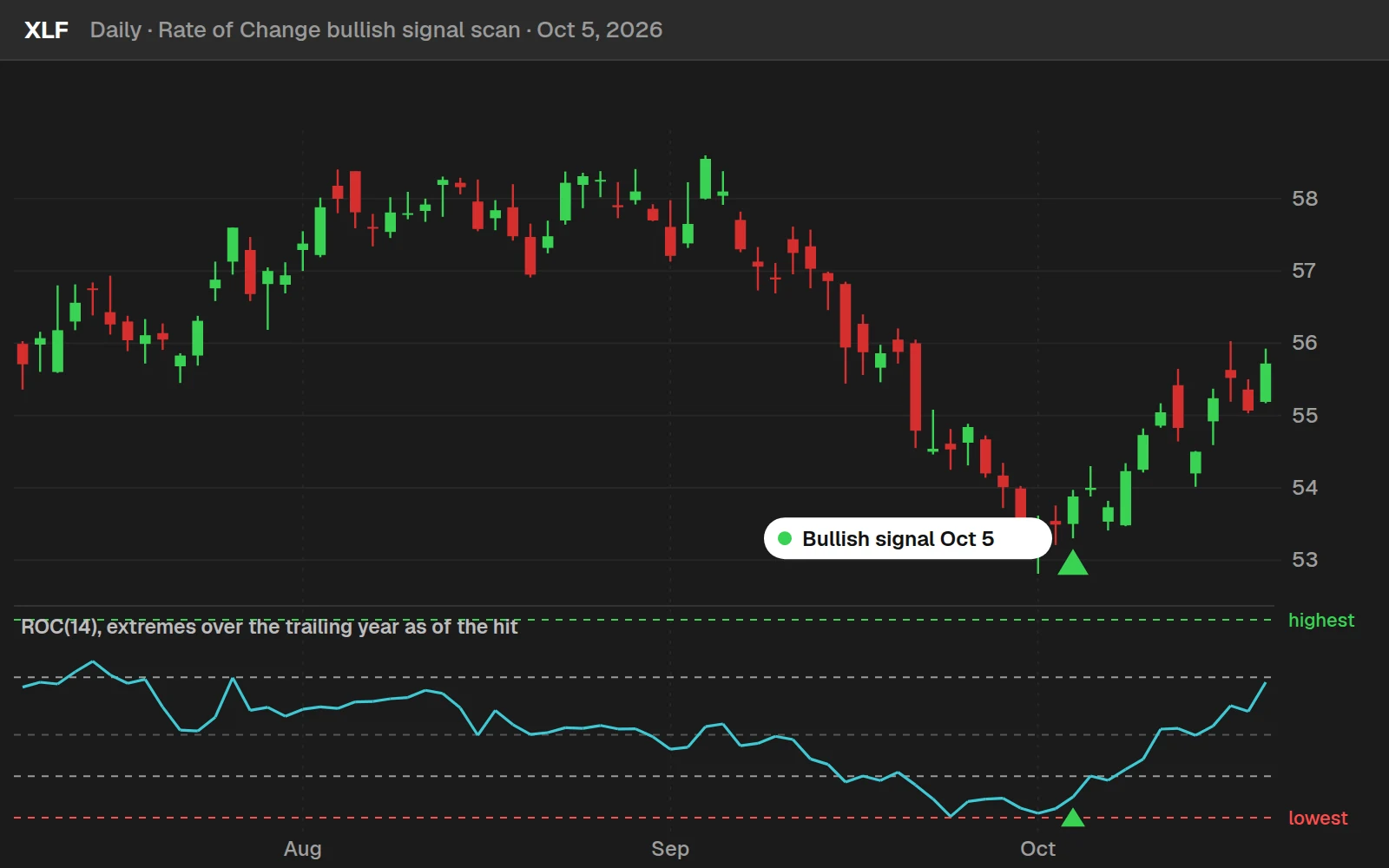
XLF is the most recent bullish signal among 44 well-known names. It closed at $53.88 that day and at $55.07 ten trading days later, +2.2%.
By the numbers
Daily bars for every stock and ETF in our data, Aug 1, 2025 to Oct 20, 2026, once each symbol has a year of ROC behind it. On a chart, HighestAll uses every bar on the chart, so an arrow there can differ from what the scan showed that day.
Full thinkScript code
Create a free account or sign in to copy all 44 lines and download the file.
Download
Download the Rate of Change Scans for ThinkOrSwim. The download is a 1-page PDF with 4 ThinkOrSwim shared links: Bullish Signal Scan, Bearish Signal Scan, Lower Extreme Zone Scan and Upper Extreme Zone Scan. In ThinkOrSwim, click Setup in the top right corner, choose Open shared item, and paste in a link. The Code tab on this page has the bullish signal scan rebuilt from the steps in the video. If you haven't imported a shared item before, here's how to import into your ThinkOrSwim platform.
Questions
How do I scan for rate of change in ThinkOrSwim?
Copy the code of our Rate of Change indicator, then in the Scan tab click Add filter, choose Study, select Custom and paste the code into the thinkScript Editor tab. Change every plot to def except the one you want to scan for, such as bullSignal, set the aggregation and run the scan. The download also has 4 ready-made scans as shared links.
Why does my scan say Exactly one plot expected?
A ThinkOrSwim scan filter can only have one plot, and the indicator code has several: the ROC, the zero line, 4 range lines and 2 signals. Change all of them to def except the one condition you want, and delete the formatting lines that go with them, as I did in the video.
Can I run a custom rate of change scan in paperMoney?
When I recorded the video, custom study filters in the Scan tab were supported only in the live money version of ThinkOrSwim, not in the paper trading version. Every rate of change scan uses a custom study filter, so you needed a live account to follow along.
How do I scan for stocks in a rate of change extreme zone?
Change extremeLow or extremeHigh from def to plot, and make sure bullSignal and bearSignal are both def. The scan then returns symbols whose ROC is in that extreme zone, whether or not a signal fired. In the video, the weekly lower extreme zone scan returned 113 stocks, including Airbnb.
How do I switch the rate of change scan from bullish to bearish?
Swap plot and def on the last two lines of the code, so bearSignal is the plot and bullSignal is a def. The bearish scan finds the ROC turning lower inside the upper extreme zone on the same bar the RSI crosses below its overbought line. In the video I ran it on 30-minute bars with extended hours off.
Why does a scan result not show a signal on my chart?
The Scan tab sees less history than most charts, and the indicator's range lines come from every bar loaded. In the video, Apple showed no bearish arrow on a 30-minute chart with 90 days of data, and the arrow appeared after I cut the chart to 15 days. Match your chart's time range to what the scan sees.
What timeframe works best for a rate of change scan?
I prefer larger timeframes in the Scan tab because they are more reliable. In the video I estimated that weekly scans see 3 or more years of history, enough for most checks, and daily scans about 1 year. Intraday scans see much less: the 30-minute Apple result only matched a 15-day chart.
What is in the rate of change scans download?
The download is a 1-page PDF with 4 ThinkOrSwim shared links: Bullish Signal Scan, Bearish Signal Scan, Lower Extreme Zone Scan and Upper Extreme Zone Scan. In ThinkOrSwim, click Setup, choose Open shared item and paste in a link. The Code tab on this page has the bullish scan code rebuilt from the video.
Related tools
 Rate of Change
 Upcoming Earnings Scan
 Anchored VWAP Scans
 MACD Crossover Near Zero Line
 Increasing Volume
 Stacked Moving Averages
Get each new indicator by email
One email on Sundays with the week's new tool and its code. A free account also unlocks every .txt download.
No credit card. Unsubscribe anytime.