
 Fair Value Gap
 False Breakout Scanner
 Heiken Ashi Trend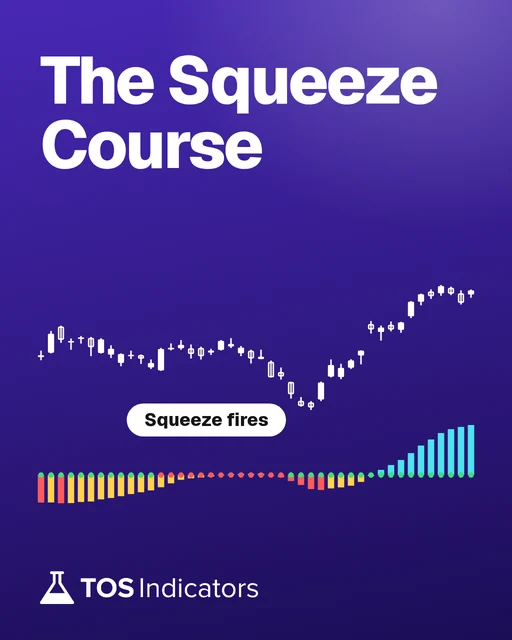
 Stock Volatility Box
 Futures Volatility Box
 ORB Setups
 Squeeze Setups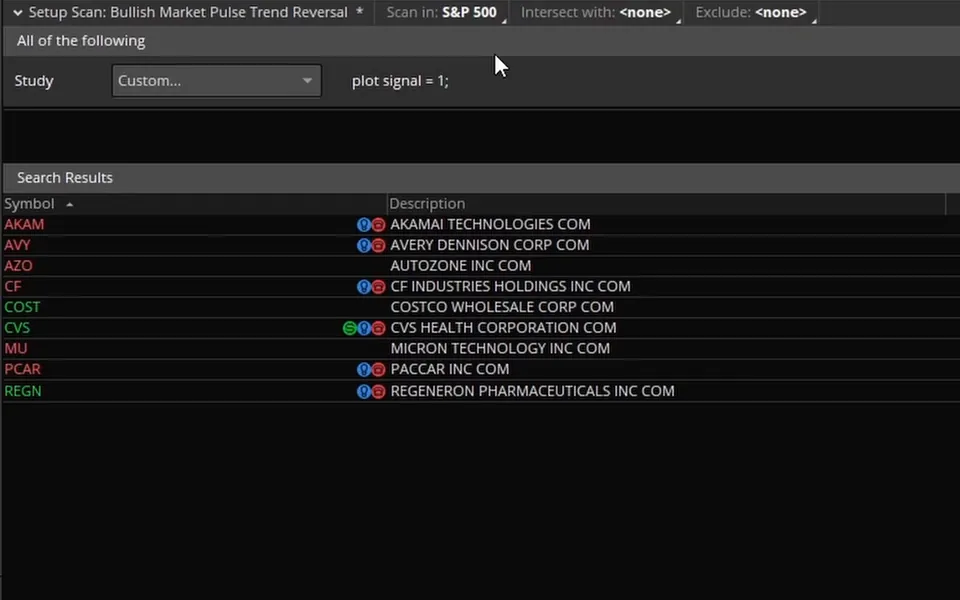
On this page
What you'll build
| Symbol | Scan | Last | Squeeze bars |
|---|---|---|---|
| AAPL | Bullish | 342.94 | 9 |
| AMC | Bullish | 2.98 | 5 |
| CVE | Bullish | 33.23 | 5 |
| GLBE | Bullish | 39.71 | 5 |
| GOOG | Bullish | 340.16 | 20 |
| GOOGL | Bullish | 344.18 | 14 |
| INSP | Bullish | 70.15 | 5 |
| KOS | Bullish | 2.79 | 5 |
| M | Bullish | 23.60 | 25 |
| NOW | Bullish | 145.36 | 15 |
| ROKU | Bullish | 155.54 | 6 |
| TMO | Bullish | 679.38 | 6 |
| ZIM | Bullish | 28.98 | 12 |
| BBIO | Bearish | 67.94 | 7 |
13 more
- Type
- Scan
- Runs as
- Stock Hacker scan
- Code
- 19 lines
- Video
- 13 minutes
- Level
- Beginner
In this tutorial I build a Squeeze scan in ThinkOrSwim that finds stocks with 5 red squeeze dots in a row and stacked moving averages. The bullish scan wants the 8, 21 and 34-period EMAs and the 50 and 200-period SMAs stacked upward. The bearish scan flips every comparison.
The scan reads the SqueezeAlert plot from the Squeeze study built into ThinkOrSwim, and the whole thing is 9 lines of thinkScript. If you're new to thinkScript, you can follow along: I explain each line, and the download has share links for both scans.
Key takeaways
- The Squeeze scan finds 5 red squeeze dots in a row by adding up the SqueezeAlert plot over the last 5 bars and checking for a total of 0.
- SqueezeAlert is 0 on a bar with a red squeeze dot and 1 on a bar with a green dot, so 5 zeros in a row means 5 straight bars in a squeeze.
- The trend filter uses the 8, 21 and 34-period EMAs and the 50 and 200-period SMAs. The bullish scan needs the 8 over the 21 over the 34 and the 50 over the 200. The bearish scan needs the reverse.
- In the video, the 5-dot condition alone returned 43 stocks in the S&P 500 on the daily timeframe. Adding the bullish stack made the list much smaller and kept Costco and AutoZone.
- Custom study filters need the live version of ThinkOrSwim. When I recorded the video, they weren't supported in paperMoney.
What it shows
What the Squeeze Scan Looks For
The Squeeze scan looks for two things on the same bar: a squeeze that has lasted at least 5 bars, and moving averages stacked in one direction. The squeeze part is the same in both versions. The moving averages decide whether a stock lands in the bullish or the bearish list.
| Condition | Bullish scan | Bearish scan |
|---|---|---|
| Squeeze dots | 5 red dots in a row | 5 red dots in a row |
| 8 EMA vs 21 EMA | Above | Below |
| 21 EMA vs 34 EMA | Above | Below |
| 50 SMA vs 200 SMA | Above | Below |
| Examples in the video | Costco, AutoZone | Qualcomm, eBay |
The EMAs and the SMAs are two separate stacks. The scan never compares the 34 EMA with the 50 SMA, so a bullish result can have its 34 EMA below its 50 SMA.
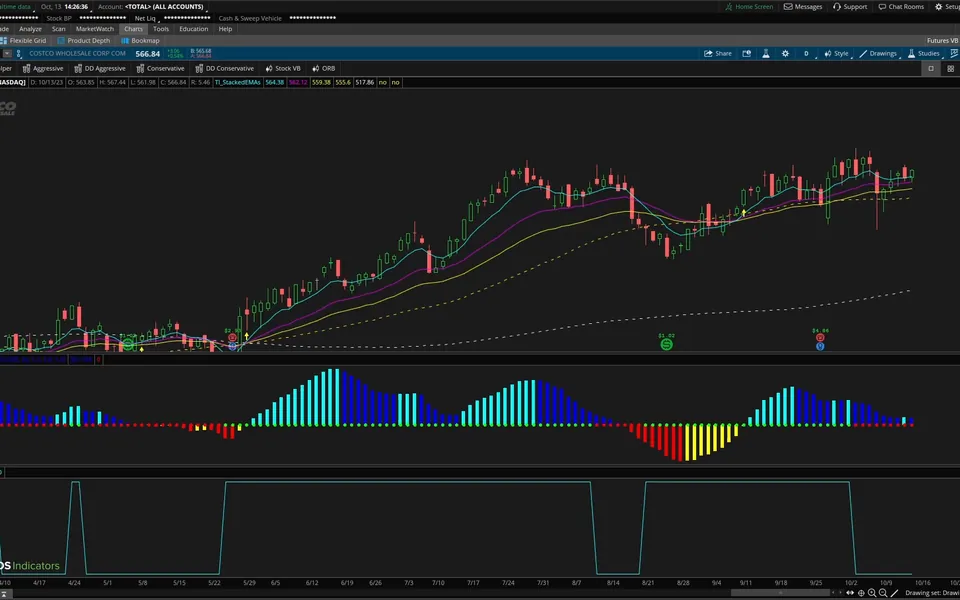
In the opening example of the video, Costco on the daily chart had everything the scan wants: stacked moving averages and 5 red squeeze dots in a row. That is the chart the scan is built to find.
The scan on real charts
Drawn from real daily bars with the code on this page, through Oct 20, 2026. The scan runs on every daily bar of 648 stocks and ETFs. I picked the examples by rule: the most recent hit on a well-known name that was up 3% or more 20 days later, and the most recent one where the squeeze fired with momentum pointing down.
XLB, Jul 29, 2026: the setup the scan looks for
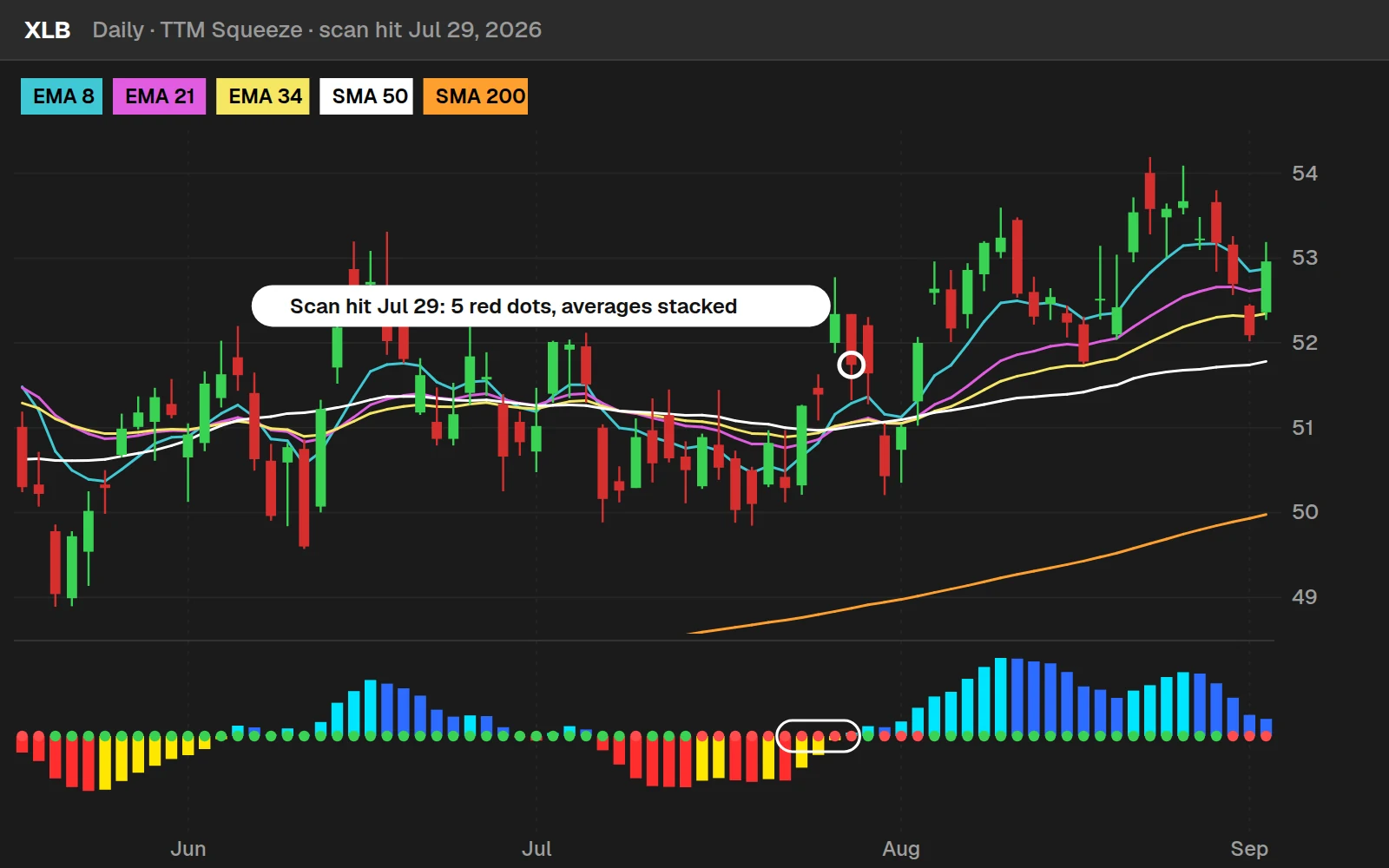
On Jul 29, 2026, XLB closed at $51.74 with its fifth red dot in a row and the 8 EMA above the 21, the 21 above the 34, and the 50 SMA above the 200. The squeeze fired 1 trading day later, on Jul 30, 2026, with the histogram above zero. 20 trading days after the scan hit, it closed at $53.67, +3.7%.
JPM, Sep 11, 2026: the same setup, the other way
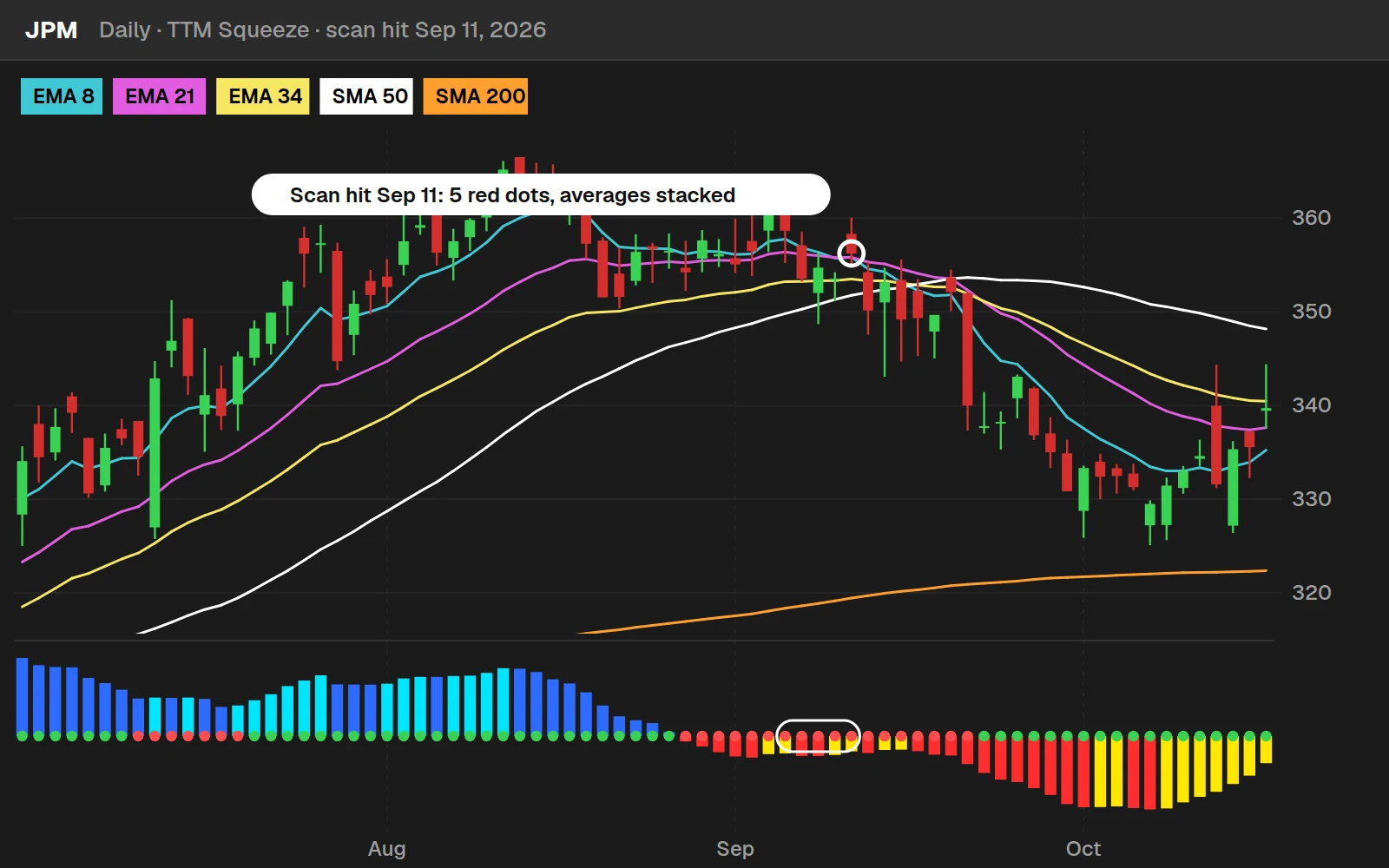
JPM hit the scan on Sep 11, 2026 at $356.23. The squeeze fired 8 trading days later, on Sep 23, 2026, with the histogram below zero, and 20 trading days after the hit it closed at $332.99, -6.5%. Stacked averages tell you the trend going in; they do not decide which way the squeeze fires.
By the numbers
Daily bars, Aug 26, 2016 to Oct 20, 2026: the 14 ETFs from 2016, most stocks from April 2025 (the 200 SMA needs 200 days first). A hit is the first day the bullish scan is true. On its own, the scan was up 20 days later a little less often than any random day in the same stocks. That is why Squeeze Setups ranks every squeeze by its own backtest, timeframe confluence and trend.
Install it in ThinkOrSwim
Download the Squeeze Dots Scans for ThinkOrSwim. The download is a 1-page PDF with two ThinkOrSwim share links, one for the bullish scan and one for the bearish scan, plus a link to the video. In ThinkOrSwim, click Setup in the top right corner, choose Open shared item, and paste in a link. The PDF doesn't contain the code, so copy it from the Code tab on this page if you want to build the scan yourself. If you haven't imported a shared item before, here's how to import into your ThinkOrSwim platform.
How to Set Up a Custom Scan in ThinkOrSwim
A custom scan is a Study filter with your own thinkScript inside it. To build this one:
- Open the Scan tab. I scanned the S&P 500, and you can pick any watchlist from the list selector at the top.
- Keep any default filters you want, then click Add filter and choose Study.
- ThinkOrSwim adds an ADXCrossover study by default. Open its dropdown, scroll to the bottom and choose Custom.
- Switch to the thinkScript Editor tab and set the aggregation at the top. I used the daily timeframe.
- Paste in the code, click OK, and run the scan.
The live version of ThinkOrSwim is required for this. When I recorded the video, custom study filters weren't supported in paperMoney. Our increasing volume scan tutorial uses the same custom filter steps if you want a second example.
How to Import the Ready-Made Scans
The Squeeze scan download is a 1-page PDF with two ThinkOrSwim share links, one for the bullish scan and one for the bearish scan, plus a link to the video. To load a scan:
- In ThinkOrSwim, click Setup in the top right corner.
- Choose Open shared item.
- Paste in the link and save the scan.
The PDF does not contain the code itself, so copy it from the Code tab on this page if you'd rather build the filter by hand. Our guide on how to import a study or scan into ThinkOrSwim walks through shared items step by step, and you'll find more free scans on the scans page.
How the code works
How SqueezeAlert Tracks the Squeeze Dots
SqueezeAlert is the plot inside the built-in Squeeze study that tells a scan whether a squeeze is on. The study has three plot variables, listed in its study settings, and SqueezeAlert is the one that follows the dots. I plotted it under the chart in the video, and it only ever takes two values.
| Dot on the chart | What it means | SqueezeAlert value |
|---|---|---|
| Red | A squeeze is on | 0 (false) |
| Green | No squeeze | 1 (true) |
The values can feel backward: 0 marks the squeeze and 1 marks no squeeze. So 5 red dots in a row on the chart are 5 zeros in a row in SqueezeAlert, and that is the pattern the scan code looks for.
For more on reading the indicator itself, and other ways to trade it, start at our Squeeze hub.
How the Scan Code Works
The Squeeze scan code is four blocks: the 5-dot condition, the moving averages, the two stacks, and the signal that combines them. I started with the squeeze condition alone and tested it before adding the trend filter.
Step 1: Reference SqueezeAlert
To read a plot from a built-in study, write the study name with parentheses, then a period, then the plot name. TTM_Squeeze().SqueezeAlert returns the SqueezeAlert value on each bar. The parentheses tell ThinkOrSwim you are referencing a study, and once it recognizes the study it suggests SqueezeAlert as you type.
Step 2: Count Five Bars With Sum
This step’s code is free with an account. Create one or sign in.
Sum adds SqueezeAlert over the last 5 bars. Every green dot adds 1, so the total is 0 only when all 5 bars are red: 0, 0, 0, 0, 0. The if ... then 1 else 0 wrapper returns 1 when that's true.
The comparison alone would also return 1 or 0, so the if is optional. I keep it because it reads more clearly.
Before adding the trend filter, I changed def to plot and ran this line on its own. On the S&P 500 with daily bars, it returned 43 stocks with 5 red squeeze dots in a row. Qualcomm was one of them, with 5 dots but moving averages that leaned bearish, which is why the scan needs a trend condition.
Step 3: Define the Moving Averages
This step’s code is free with an account. Create one or sign in.
ExpAverage(close, 8) is an 8-period exponential moving average of the close. I copied that line for the 21 and 34.
The simple moving averages use the SimpleMovingAvg study with the close as the price and lengths of 50 and 200. Writing length = 50 by name makes sure the 50 goes to the length input.
Step 4: Build the Stacks and the Signal
This step’s code is free with an account. Create one or sign in.
bullStacked is true when the 8 EMA is above the 21, the 21 is above the 34, and the 50 SMA is above the 200. bearStacked uses less-than signs for each comparison.
The plot line returns 1 only when the 5-dot condition and the bullish stack both equal 1. The scan lists every stock where the signal is 1 on the latest bar. For a scan built on the moving average stack alone, see our stacked moving averages scan.
Full thinkScript code
Create a free account or sign in to copy all 19 lines and download the file.
Examples
What the Scan Found in the Video
The scan results in the video come from the S&P 500 on the daily timeframe, on the day I recorded. Your list will be different, but the charts show what a hit looks like.
- 5 dots only: 43 stocks. Qualcomm had 5 red dots in a row, but its moving averages leaned bearish.
- Bullish scan: the list became much smaller. Costco showed up again, and AutoZone (AZO) had more than 5 red dots in a row with stacked moving averages.
- Bearish scan: Qualcomm appeared here, and eBay had bearish stacked moving averages with 5 or more red squeeze dots.
AutoZone shows that the scan doesn't stop at exactly 5. Sum only checks the last 5 bars, so any stock whose last 5 bars are all red passes, and longer squeezes show up too.
How I Use the Results
The Squeeze scan gives me a list of stocks that have been in a squeeze for at least 5 bars with the trend on one side. The scan does not say when the squeeze will fire or how far price will move, so I open each chart and read it before doing anything.
Before you trade a name the scan finds, decide where your stop goes, and size the position so a stop-out costs a small, fixed share of your account.
To follow the results across timeframes, put them in our free Squeeze dashboard. It counts red dots on daily, 1-hour and 30-minute bars and flags the bar where a squeeze fires.
Customize and troubleshoot
The Bearish Version
The bearish Squeeze scan is the bullish scan with one word changed in the last line: bullStacked becomes bearStacked.
This step’s code is free with an account. Create one or sign in.
The 5-dot condition is the same in both versions, because the trend condition is what separates bullish from bearish. Save the two versions as separate scans so you can run either one.
Ways to Customize the Scan
The Squeeze scan adapts with small edits, because SqueezeAlert is a value you can test in code. A few changes to try:
- Change the dot count. Replace the 5 in
Sum(TTM_Squeeze().SqueezeAlert, 5)with a larger number to require a longer squeeze, or a smaller one for a shorter squeeze. - Change the timeframe. Set a different aggregation at the top of the thinkScript Editor. I used daily bars.
- Change the list. Scan the S&P 500, as I did, or any watchlist you choose.
- Scan for other patterns. Once you can read SqueezeAlert, you can look for other dot patterns of your own.
For Volatility Box members, I added a module to the Squeeze Course with a similar scan built on the Triple Pro Squeeze. It looks for 5 dots in a row in any mix of red, black or yellow squeeze dots, with bullish and bearish share links. It's in Module 17: Five Triple Pro Squeeze Dots in a Row Scan.
Questions
How do I scan for 5 red squeeze dots in a row in ThinkOrSwim?
Add a custom Study filter in the Scan tab and add up the SqueezeAlert plot of the built-in Squeeze study over the last 5 bars. SqueezeAlert is 0 on every red-dot bar, so a total of 0 means all 5 bars had a squeeze. Set the aggregation to the timeframe you want. I used daily bars on the S&P 500.
What does SqueezeAlert mean in thinkScript?
SqueezeAlert is one of the three plot variables in the Squeeze study built into ThinkOrSwim. It equals 0 on bars with a red squeeze dot, meaning a squeeze is on, and 1 on bars with a green dot, meaning no squeeze. Because it only takes those two values, a scan can count squeeze bars by adding it up.
Why does the scan check for a sum of 0 instead of 5?
SqueezeAlert is 1 on green dots and 0 on red ones. Each green dot adds 1 to the total and each red dot adds nothing. A sum of 0 over the last 5 bars therefore means all 5 bars had red dots. A sum of 5 would mean 5 green dots, the opposite of what the scan wants.
Why won't my custom squeeze scan run in paperMoney?
When I recorded the video, ThinkOrSwim didn't support custom study filters in paperMoney, so the scan needs the live version of the platform. Log in to the live platform, open the Scan tab, and build the filter with Add filter, Study, Custom and the thinkScript Editor, or import it from the share links in the download.
Which moving averages does the squeeze scan use?
The scan uses 3 exponential moving averages, the 8, 21 and 34, and 2 simple moving averages, the 50 and 200, all calculated on the close. The bullish stack needs the 8 over the 21, the 21 over the 34, and the 50 over the 200. The bearish stack reverses each comparison. The 34 EMA is never compared with the 50 SMA.
How do I switch the squeeze scan from bullish to bearish?
Change bullStacked to bearStacked in the plot signal line. The 5-dot condition stays the same, and bearStacked already holds the reversed moving average comparisons. In the video, the bearish run returned stocks such as Qualcomm and eBay, which had 5 or more red dots with bearish stacked moving averages.
Does the scan find stocks with more than 5 squeeze dots?
Yes. The scan only checks the last 5 bars, so any stock whose last 5 bars all have red dots passes, however long the squeeze has run. AutoZone showed up in the video with more than 5 red dots in a row. To require a longer squeeze, raise the 5 in the Sum function.
What is the difference between this scan and the Squeeze dashboard?
The scan searches a whole list, such as the S&P 500, for one condition on one timeframe and returns the stocks that pass. The Squeeze dashboard shows a watchlist you choose in MarketWatch columns, with red-dot counts and fired squeezes on daily, 1-hour and 30-minute bars side by side. Use the scan to find names, then watch them in the dashboard.
Goes with
Related tools
 TTM Squeeze BacktesterBacktester · Free
 TTM Squeeze Histogram BacktesterBacktester · Free
 TTM Squeeze DashboardDashboard · Free
 Trend SqueezeIndicator · Free
 Create a TTM Squeeze Watchlist in SecondsthinkScript tutorial · Free account
 Automated trading: Entering a Squeeze On a PullbackthinkScript tutorial · Members
Get each new indicator by email
One email on Sundays with the week's new tool and its code. A free account also unlocks every .txt download.
No credit card. Unsubscribe anytime.