
 Fair Value Gap
 False Breakout Scanner
 Heiken Ashi Trend
 Stock Volatility Box
 Futures Volatility Box
 ORB Setups
 Squeeze Setups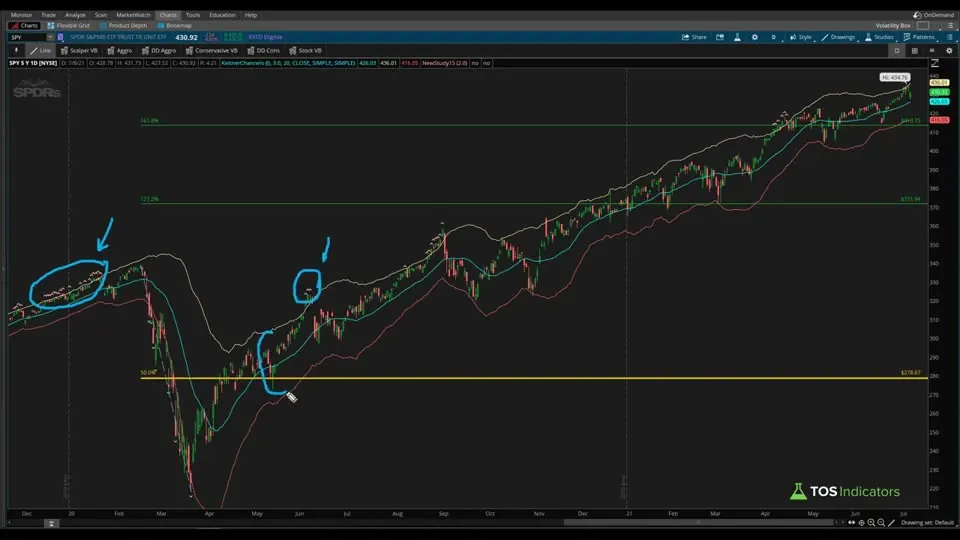
On this page
Overview
Introduction
Good afternoon, everyone and welcome to a five-minute thinkScript video. In today's video, we're going to answer the question - "How do we build an indicator that lets us know whenever price action is too extended?" If you're new to thinkScripting, this is going to be a great introduction and is a beginner friendly tutorial (we'll write less than 10 lines of code). To give you an idea of how this a tutorial is broken down...- In the first minute, I'll show you a preview of the final version of the indicator
- We'll spend the next three or so minutes writing thinkScript code. I'll spend a little bit more time breaking down individual concepts, to help explain the code along the way.
- Finally, I'll spend the last minute to summarize what we've accomplished in this tutorial, along with ways that you can take the concepts that we discussed in today's video, especially this idea of being overly extended, and turn that into something a little more powerful.
Demo of the Final Version of the Indicator
Here's what the final version of the "Overly Extended" indicator looks like: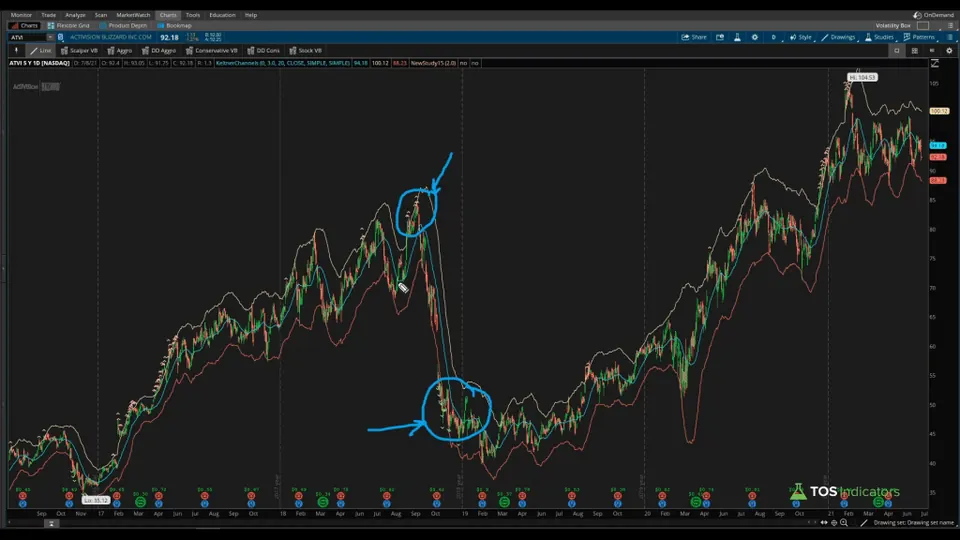 You should notice the "Boolean Wedges" (that's what ThinkOrSwim calls them), indicating that price action is too extended. Our definition of "extended" involves using the Keltner Channels, and specifically measuring price action's relationship to the upper and lower Keltner Channel bands.
It will plot both long and short wedges, using a very simple boolean condition, which we will write in the thinkScript section of this tutorial.
You should notice the "Boolean Wedges" (that's what ThinkOrSwim calls them), indicating that price action is too extended. Our definition of "extended" involves using the Keltner Channels, and specifically measuring price action's relationship to the upper and lower Keltner Channel bands.
It will plot both long and short wedges, using a very simple boolean condition, which we will write in the thinkScript section of this tutorial.
Understanding the Keltner Channels
Before we start writing our "Overly Extended" indicator, we need to understand the Keltner Channels code. Let's start with the user inputs.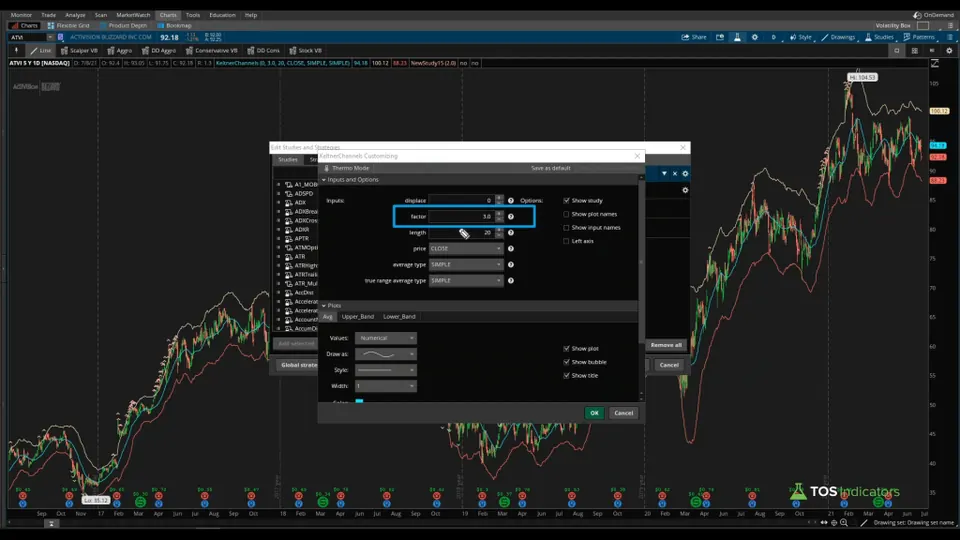 While there are a few different inputs available, the one input that we care about is the "Factor" variable. The "Factor" variable is what determines how elastic the Keltner Channel upper and lower bands are (the higher the number, the "more extended").
A 3.0 factor means we're increasing the elasticity of the Keltner Channels. As you continue to increase the factor, and if the "Overly Extended" boolean wedges continue to plot, the further extended we are.
This "Factor" input is something we'd like the user to be able to control from the studies menu in our version of the final indicator. With the value that the user inputs, the upper and lower bands of the Keltner Channel will adjust accordingly (and thus, our wedges).
Using your newfound knowledge about the Keltner Channels, we are now ready to start writing some custom thinkScript code.
While there are a few different inputs available, the one input that we care about is the "Factor" variable. The "Factor" variable is what determines how elastic the Keltner Channel upper and lower bands are (the higher the number, the "more extended").
A 3.0 factor means we're increasing the elasticity of the Keltner Channels. As you continue to increase the factor, and if the "Overly Extended" boolean wedges continue to plot, the further extended we are.
This "Factor" input is something we'd like the user to be able to control from the studies menu in our version of the final indicator. With the value that the user inputs, the upper and lower bands of the Keltner Channel will adjust accordingly (and thus, our wedges).
Using your newfound knowledge about the Keltner Channels, we are now ready to start writing some custom thinkScript code.
Writing thinkScript Code
Now, let's start writing some thinkScript code. We can give our new indicator a name, calling it TI_ExtendedKeltnerChannels. We can start by first defining our one input variable, which is the Keltner channel "Factor." We make this an input variable, so the user can change the value directly from the study's menu, instead of needing to edit code. We can define this variable as "KCfactor" and give the variable a default value of 3.0. Next, I can define our extended variables, which is what will contain the logic behind what plots on our chart. Let's start defining the long-side extended variable, which we can call "extendedLong." Our condition checks if the closing price of the current candle is greater than the Upper Band of the Keltner Channels. If it is, then "extendedLong" will return a 1, plotting true. Now, we can copy paste this one more time, for our short side. The reverse of the above condition is true for the short side. In this case, we are checking if the closing price of the current candle is less than the Lower Bands of the Keltner Channels, using the same "KCFactor" variable. Finally, we can add in the appropriate formatting, by defining the painting strategy. We can set the painting strategy for extendedLong and extendedShort to wedges, using:- "PaintingStrategy.BOOLEAN_WEDGE_UP"
- "PaintingStrategy.BOOLEAN_ARROW_DOWN"
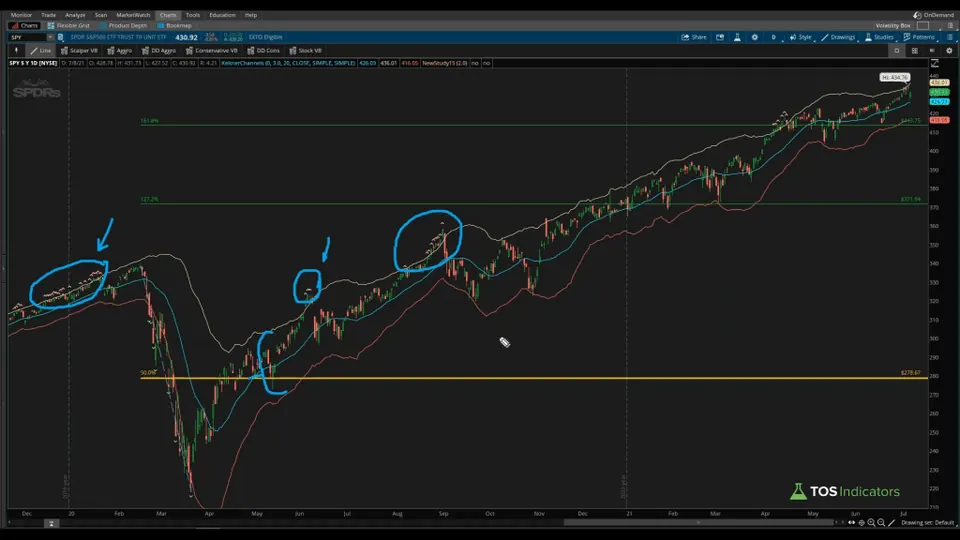 In terms of how you can continue to improve this indicator beyond what we currently have, you can start to make these conditions a bit more intricate. For example, you may also want to include an oversold/overbought indicator, such as the RSI (ie. RSI > 70).
You can layer on other indicators that you may prefer trading with, to continue to build out the "extendedLong" and "extendedShort" variables, and start to make these conditions a bit more complex.
The goal of the indicator is to not only help save you chart space, but also the mental bandwidth to automatically alert you when we are overly extended.
In terms of how you can continue to improve this indicator beyond what we currently have, you can start to make these conditions a bit more intricate. For example, you may also want to include an oversold/overbought indicator, such as the RSI (ie. RSI > 70).
You can layer on other indicators that you may prefer trading with, to continue to build out the "extendedLong" and "extendedShort" variables, and start to make these conditions a bit more complex.
The goal of the indicator is to not only help save you chart space, but also the mental bandwidth to automatically alert you when we are overly extended.
Keltner Channel wedges on real charts
Drawn from real daily bars with the code on this page, through Oct 20, 2026. A wedge prints when a bar closes outside a Keltner Channel set to a factor of 3.0, twice the default of 1.5: the 20-bar average of the close plus or minus 3 times the 20-bar average true range. A light green wedge under the bar means a close below the lower band, a pink wedge above it a close above the upper band. I picked the most recent first close below the lower band on a well-known name that was higher 10 trading days later, and the most recent that was not.
PEP, Oct 1, 2026: stretched, then snapped back
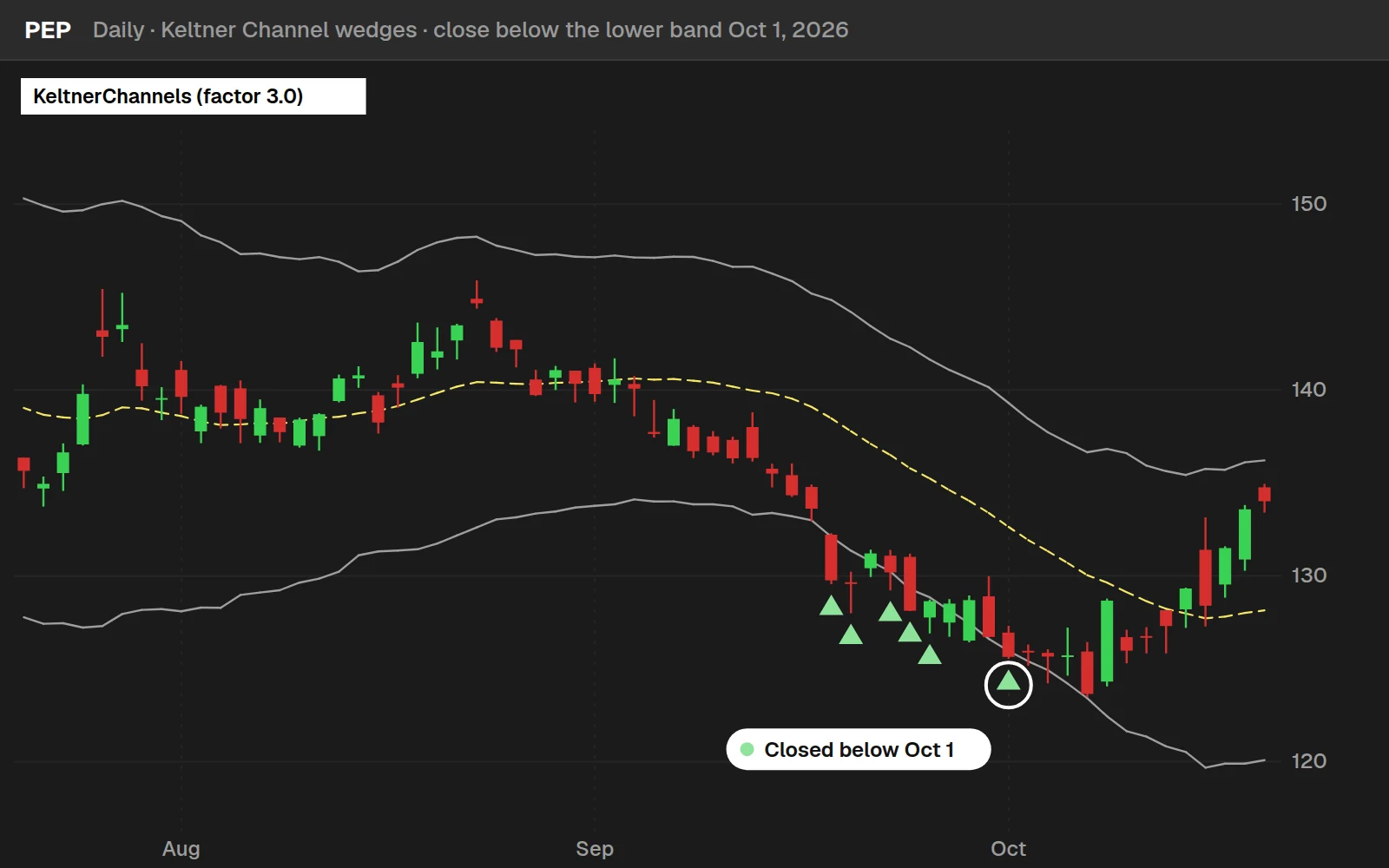
PEP closed at $125.63 below the lower band and at $128.39 ten trading days later, +2.2%.
BAC, Sep 28, 2026: stretched, and kept going
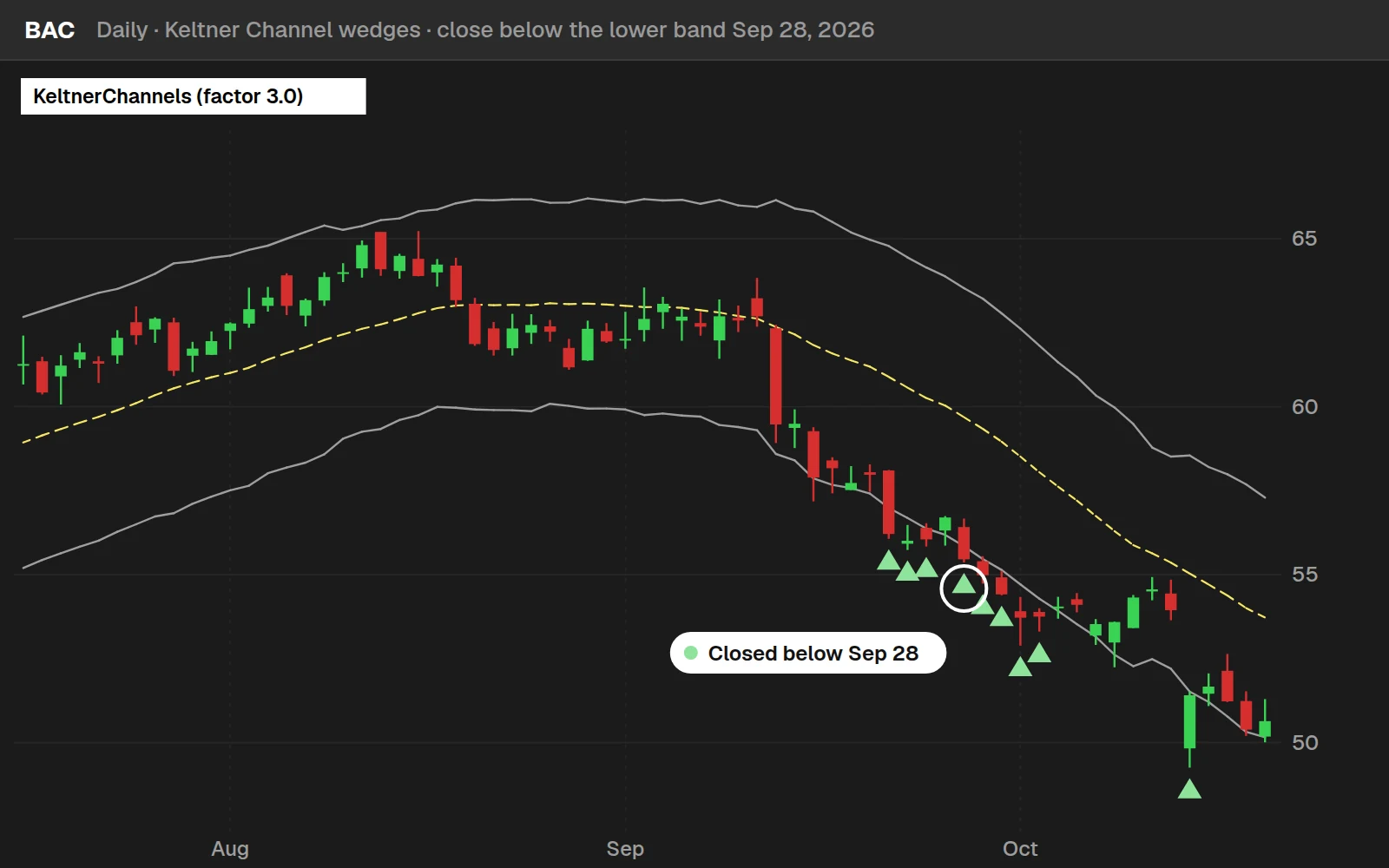
BAC closed at $55.45 and at $54.56 ten trading days later, -1.6%. Extended means far from the average, not done falling.
By the numbers
Daily bars for 648 stocks and ETFs through Oct 20, 2026: most stocks from July 2024, the 14 ETFs from 2016. The first close of each run outside the band, against every day in the same symbols over the same bars. After a close above the upper band, price was lower 10 days later 48.0% of the time.
Full thinkScript code
Create a free account or sign in to copy all 9 lines and download the file.
Download
Download the Keltner Channel Wedges Indicator for ThinkOrSwim. The download contains a STUDY.ts file, which you can directly import into your ThinkOrSwim platform.
Questions
How to use Keltner Channel Wedges indicator in ThinkOrSwim?
Import the Keltner Channel Wedges indicator through Studies > Edit Studies > Import. Once loaded, the indicator automatically analyzes price action and generates signals. Key settings include period length, signal sensitivity, and display options. Most traders find the default settings work well, but you can customize based on your timeframe and trading style.
What are the best settings for Keltner Channel Wedges indicator?
For day trading with Keltner Channel Wedges, I like to use a 20-period EMA with a 3.0 factor. These settings provide optimal sensitivity for intraday volatility changes. For swing trading, I like to use the same settings, but note that sometimes lowering to 2.0 factor will help to find more opportunities.
Does Keltner Channel Wedges indicator repaint in ThinkOrSwim?
The Keltner Channel Wedges indicator is designed to not repaint once a candle closes. All calculations are based on confirmed price data, ensuring signals remain consistent for backtesting and live trading. However, always verify this behavior in OnDemand mode before using real capital.
Can I use Keltner Channel Wedges indicator for day trading?
Yes, the Keltner Channel Wedges works well for day trading when properly configured. Use it on 5-15 minute charts with tighter settings for more responsive signals. Combine with volume analysis and support/resistance levels for higher probability setups. Always use stop losses as intraday moves can be volatile.
How to backtest Keltner Channel Wedges indicator in ThinkOrSwim?
Use ThinkOrSwim's OnDemand feature to backtest the Keltner Channel Wedges indicator. Load historical data, apply the indicator, and manually track signals and outcomes. For automated backtesting, combine with ThinkOrSwim's strategy functions. Document win rates, average gains/losses, and optimal market conditions for best results.
What's the difference between Keltner Channels and Bollinger Bands for wedge patterns?
Keltner Channels use ATR (Average True Range) while Bollinger Bands use standard deviation, making Keltner Channels more responsive to actual price volatility. For wedge patterns, Keltner Channels provide cleaner signals because ATR directly measures volatility changes, while Bollinger Bands can give false wedge signals during trending markets. Keltner Channel wedges are more reliable for breakout trading, especially in trending markets where Bollinger Bands may stay expanded.
How do I combine Keltner Channel Wedges with other ThinkOrSwim indicators?
Combine the Keltner Channel wedges with a trigger indicator, that helps you pinpoint exactly when to enter the mean-reversion trade. My personal favorite is to use the Edge Signals indicator (think of it as RSI on steroids). This is detailed more in the V-Shaped Reversal setup.
How do I set up alerts for Keltner Channel Wedge breakouts in ThinkOrSwim?
You can use the Alert function to set up ThinkOrSwim alerts, directly inside of the Keltner Channel Wedges' indicator code. The alerts will notify you whenever a wedge prints, sending you a notification in your ThinkOrSwim platform, mobile app, and mobile device.
Goes with
Related tools
 Average True Range Scanner
 Seasonal Analysis
 Cash-Secured Put Calculator
 Covered Call Calculator
 Pre-Earnings Analysis
 Reversion to 50-Day Moving Average
Get each new indicator by email
One email on Sundays with the week's new tool and its code. A free account also unlocks every .txt download.
No credit card. Unsubscribe anytime.