
 Fair Value Gap
 False Breakout Scanner
 Heiken Ashi Trend
 Stock Volatility Box
 Futures Volatility Box
 ORB Setups
 Squeeze Setups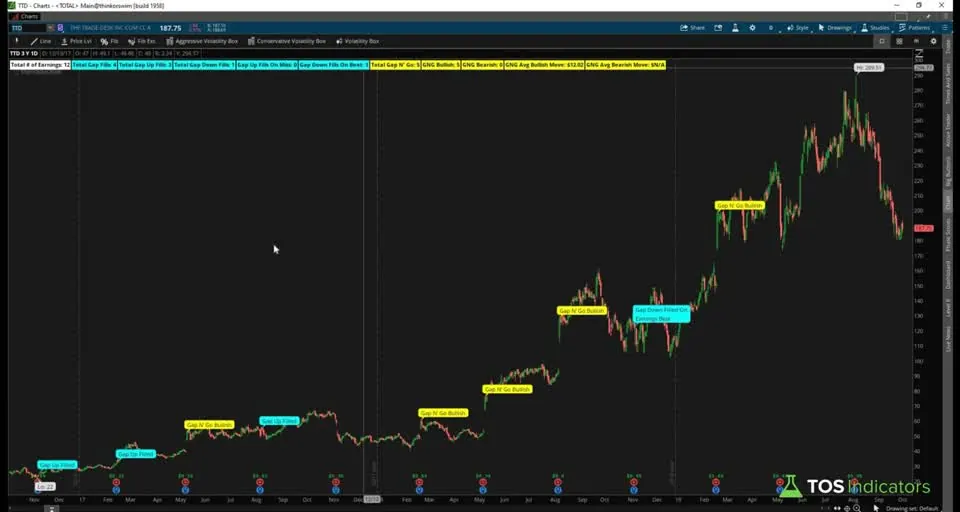
On this page
Overview
In this tutorial I build Smarter Earnings, a free ThinkOrSwim indicator for the day of earnings. It looks at every past report on your chart and asks what price did right after it: did the stock gap up or down, did the gap fill or did it gap and go, and did the company beat or miss its estimate?
The answers show up as labels at the top of the chart and as bubbles on each earnings bar, so you can see a stock's personality before its next report. I built it for traders who would rather wait for the number and trade the reaction than hold through the report. It's episode 9 of my How to thinkScript series.
Key Takeaways
- Smarter Earnings is a free ThinkOrSwim indicator that studies the day of earnings only: whether price gapped, whether the gap filled, and whether the company beat or missed its estimate.
- A gap up means the earnings bar opened above the previous bar's high, and a gap down means it opened below the previous bar's low. The gap fills when the same bar trades back to that level.
- Beats and misses come from 2 built-in thinkScript functions, GetActualEarnings() and GetEstimatedEarnings(). Reports released after the close are measured on the next bar.
- In the video, Roku's daily chart showed 8 earnings, 1 gap fill and 7 gap and go moves, 5 of them bullish, with an average bullish move of about $7.40.
- The download adds a label group the video doesn't build: a rough expected move from implied volatility, compared with the actual gap on each earnings day.
What the Smarter Earnings Indicator Measures
The Smarter Earnings indicator measures what price did in the first session after each earnings report. It leaves the run-up into earnings to other tools and focuses on the reaction once the number is out.
I planned it as a tree diagram before writing any code: find the earnings bar, check for a gap up or a gap down, check whether the gap filled or kept going, and line that up with the earnings result. With no gap, the indicator does nothing for that report.
Common sense says each outcome should fit an earnings result, such as a gap up that fills on a miss. The table shows the 4 pairings the indicator tracks.
| Gap | What price did on the earnings bar | Result that fits | Name in the indicator |
|---|---|---|---|
| Gap up | Came back down to fill the gap | Miss | Gap up fill |
| Gap up | Kept going without filling | Beat | Bullish gap and go |
| Gap down | Came back up to fill the gap | Beat | Gap down fill |
| Gap down | Kept going without filling | Miss | Bearish gap and go |
Counted across every report on the chart, these outcomes show whether a stock has a personality, such as gapping and going after beats. That history becomes a written plan before the next report.
Reading the Smarter Earnings Labels and Bubbles
The Smarter Earnings labels sit at the top of the chart in color groups, and each earnings bar gets a bubble so you can check every count against the price action. These are the labels in the download:
| Label | Color | What it shows |
|---|---|---|
| Total # of Earnings | White | Earnings reports on the chart |
| Greater Than Expected Move X% of Time | Lime | Share of reports where the actual gap was bigger than the rough expected move |
| Total Gap Fills | Cyan | Gap ups and gap downs that filled on the earnings bar |
| Total Gap Up Fills: X, Y on Miss | Cyan | Gap up fills, and how many came on an earnings miss |
| Total Gap Down Fills: X, Y on Beat | Cyan | Gap down fills, and how many came on a beat |
| Total Gap N' Go | Yellow | Gaps that didn't fill |
| GNG Bullish: X, Y on Beats | Yellow | Gap ups that didn't fill, and how many came on a beat |
| GNG Bearish: X, Y on Misses | Yellow | Gap downs that didn't fill, and how many came on a miss |
| GNG Avg Bullish Move and GNG Avg Bearish Move | Yellow | Average dollar move from the open to the high (bullish) or to the low (bearish) on those bars |
| GNG Lowest Bullish Move and GNG Lowest Bearish Move | Yellow | The smallest of those moves |
The bubbles use the same colors. Cyan bubbles read Gap Up Filled or Gap Down Filled, with On Earnings Miss or On Earnings Beat added when the result matched. Yellow bubbles mark Gap N' Go Bullish and Gap N' Go Bearish. Lime bubbles show the expected move and the actual move on each earnings bar.
One more lime bubble appears on the latest bar when the next session is the one that will react to a report, showing the expected move ahead of time.
Inputs
| Input | Default | What it turns on |
|---|---|---|
| gapFillLabels | yes | The cyan gap fill labels |
| gapNGoLabels | yes | The yellow gap and go labels |
| expectedMoveLabels | yes | Keeps the white total and the lime expected move label on when the other 2 are off |
The gap fill and gap and go inputs each switch one group, so you can hide a strategy that doesn't fit your trading and cut the noise on the chart. The white total and the lime expected move label show while any of the 3 inputs is on. The inputs control the labels only, and the bubbles always plot.
If you want to change the label text or colors, our AddLabel tutorial covers the syntax used at the bottom of the script.
How to Add Smarter Earnings to ThinkOrSwim
Smarter Earnings installs like any other custom study. You can import the .ts file from the download, or build it yourself: in the video I went to Charts, clicked the studies icon, clicked Create, and named the new study TI_SmarterEarnings.
- Download the zip and unzip TI_SmarterEarningsSTUDY.ts.
- Import the file as a study in ThinkOrSwim, or create a new study and paste in the code from the Code tab.
- Add it to a daily chart. The time range sets how many reports it counts: a 1-year chart shows 4 earnings, and a 2-year chart shows 8.
- Open the study settings to turn label groups on or off.
If you haven't added a custom study before, our guide on how to import a study into ThinkOrSwim walks through it.
How the Smarter Earnings Code Works
The Smarter Earnings code is built in modules: global variables, estimated versus actual earnings, gap fills, gap and go, and the labels and bubbles. I broke every condition into its own variable, even where two could be combined, so future versions can reference each piece.
Global Variables: Finding the Earnings Bar
HasEarnings() marks the bar of the report date, and its EarningTime parameter separates reports released before the open from those released after the close. Our upcoming earnings scan tutorial covers the function and that parameter in full, including how to scan for future report dates.
This step’s code is free with an account. Create one or sign in.
The key line is groupAME. An after-market report can't move price until the next session, so it reads the previous bar with [1]. earningsGroup combines both groups so later modules land on the reaction bar.
TotalSum(earningsDay) counts the reports on the chart. To test a variable as you build, I added a temporary bubble, not in the download: AddChartBubble(earningsGroup, close, earningsGroup, Color.YELLOW);. On AMD, which reports after market hours, the bubble landed on the next bar, as it should.
Estimated vs. Actual Earnings: Beat or Miss
GetEstimatedEarnings() and GetActualEarnings() are functions built into ThinkOrSwim that return the estimated and the reported earnings per share. Each line checks IsNaN first, and when a bar has no value, it carries the previous bar's value forward with [1].
This step’s code is free with an account. Create one or sign in.
A beat is actual above the estimate, and a miss is actual below it. An exact match counts as neither.
When I tested this on AMD in the video, one bar showed an estimate of 0.097 and an actual of 0.11, and another showed 7 cents estimated and 8 cents actual. Both were beats.
Gap Fills
A gap up needs the open above the previous bar's high. Most people would expect the previous close here, and I chose the high on purpose so the indicator counts exaggerated gaps whenever possible. A gap down needs the open below the previous bar's low.
The fill check runs on the same bar. A gap up fills when that bar's low trades back down to the previous high, and a gap down fills when its high trades back up to the previous low. An open above the previous close but below the previous high doesn't count as a gap.
This step’s code is free with an account. Create one or sign in.
Later lines pair each fill with the earnings result and total them with TotalSum.
The pairs have names such as gapUpFilledAndEarningsMiss. A gap that doesn't fill is stored as gapUpDidNotFill or gapDownDidNotFill, using ! to mean not.
Gap and Go
A gap and go is a gap that never filled on the earnings bar: price kept going in the direction it gapped. In the download, every unfilled gap counts as a gap and go, and the WithEarnings versions count the ones that came with the matching result.
This step’s code is free with an account. Create one or sign in.
A beat matches a bullish gap and go, and a miss matches a bearish one. Those feed the on Beats and on Misses counts in the labels.
The average move is measured on the same bar: the high minus the open for a bullish gap and go, and the open minus the low for a bearish one. I measure from the open because that's the first price you can act on once you know the result and the gap.
This step’s code is free with an account. Create one or sign in.
I calculated the average by hand. TotalSum adds up the moves, a second TotalSum of the 1s works as a counter, and the sum divided by the counter gives the average across the whole chart. LowestAll finds the smallest move.
Expected Move (Added in the Download)
The expected move module is in the download, and I don't build it in the video. The code comment calls it a rough calculation that uses a 2-day square root: the previous bar's implied volatility, doubled, times the square root of 2 divided by the square root of 365, times the previous close.
This step’s code is free with an account. Create one or sign in.
The actual move is the gap from the previous close to the earnings bar's open. A gap bigger than the expected move counts toward the Greater Than Expected Move percentage.
Both branches of the if statement use the same formula, so the expected move exists on every bar. That lets the last-bar bubble show it ahead of the next report.
Video Build vs. Download
The Smarter Earnings download (its header says last updated 10/17/2019) goes further than the version I build in the video. The Code tab on this page is the download file. These are the differences:
| Part | Built in the video | In the download |
|---|---|---|
| Inputs | gapFillLabels and gapNGoLabels | Adds expectedMoveLabels |
| Gap and go | Counts an unfilled gap only with the matching result: a beat for bullish, a miss for bearish | Counts every unfilled gap, and shows how many came with the matching result |
| Expected move | Not built | Rough expected move from implied volatility, a percentage label and lime bubbles |
| Lowest move | Not built | GNG Lowest Bullish Move and GNG Lowest Bearish Move labels |
Roku appears twice in the video with different gap and go counts. The indicator I showed at the start counted 7 gap and go moves, 5 of them bullish. The version I built on camera, which needs the matching result, counted 5, with 4 bullish. The video doesn't say why.
Examples from the Video: Roku, AMD, Microsoft and The Trade Desk
The Smarter Earnings examples in the video are historical counts from daily charts in 2019, and each covers only the reports on that chart. Today's charts will show different numbers.
| Stock | Earnings on the chart | Gap fills | Gap and go | Average move |
|---|---|---|---|---|
| Roku (ROKU), at the start of the video | 8, about 2 years | 1, a gap up that filled | 7, with 5 bullish | About $7.40 on bullish gap and go |
| AMD | 12 | 1, a gap up that filled on a miss | 7: 4 bullish, 3 bearish | 84 cents bullish, $1.14 bearish |
| Microsoft (MSFT) | 12, a 3-year chart | 4: 3 gap ups and 1 gap down | 5, all bullish | About 79 cents bullish |
| The Trade Desk (TTD) | 12 | 4: 3 gap ups and 1 gap down | 5, all bullish | $12.02 from the open, bullish |
AMD, Microsoft and The Trade Desk come from the version I built in the video, where a gap and go needs the matching result. Microsoft's 5 gap and go moves all came with beats and traveled about 79 cents on average over the 3 years.
None of The Trade Desk's gap up fills came on a miss, and its one gap down fill came on a beat. That report came out after the close, the next bar gapped down and filled, and the numbers were 53 cents estimated against 65 cents actual.
I pointed out one false signal on Roku while recording. The code has a few glitches, which is why every count has a bubble you can check on the chart.
How I Use Smarter Earnings: An If-This-Then-That Plan
Smarter Earnings is a planning tool for the session after a report. Here is the process I describe in the video:
- Find stocks with earnings in the next day or two. Our free upcoming earnings scan builds that list.
- Add Smarter Earnings to each chart and read the labels.
- Write the plan before the report. My example for Roku: if it gaps up and the report is a beat, expect a gap and go and look for a reason to get in on the long side.
- When the report comes out, confirm the gap and the result, then follow the plan with a trade that suits your account size and risk tolerance.
This way you skip the overnight earnings risk and trade the reaction once the information is out, using what happened the last times the same thing occurred. The history is a lean, and the next report can break the pattern. Before entering, decide where your stop goes and size the position so a stop-out costs a small, fixed share of your account.
Our upcoming earnings with high short interest scan uses Smarter Earnings as one of its checks. For the days before a report, Volatility Box members have the Pre-Earnings Analysis indicator.
Our research article How to Trade the Day of Earnings with the Smarter Earnings Indicator is another place to start. The earnings page collects the rest of our earnings tools, and more free studies are on the indicators page.
Full thinkScript code
Create a free account or sign in to copy all 108 lines and download the file.
Download
Download the Smarter Earnings indicator for ThinkOrSwim. The download is a .zip with one file, TI_SmarterEarningsSTUDY.ts, the same code as the Code tab on this page (last updated 10/17/2019). It includes the expected move labels, which the video doesn't build. Import the .ts file as a study. If you haven't added a custom study before, here's how to import an indicator into your ThinkOrSwim platform.
Questions
What does the Smarter Earnings indicator do?
Smarter Earnings is a free ThinkOrSwim study that looks at each earnings day on your chart and counts what price did: gap fills, gap and go moves, and whether each came with an earnings beat or miss. Labels at the top show the totals and the average moves, and chart bubbles mark every case.
How does Smarter Earnings define a gap up?
A gap up is an earnings bar that opens above the previous bar's high. Most people would expect the previous close, and I chose the high on purpose so the indicator counts exaggerated gaps. A gap down opens below the previous bar's low. The gap fills if the same bar trades back to that level.
What is a gap and go in the Smarter Earnings indicator?
A gap and go is an earnings gap that doesn't fill: price keeps moving in the direction it gapped. A bullish gap and go is an unfilled gap up, and a bearish one is an unfilled gap down. The labels also show how many came with a beat or a miss, and the average and lowest move from the open.
How does the indicator know if earnings beat or missed?
It compares two built-in thinkScript functions on the earnings bar, GetActualEarnings() and GetEstimatedEarnings(). Actual above the estimate is a beat, and actual below it is a miss. In the video, an AMD report with a 0.097 estimate and a 0.11 actual counted as a beat.
Why does the Smarter Earnings bubble show up the day after earnings?
The report came out after the market closed, so price couldn't react until the next session. The code checks HasEarnings(EarningTime.AFTER_MARKET) on the previous bar and measures the gap on the current one. Reports released before the market opens are measured on the same day.
How do I add Smarter Earnings to ThinkOrSwim?
Download the zip, unzip TI_SmarterEarningsSTUDY.ts, and import it as a study in ThinkOrSwim. Or create a new study and paste in the code from the Code tab. Add it to a daily chart: a 1-year chart covers 4 earnings, and a 2-year chart covers 8.
How does Smarter Earnings calculate the expected move?
The download uses a rough formula: the square root of 2 divided by the square root of 365, times twice the previous bar's implied volatility, times the previous close. It compares that with the actual gap from the previous close to the open and shows how often the gap was bigger. The video doesn't build this part.
What chart should I use with Smarter Earnings?
Use a daily chart. The indicator counts every report in view, so the time range sets the sample: a 1-year chart shows 4 earnings, a 2-year chart 8, and the 3-year Microsoft chart in the video showed 12. A longer chart gives a longer average, such as a 5-year average on a 5-year chart.
Goes with
Related tools
 Pre-Earnings Analysis
 Upcoming Earnings Scan
 Upcoming Earnings with High Short Interest
 Dynamic RSI
 Simple Breakout Tool
 Multi-Time Frame DMI
Get each new indicator by email
One email on Sundays with the week's new tool and its code. A free account also unlocks every .txt download.
No credit card. Unsubscribe anytime.