
 Fair Value Gap
 False Breakout Scanner
 Heiken Ashi Trend
 Stock Volatility Box
 Futures Volatility Box
 ORB Setups
 Squeeze Setups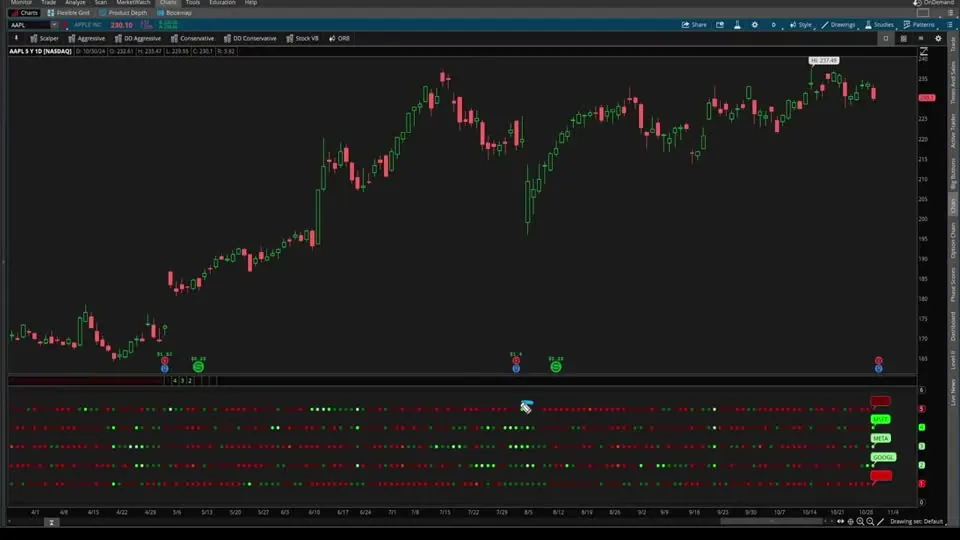
On this page
Overview
In this tutorial I build a volume intensity indicator for ThinkOrSwim that tracks 5 symbols in one lower panel. For each symbol it divides volume by its average volume and colors a row of dots by that ratio, from light green when volume is more than 2 times its average to light red when it's half the average or less.
I write the code for the first symbol by hand, then use the free version of ChatGPT to copy it for the other 4. The indicator is for traders who want to spot clusters of heavy or quiet volume across a group of stocks at a glance, and the finished study is a free download.
Key Takeaways
- The Volume Intensity indicator plots 5 rows of dots in a ThinkOrSwim lower panel, one row per symbol. The default symbols are AAPL, MSFT, META, GOOGL and NVDA.
- Volume intensity is a bar's volume divided by its average volume over the length input, which defaults to 20 bars. A reading of 2 means volume is twice its average.
- The dots use 6 colors: light green above 2, green above 1.5, dark green above 1, dark red above 0.75, red above 0.5 and light red at 0.5 or below.
- I code symbol 1 by hand and have the free version of ChatGPT rename the variables for symbols 2 to 5. Each copy then needs its row number changed by hand.
- A chart bubble on the last bar names each row, and 2 black lines at 0 and 6 frame the 5 rows.
What the Volume Intensity Indicator Shows
The Volume Intensity indicator turns volume for 5 symbols into 5 rows of colored dots, so you can read all of them in one panel. Symbol 1 plots on the top row at 5 and symbol 5 on the bottom row at 1. A bubble with the ticker sits at the right end of each row, in the same color as the latest dot.
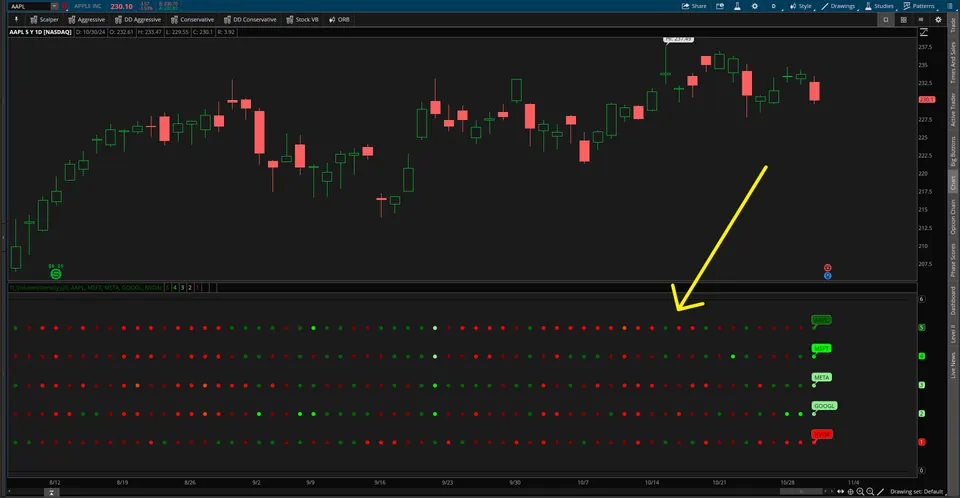
Each dot's color comes from that symbol's intensity on that bar. The table shows the 6 levels in the order the code checks them.
| Intensity (volume divided by its average) | Dot color | What it means |
|---|---|---|
| Above 2 | Light green | Volume more than twice its average |
| Above 1.5, up to 2 | Green | 1.5 to 2 times the average |
| Above 1, up to 1.5 | Dark green | Above average |
| Above 0.75, up to 1 | Dark red | At or a little below average |
| Above 0.5, up to 0.75 | Red | Below average |
| 0.5 or below | Light red | Half the average or less |
In the video I call light green very high volume. Light red is unusual too: volume is less than half its average. I describe that as muted volatility, which often comes before an uptick.
Why I Built the Volume Intensity Indicator
The Volume Intensity indicator does 3 things I find missing in the usual volume indicators:
- It tracks changes in volume strength quickly. Each symbol is measured against its own average, so the 5 rows share one scale. Together they give a broader view of which stock is moving, especially during earnings season.
- It makes clusters easy to spot. Stretches of light green across 4 of the 5 symbols, or light red across several, stand out right away.
- It highlights when momentum shifts. In my experience the volume setups tend to come shortly after the spike rather than on the day of it. I think it pairs well with our Momentum Cross indicator: heavy volume, then muted volume, then a shift in momentum.
I said in the video that I'd cover how to read these patterns in a future video. This tutorial is about building the indicator.
How Volume Intensity Fits With Our Other Volume Tools
Volume Intensity uses the same ratio as our Average Volume Stats indicator: volume divided by its average. The two differ in what they read and how they show it.
- Bars. Average Volume Stats locks volume to the daily bar with
period = "Day". Volume Intensity sets no period, so each dot is one bar of the chart you're on. On the daily chart I used in the video, that's one day. - Symbols. Average Volume Stats reads the chart's symbol. Volume Intensity reads the 5 symbols in its inputs, whatever chart you put it on.
- Output. Average Volume Stats prints numbers in labels. Volume Intensity shows colored dots.
To search the whole market instead of 5 symbols, use the unusual volume scans for volume several standard deviations above normal, or the increasing volume scans for volume that rises 3 bars in a row while staying above its average.
Volume Intensity Settings
The Volume Intensity indicator has 6 inputs: one length and 5 symbols. Double-click the study to change them, and the dots recalculate when you click OK.
| Input | Default | What it does |
|---|---|---|
| length | 20 | Bars in the volume average. In the video I also used 50. |
| symbol1 | AAPL | Top row, plotted at 5 |
| symbol2 | MSFT | Row plotted at 4 |
| symbol3 | META | Row plotted at 3 |
| symbol4 | GOOGL | Row plotted at 2 |
| symbol5 | NVDA | Bottom row, plotted at 1 |
How to Build the Volume Intensity Indicator in ThinkOrSwim
The Volume Intensity build starts with a new study, its panel and its inputs. These are the steps from the video:
- Click the Studies icon and choose Create. I named mine TI_VolumeIntensity.
- Delete the starter line,
plot Data = close;. - Type
declare lower;so the study always opens in a lower panel, where studies like RSI and ATR go. - Add the length input and one input per symbol, as in the code below.
- ThinkOrSwim then shows the error "at least one plot should be defined". To check the inputs before writing the rest, I added a temporary
plot signal = 1;, clicked OK, double-clicked the study to see the settings, then deleted the line.
This step’s code is free with an account. Create one or sign in.
To skip the typing, download the finished study and follow our guide on how to import a study into ThinkOrSwim.
The Code for Symbol 1, Step by Step
The Volume Intensity code for one symbol has 5 steps: fetch its volume, compare it with its average, plot a row of dots, color them and label the row. Every variable for symbol 1 ends in 1, which turns the copies for symbols 2 to 5 into a find-and-replace job.
Step 1: Volume for the Input Symbol
This step’s code is free with an account. Create one or sign in.
The symbol parameter pulls volume for the symbol in the first input instead of the symbol on your chart.
Step 2: The Average and the Intensity Ratio
This step’s code is free with an account. Create one or sign in.
volAvg1 is the mean volume over the last 20 bars, the baseline. intensity1 is the current bar's volume divided by that baseline. When I plotted intensity1 on its own in the video, it ranged from 0 to about 5 on that chart, and the tallest reading meant volume 5 times its average.
Step 3: Plot a Row of Dots
This step’s code is free with an account. Create one or sign in.
The plot puts symbol 1 at a fixed height of 5, the top row. !IsNan(close) is true on bars where a close exists. My first version plotted 1 where a close existed and 0 where it didn't, so the line dropped to zero in the empty space right of the last bar. Double.Nan plots nothing there.
Points and a line weight of 3 turn the line into dots big enough to read. At this stage every dot is the same color, so the row tells you nothing yet.
Step 4: Color the Dots
AssignValueColor sets the color bar by bar. The checks run top to bottom and stop at the first one that's true, so the 1.5 line doesn't need to say "and below 2": anything above 2 was already caught. The green levels mean above-average volume, and the red levels get lighter as volume falls further below average.
This step’s code is free with an account. Create one or sign in.
With the colors in place, each dot carries the intensity reading.
Step 5: Name the Row With a Chart Bubble
The AddChartBubble line uses 4 parameters: when to show the bubble, where to put it, what text goes inside, and its color. IsNan(close[-1]) is true when the next bar has no close. On its own it matched the last bar and every empty bar after it, so I added close > 0 to keep one bubble on the last bar.
This step’s code is free with an account. Create one or sign in.
The bubble sits at 5, prints symbol 1's ticker and reuses the dot colors.
Using ChatGPT to Copy the Code for Symbols 2 to 5
ChatGPT handled the repetitive part of the Volume Intensity build. I used the free version, without logging in, and gave it this prompt with the symbol 1 code pasted below it:
Take this code and change all of the variable names that end in one to now end in two so that this works for symbol 2 as well.
It returned the symbol 2 code with every variable renamed. The renamed code still plotted at 5, so I changed the 5 to a 4 in both the plot and the chart bubble before applying it. Then I asked it to repeat the code for symbols 3, 4 and 5 in one go, and set their rows to 3, 2 and 1 by hand.
In my experience ChatGPT is weak at creating indicators like this from scratch and very good at basic tasks like this one. Find and replace in a text editor does the same job.
Framing the Rows With Two Baselines
The Volume Intensity panel needs 2 more plots to look right: flat lines at 0 and 6, one below the bottom row and one above the top row. With only the 5 rows plotted, the panel looked off to me. Each line is a plot with one fixed value, which gives the panel a fixed top and bottom so the rows sit evenly.
This step’s code is free with an account. Create one or sign in.
I colored both lines black because my charts have a black background, which makes them close to invisible. Match the color to your own background.
How I Read the Dots and Tweak the Settings
The Volume Intensity indicator monitors volume for you: instead of watching 5 volume panels, you scan 5 rows of color. I look for clusters, light green across several symbols on the same bars or a run of light red, then watch for momentum to shift. The colors tell you when to look closer. They don't pick a direction.
A stretch of light green says volume is heavy, and the bars that follow can go either way. Decide where your stop goes before you enter, and size the position so a stop-out costs a small, fixed share of your account.
- Length. I tried 20 and 50 in the video. A shorter length looks at shorter-term volume. I think 50 is the safer bet.
- Thresholds. I kept the 6 levels simple. If muted volume for you means something lower than half the average, lower the 0.5 level.
- Symbols. Swap any of the 5 inputs in the settings. To compare only the index markets, type their symbols into the inputs.
Common Problems and Fixes
The Volume Intensity build in the video hit 4 fixable problems: no plot yet, a 0 else value, extra chart bubbles and rows that looked off. Pasting in the copied blocks adds a fifth: a row number left unchanged. The table shows the fix for each.
| Problem | Cause | Fix |
|---|---|---|
| "At least one plot should be defined" | The study has inputs but no plot yet | Add a plot. A temporary plot signal = 1; works |
| A line at 0 right of the last bar | The else value is 0 | Use Double.Nan |
| A bubble on every empty bar after the last one | IsNan(close[-1]) on its own | Add close > 0 |
| Two symbols on the same row | A copied block kept the old row number | Change the number in both the plot and the bubble |
| Rows look squeezed or uneven | The panel has no fixed top and bottom | Add the black baselines at 0 and 6 |
More free studies built step by step are on our indicators page.
Volume Intensity on real charts
Drawn from real daily bars with the code on this page, through Oct 20, 2026. The defaults: AAPL, MSFT, META, GOOGL and NVDA, each day's volume divided by its 20-day average. Here the study sits under a QQQ chart, since all five are among its largest holdings.
QQQ around Apr 30, 2026
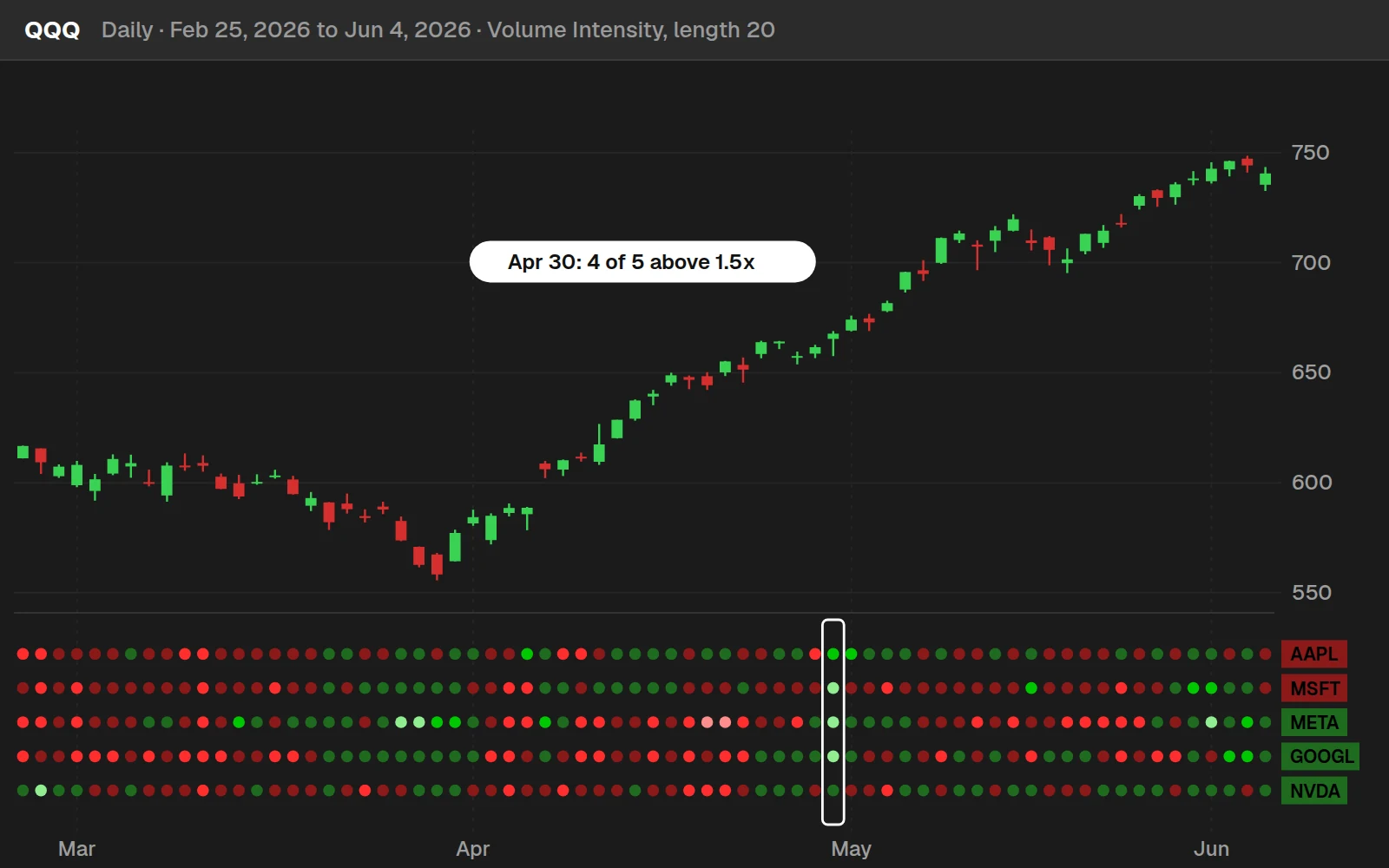
I picked the day by rule: the most recent session when at least 4 of the 5 names traded more than 1.5 times their 20-day average volume. That was Apr 30, 2026: AAPL 1.55x, MSFT 2.05x, META 3.47x, GOOGL 2.91x, NVDA 1.46x. QQQ moved +0.9% that day.
By the numbers
Daily bars from Aug 7, 2024 to Oct 20, 2026 (553 sessions). A move is the size of QQQ's close-to-close change, up or down. Heavy volume across the group tended to come on bigger days for the index.
Full thinkScript code
Create a free account or sign in to copy all 134 lines and download the file.
Download
Download the Volume Intensity indicator for ThinkOrSwim. The download is a .zip with one study file, TI_VolumeIntensitySTUDY.ts: the finished indicator from the video, with 5 symbol inputs, a 20-bar length, the 6-color dots, chart bubbles and the baselines at 0 and 6. Import it as a study. If you haven't added a custom study before, here's how to import an indicator into your ThinkOrSwim platform.
Questions
What is volume intensity?
Volume intensity is a bar's volume divided by its average volume over a set number of bars, 20 by default in our indicator. A reading of 1 means average volume, 2 means twice the average and 0.5 means half. The Volume Intensity indicator turns that ratio into colored dots for 5 symbols at once.
How do I add the Volume Intensity indicator to ThinkOrSwim?
Download the free study from this page and import TI_VolumeIntensitySTUDY.ts, or click Studies, choose Create, delete the starter code and paste in the code from the Code tab. It opens in a lower panel with 5 rows of dots. Double-click it to change the symbols or the length.
What do the colors in the Volume Intensity indicator mean?
Light green means volume is more than 2 times its average, green more than 1.5 times and dark green above average. Dark red means more than 0.75 times, up to average, red more than 0.5 times and light red half the average or less. Green is above-average volume, and the reds get lighter as volume falls.
How do I change the symbols in the Volume Intensity indicator?
Double-click the study and type new symbols into symbol1 through symbol5. The defaults are AAPL, MSFT, META, GOOGL and NVDA. Symbol 1 plots on the top row and symbol 5 on the bottom row, and the bubbles at the right edge show the new tickers. In the video I mention comparing only the index markets this way.
What length should I use for volume intensity?
The default is 20 bars. In the video I also tried 50, which I think is the safer setting, and you can go shorter if you care about shorter-term volume. The length sets how many bars go into the average, so each dot compares the current bar's volume with the mean of that many bars.
Does the Volume Intensity indicator work on intraday charts?
The code reads volume without a fixed period, so each dot is one bar of the chart you put it on. On a daily chart a dot compares one day with the 20-day average. On a 5-minute chart it would compare one 5-minute bar with the last 20 of them. I built and used it on a daily chart in the video.
How did ChatGPT help build the Volume Intensity indicator?
I wrote the code for symbol 1 by hand, then asked the free version of ChatGPT to change every variable name ending in 1 to end in 2 so the code works for symbol 2. I changed the row number from 5 to 4 myself, then had it repeat the code for symbols 3, 4 and 5.
Why are there lines at 0 and 6 in the Volume Intensity panel?
The 2 lines frame the 5 rows of dots, which plot at 1 through 5, and give the panel a fixed top and bottom. With only the dots, the panel looked off in the video. I colored both lines black to match my chart background so they almost disappear. Use your own background color.
Related tools
 Advanced Volume Zone Oscillator
 Average Volume Stats
 Increasing Volume
 Unusual Volume
 Trend Squeeze
 Parabolic SAR
Get each new indicator by email
One email on Sundays with the week's new tool and its code. A free account also unlocks every .txt download.
No credit card. Unsubscribe anytime.