
Why November is a Good Time to Buy This Stock
Discover why November is historically the best month for stocks with a 73% win rate. Learn how to use ThinkOrSwim seasonality charts, ThinkScript scanners, and the Volatility Box to identify and time high-probability seasonal trades in top-performing sectors.

- November Historical Returns: What the Data Shows
- Why Seasonal Patterns Exist in the Stock Market
- Which Sectors Outperform in November
- Amazon (AMZN): A November Seasonality Case Study
- Using ThinkOrSwim Seasonality Charts for Analysis
- ThinkScript Code for Seasonal Scanning
- Timing Your November Entry
- Risk Management for Seasonal Trades
- Integrating the Volatility Box for Seasonal Setups
- Essential Tools for Seasonal Trading
- Frequently Asked Questions
November has earned its reputation as one of the strongest months for equities. Backed by more than seven decades of data, the S&P 500 has averaged a gain of roughly 1.7% in November, with a win rate above 73%. For traders who combine seasonal patterns with technical confirmation using thinkorswim indicators, November presents a high-probability window for equity exposure.
This article breaks down the historical data behind November seasonality, identifies the sectors and stocks that benefit most, and provides practical tools (including ThinkScript code and thinkorswim scanners) to help you time entries with precision.
November Historical Returns: What the Data Shows
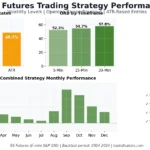
Since 1950, the S&P 500 has posted an average monthly return of approximately 1.7% in November. Only April and December come close, with averages near 1.5% and 1.6% respectively. Over a 50-year lookback, November has been positive roughly 73% of the time, well above the average monthly win rate of about 60%.
November also marks the start of the favorable November-through-April period. From 1950 to 2024, the S&P 500 delivered an average cumulative return of 7.2% during November to April, compared to just 2.1% during May to October. That 3.5x differential is the foundation of the well-known "Sell in May" adage.
Average S&P 500 Monthly Returns (1950-2024)
| Month | Avg. Return | Win Rate | Rank |
|---|---|---|---|
| January | +1.0% | 62% | 6 |
| February | +0.2% | 55% | 9 |
| March | +1.2% | 65% | 4 |
| April | +1.5% | 70% | 2 |
| May | +0.3% | 57% | 8 |
| June | +0.1% | 53% | 10 |
| July | +1.1% | 62% | 5 |
| August | -0.1% | 52% | 11 |
| September | -0.5% | 45% | 12 |
| October | +0.9% | 60% | 7 |
| November | +1.7% | 73% | 1 |
| December | +1.6% | 72% | 3 |
The weakest stretch runs from June through September, with August and September frequently posting negative returns. The strongest period starts in November and extends through April. Traders who align their exposure with this pattern gain a statistical tailwind.
Why Seasonal Patterns Exist in the Stock Market
Seasonal patterns emerge from recurring institutional and behavioral forces. Institutional fund managers often increase equity exposure ahead of year-end to improve portfolio performance for annual reporting. Holiday consumer spending ramps up with Black Friday and Cyber Monday, lifting revenue expectations for retail and e-commerce companies.
Tax-loss harvesting in October creates artificial selling pressure that reverses in November as buyers return. Q3 earnings season in late October and early November also triggers momentum when upside surprises land. The combination of institutional buying, consumer tailwinds, and earnings catalysts creates a convergence of bullish forces.
Which Sectors Outperform in November
Not all sectors benefit equally. Consumer Discretionary and Technology tend to lead, driven by holiday spending expectations and the electronics upgrade cycle. Retail sales between November 1 and December 24 have grown consistently, with recent years showing 3.1% to 3.2% year-over-year increases.
November Sector Performance (10-Year Averages)
| Sector | Avg. Nov. Return | Win Rate | Key Driver |
|---|---|---|---|
| Consumer Discretionary | +2.1% | 75% | Holiday spending, Black Friday |
| Technology | +1.9% | 72% | Electronics sales, cloud demand |
| Financials | +1.8% | 70% | Year-end lending, rate environment |
| Industrials | +1.7% | 68% | Capex planning, infrastructure |
| Healthcare | +1.6% | 66% | Enrollment periods, Medicare |
| Communication Services | +1.5% | 65% | Ad spending, holiday campaigns |
| Energy | +1.0% | 58% | Heating demand, variable |
| Utilities | +0.6% | 55% | Defensive, less seasonal |
| Real Estate | +0.5% | 52% | Rate-sensitive, mixed |
Amazon (AMZN): A November Seasonality Case Study
Amazon provides one of the clearest examples of November seasonal strength. As the dominant e-commerce platform, AMZN captures a disproportionate share of holiday spending. Based on historical data, Amazon has averaged a monthly return of 3.42%, but November and Q4 returns have consistently exceeded that baseline.
The seasonal setup involves several converging factors. Prime Early Access sales in October generate buzz that carries forward. Black Friday and Cyber Monday represent two of Amazon's highest-volume days. AWS also benefits as enterprise clients finalize annual cloud budgets in Q4, adding a second growth vector.
When analyzing AMZN seasonality on thinkorswim, look for an October pullback followed by a November reversal. Entries near support levels in late October or the first week of November have historically provided favorable risk-reward ratios. Volume expansion and a break above the October trading range serve as key confirmation signals.
Using ThinkOrSwim Seasonality Charts for Analysis
ThinkOrSwim includes a built-in Seasonality chart mode that plots daily price data for each year individually, allowing visual comparison across multiple years. To access it, open any chart, click the Chart Mode dropdown (where it says "Standard"), and select "Seasonality." The platform will overlay each year as a separate colored line.
To normalize the comparison, go to Price Axis settings and select "Show as percentage," which aligns all years to the same starting point. Enable "Show corporate actions" to see where earnings dates fall relative to the seasonal pattern. Adjust the year range to focus on the most recent 5 to 10 years for relevance.
ThinkScript Code for Seasonal Scanning
To systematically identify stocks with strong November seasonality, you can build a custom scanner using ThinkScript. The following code calculates the average November return over a specified lookback and flags stocks where November has historically been positive at least 70% of the time. This is one of the more practical thinkorswim scripts for day trading seasonal setups.
# November Seasonality Scanner
# Flags stocks with historically strong November returns
# Use in thinkorswim Stock Hacker scanner

input lookbackYears = 10;
input minWinRate = 70;

def month = GetMonth();
def year = GetYear();
def isNovember = month == 11;
def isNovStart = isNovember and month[1] != 11;
def isNovEnd = isNovember and month[-1] != 11;

def novOpen = if isNovStart then open else novOpen[1];
def novClose = if isNovEnd then close else novClose[1];
def novReturn = if isNovEnd then ((novClose - novOpen) / novOpen) * 100 else 0;

def novCount = if isNovEnd and year >= (GetYear() - lookbackYears)
    then novCount[1] + 1 else novCount[1];
def novWins = if isNovEnd and novReturn > 0
    and year >= (GetYear() - lookbackYears)
    then novWins[1] + 1 else novWins[1];
def novTotalReturn = if isNovEnd
    and year >= (GetYear() - lookbackYears)
    then novTotalReturn[1] + novReturn else novTotalReturn[1];

def winRate = if novCount > 0
    then (novWins / novCount) * 100 else 0;
def avgReturn = if novCount > 0
    then novTotalReturn / novCount else 0;

plot scan = winRate >= minWinRate and avgReturn > 1.0;

AddLabel(yes, "Nov Win Rate: " + Round(winRate, 1) +
    "% | Avg Return: " + Round(avgReturn, 2) + "%",
    if winRate >= minWinRate then Color.GREEN else Color.RED);
To use this scanner, open Stock Hacker in thinkorswim and add a custom filter using the code above. Set the lookback to 10 years for a balance between statistical significance and recency. The minWinRate defaults to 70%, meaning only stocks positive in at least 7 of the last 10 Novembers will appear.
Timing Your November Entry
Seasonal data tells you which month to be positioned, but not the exact entry day. Historical data shows that November's gains tend to be front-loaded, with the first two weeks contributing more than the final two weeks.
The optimal entry window falls between the last trading days of October and the first five trading days of November. This captures the reversal from October seasonal weakness into November strength. Waiting until mid-November often means chasing a move that is already half complete.
Technical confirmation should include three elements: a support bounce near the 20-day or 50-day moving average, expanding volume on the bounce, and relative strength versus the S&P 500 trending upward. These filters separate genuine seasonal moves from statistical noise.
Risk Management for Seasonal Trades
Seasonal patterns provide a statistical edge, not a guarantee. Over a 50-year period, November has been negative 27% of the time. Proper risk management is essential to survive the losing years while capturing the gains from the winning majority.
Position sizing should reflect the probabilistic nature of seasonal trades. Risk no more than 1-2% of total account equity on any single seasonal position. For a $50,000 account, that means a maximum risk of $500 to $1,000 per trade. Calculate position size by dividing dollar risk by the distance from entry to stop loss.
Stop placement should sit below the October low or the most recent swing low on the daily chart. Profit targets should reflect the historical average November return for the specific stock. Taking partial profits at the average return level and letting the remainder run into December captures additional upside from the broader holiday rally.
Integrating the Volatility Box for Seasonal Setups
The Volatility Box identifies high-probability price levels where reversals are statistically likely. When combined with seasonal analysis, it adds precision to entry and exit decisions that calendar data alone cannot provide.
For November seasonal trades, the Volatility Box helps in three ways. It identifies exact price levels where a late-October pullback is likely to find support. It provides statistically derived resistance levels as profit targets. And its volatility-based framework adapts to current market conditions, ensuring stop placement reflects actual price behavior rather than a fixed percentage.
The workflow: identify stocks with strong November seasonality using the scanner above, switch to the daily chart, apply the Volatility Box, and look for price approaching or bouncing from a support level during the late October entry window. This convergence of seasonal strength and statistical support creates a high-probability setup.
Essential Tools for Seasonal Trading
Each tool addresses a different component of the seasonal trading process. The Seasonal Analysis Indicator provides a visual overlay of historical patterns directly on your thinkorswim chart, eliminating the need to switch chart modes. The Volatility Box pinpoints support and resistance. The Indicators Library and Scanners Collection offer additional filters for technical confirmation.
Using these tools together creates a systematic workflow: identify seasonal candidates, confirm technical strength, pinpoint entries with the Volatility Box, and execute with defined risk parameters. This transforms seasonal observation into a repeatable trading strategy.
Frequently Asked Questions
Why is November historically the best month for stocks?
November benefits from the reversal of October tax-loss harvesting pressure, institutional fund managers increasing equity exposure ahead of year-end performance reporting, the start of holiday consumer spending (Black Friday, Cyber Monday), and post-election clarity in election years. Since 1950, these forces have combined to produce an average S&P 500 return of +1.7% with a 73% win rate.
How do I access the Seasonality chart in ThinkOrSwim?
Open any chart in thinkorswim desktop, click the Chart Mode dropdown (defaults to "Standard"), and select "Seasonality." The platform plots individual year data as separate colored lines. Go to Chart Settings, then Price Axis, and enable "Show as percentage" to normalize all years to the same starting point.
Which stocks benefit most from November seasonality?
Consumer Discretionary and Technology stocks tend to show the strongest November performance. Amazon (AMZN) is a prime candidate given its direct exposure to holiday spending. Retailers like Gap (GAP), Deckers Outdoor (DECK), and Abercrombie & Fitch (ANF) also show strong patterns. Use the ThinkScript scanner with thinkorswim scanners to identify additional candidates.
Can I use the Volatility Box with seasonal trading strategies?
Yes. The Volatility Box complements seasonal analysis by providing specific price levels for entries, stops, and targets. Apply it to stocks that pass your seasonal scan, then look for price approaching a support level during the late October or early November entry window.
What is the best entry timing for November seasonal trades?
November's gains tend to be front-loaded. The optimal entry window is the last trading week of October through the first five trading days of November. This captures the reversal from October weakness into November strength. Waiting until mid-November typically means entering after a significant portion of the move has already occurred.
How reliable are seasonal patterns for trading decisions?
Seasonal patterns provide a statistical edge, not a guarantee. November's 73% win rate means it still loses roughly one in four years. Treat seasonality as one input in a multi-factor process, combining it with technical analysis, fundamental catalysts, and risk management. The pattern has persisted for over 70 years, suggesting the underlying drivers are structural. However, always use stop losses on every seasonal trade.



Ready to Trade With an Edge?
Join 40,000+ traders using institutional-grade tools for ThinkOrSwim.
Get the Bundle