
 Fair Value Gap
 False Breakout Scanner
 Heiken Ashi Trend
 Stock Volatility Box
 Futures Volatility Box
 ORB Setups
 Squeeze Setups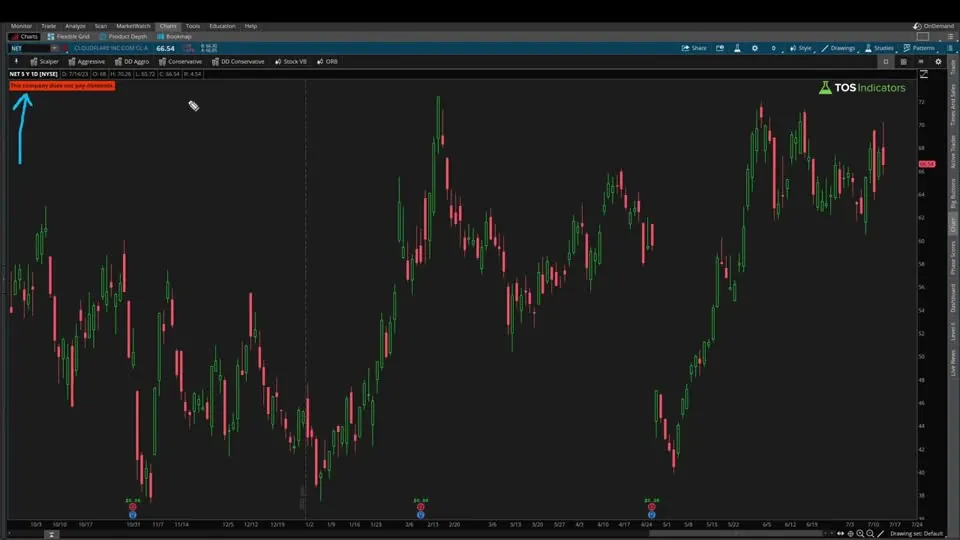
On this page
Overview
In this tutorial I build a dividend yield indicator for ThinkOrSwim from scratch, starting from the GetDividend() function. It labels the latest dividend, the dividend yield and the number of payouts over the past year, and it puts a chart bubble with the yield on every bar where a dividend was paid.
The indicator gives you 2 ways to calculate the yield, a threshold that turns the label green, and switches for the labels and bubbles. It's for income investors who want the yield and its history on the same daily chart as the price. Volatility Box members can follow Part 2, where I build the Pro version.
Key Takeaways
- The Dividend Yield indicator reads ThinkOrSwim's
GetDividend()function, which only has data on a daily chart, so anAssertline stops the study on any other time frame. - The default method multiplies the latest dividend by a payout multiplier and divides by the close. The 1-yr lookback method divides the dividends paid over the last 252 daily bars by the close.
- The yield label turns light green when the yield is above the
thresholdinput, 0.04 (4%) by default, and yellow when it isn't. - In the video, PMT counted 5 payouts in the past year because of a special dividend. Its yield read 11.83% with the default method and 13.82% with the 1-yr lookback.
- A stock with no dividend in the last 252 bars, like Cloudflare in the video, shows one light red label: "This company does not pay dividends."
What Is Dividend Yield?
Dividend yield is the yearly dividend a stock pays per share divided by its share price, written as a percentage. A $50 stock that pays $2 a year has a 4% dividend yield. The yield rises when the price falls or the dividend grows, and it falls when the price rises or the dividend is cut.
There are 2 common ways to count the yearly dividend. A forward, or indicated, yield takes the latest payment and multiplies it by the number of payments in a year. A trailing yield adds up the dividends paid over the last 12 months. The indicator offers both, as its default and 1-yr lookback methods.
Dividend yield is one of several ways to put a price on a company. Our P/E ratio indicator compares the price with earnings, and the price to book ratio indicator compares it with book value.
What the Dividend Yield Indicator Shows
The Dividend Yield indicator plots on the price chart and shows its results in 3 labels and a set of chart bubbles. The labels sit in the top left corner. The bubbles sit at the close of each bar where ThinkOrSwim reports a dividend, on the ex-dividend date.
| Output | What it shows | Color |
|---|---|---|
| Total Payouts label | Number of dividends in the last 252 daily bars | White |
| Dividend label | Latest dividend in dollars, rounded to 2 decimals, and the dividend yield as a percentage | Light green above the threshold, yellow otherwise |
| No-dividend label | "This company does not pay dividends." when there was no dividend in the last 252 bars | Light red |
| Chart bubbles | The dividend yield on each dividend bar | Light green above the threshold, yellow otherwise |
The Total Payouts and Dividend labels only show when the stock paid at least 1 dividend in the last 252 bars, and the no-dividend label only shows when it paid none, so you never see both at once. With a bubble on every payment, you can see how the yield has moved over time and whether today's number is unusual for the stock.
The Inputs
The Dividend Yield indicator has 4 inputs. Double-click the study on the chart to open its settings and change them.
| Input | Default | What it does |
|---|---|---|
| yieldCalculationType | default | "default" uses the latest dividend times the payout multiplier. "1-yr lookback" uses the dividends paid over the last 252 bars. |
| threshold | 0.04 | A yield above this turns the label and bubbles light green. Enter it as a decimal: 0.04 is 4%. |
| labelsOn | yes | Shows or hides all labels |
| chartBubblesOn | yes | Shows or hides the chart bubbles |
How to Build the Dividend Yield Indicator in ThinkOrSwim
The Dividend Yield indicator is one study, and I build it in the video in the order below. The study needs a daily chart to show anything. If you'd rather not type it, copy the Code tab or import the download.
- In ThinkOrSwim, click the Studies icon and choose Create to open the thinkScript editor.
- Name the study. I named mine TI_DividendYield.
- Erase the default code and paste in the code from the Code tab.
- Click OK, then Apply, on a daily chart.
Before writing any code, I planned the build in 5 parts: get the dividend, calculate the yield 2 ways, count the payouts, add the inputs, then add the labels and chart bubbles. I also listed 2 edge cases: companies that don't pay a dividend, and charts that aren't on a daily time frame.
To import the .ts file instead, follow our guide on how to import a study into ThinkOrSwim.
How the Dividend Yield Code Works
The Dividend Yield code builds the yield in 8 steps. Each snippet below comes from the download.
Step 1: The Price Chart and the Daily Check
This step’s code is free with an account. Create one or sign in.
declare upper puts the study on the price chart, where the labels and bubbles belong. GetDividend() only has dividend data on a daily chart, so the Assert line checks that getAggregationPeriod() equals AggregationPeriod.Day. On any other time frame the study stops and shows an exclamation mark. Click it to read the message.
Step 2: Getting the Dividend
This step’s code is free with an account. Create one or sign in.
GetDividend() returns the dividend amount for the current symbol on its dividend date and NaN on every other bar. I started from the first example in ThinkOrSwim's own reference for the function, which plots dividends in a lower pane. If GetDividend() is NaN, the variable carries forward its value from the bar before. If not, it takes the new dividend.
In the video, Verizon's dividend read 65.2 cents, the same amount ThinkOrSwim shows in its green dividend marker. When I put this variable in a chart bubble on every bar, every bar showed a dividend, because the value carries forward. That works for the latest dividend and fails when you need to add up a year of payments.
Step 3: A Second Dividend Variable for Sums
This step’s code is free with an account. Create one or sign in.
dividend2 is the same check with one change: it stores 0 on bars without a dividend instead of carrying the last value forward. Adding it up over a year then gives the total paid.
Step 4: Counting the Payouts
This step’s code is free with an account. Create one or sign in.
totalDividends uses the same trick to count: 0 on a bar without a dividend, 1 on a bar with one, summed over 252 bars, about 1 trading year of daily bars. sumPastYrDividends adds up dividend2 over the same 252 bars, so it holds the dollars paid over the past year.
In the video, Verizon showed 4 payouts. PMT showed 5, because it paid a special dividend during the year.
Step 5: The Payout Multiplier
This step’s code is free with an account. Create one or sign in.
The payout multiplier sets how many payments a year the default method assumes. In the download, a stock with 12 or more payouts in the last 252 bars gets 12, for monthly payers, and every other stock gets 4. A quarterly payer with one special dividend, like PMT, still gets 4, so the special payment doesn't inflate the default yield.
The video builds this line in stages. I first typed a 4, which gave Verizon a yield of 7.67%. Swapping in totalDividends counted PMT's special dividend as a 5th regular payment, so on camera I settled on if totalDividends == 5 then 4 else totalDividends. The free download uses the 12-or-4 rule instead, and the Pro download keeps the video's line.
Step 6: Two Ways to Calculate the Yield
The yieldCalculationType input adds a dropdown to the study settings, and the switch picks the formula for each choice. "default" takes the latest dividend times the payout multiplier, divided by the close, which is how Yahoo Finance and most sites quote the yield. "1-yr lookback" divides the past year's dividends by the close.
This step’s code is free with an account. Create one or sign in.
This step’s code is free with an account. Create one or sign in.
In the video, PMT read 11.83% with the default method, based on its 40-cent dividend, the figure that lines up with sites like Yahoo Finance. The 1-yr lookback read 13.82%, higher because it counts the special dividend.
Step 7: Labels, Threshold and Chart Bubbles
The threshold sets the label color: light green when the yield is above it, yellow when it isn't. When I raised the threshold above PMT's 13.82% yield in the video, the label changed color. Colors make it quick to scroll through a list of charts and spot the yields you care about.
This step’s code is free with an account. Create one or sign in.
AsPercent prints the yield as a percentage, and Round(dividend,2) trims the dividend to 2 decimals for the odd case with 3. If you're new to labels, our AddLabel tutorial covers the syntax.
The chart bubble only prints where getDividend() returns a value, so you see one bubble per payment. In my first test it printed on every bar. It shows only the yield, since ThinkOrSwim already marks the dividend amount at the bottom of the chart, in the same light green and yellow as the label.
This step’s code is free with an account. Create one or sign in.
Step 8: Stocks That Don't Pay Dividends
This step’s code is free with an account. Create one or sign in.
The last label covers the first edge case. When totalDividends is 0, it prints in light red, and the totalDividends > 0 condition hides the other labels. I tested it on Cloudflare, a growth stock with no dividend.
The chart bubble needs no extra check, since it only prints on a dividend bar.
Examples From the Video
The Dividend Yield examples in the video are Verizon, PMT and Cloudflare, and the figures below come from the day I recorded. Yields change every day with the price, so read them as examples of how the indicator behaves. Each row shows what the indicator read on that chart.
| Chart | What the indicator showed in the video |
|---|---|
| Verizon (VZ), daily | Dividend of 65.2 cents, 4 payouts, a 7.67% yield with the dividend multiplied by 4 |
| PMT, daily | 5 payouts including a special dividend. 11.83% with the default method, 13.82% with the 1-yr lookback, label green at the 4% threshold |
| PMT, 1-minute | No dividend data on the chart, so the Assert error shows instead of labels |
| Cloudflare, daily | The light red "This company does not pay dividends." label and nothing else |
Dividend Yield vs Dividend Yield Pro
Dividend Yield Pro is the members' version of this indicator, built in Part 2 of the tutorial. It keeps the 2 calculation methods and the payout count, moves the study to a lower pane, and draws the yield as a line against its own history. The table shows how the 2 versions differ.
| Feature | Dividend Yield (free) | Dividend Yield Pro |
|---|---|---|
| Where it plots | Price chart: labels and bubbles | Lower pane: the yield as a line |
| Yield methods | default and 1-yr lookback | The same 2 |
| Main label color | Above or below your threshold | Above both the 200-bar average and the midpoint yield |
| Historical range | None | Highest, lowest and midpoint yield, plus 2 quadrant lines |
| Dividend growth | None | Year-over-year growth label |
In the preview at the start of the video, the Pro version showed Verizon's 7.48% yield against a usual range of about 4.3% to 4.5% over the past 5 years. It was above its midpoint and its 200-bar average, with positive year-over-year growth, which put Verizon in the top of the indicator's 4 quadrants.
Members can follow the build on the Dividend Yield Pro page, and the Volatility Box page covers the memberships.
How I Use the Dividend Yield Indicator
The Dividend Yield indicator tells me what a stock pays relative to its price, and the bubbles show how that yield moved from one payment to the next. A high yield can come from a falling price as easily as from a rising dividend, so the history on the chart matters as much as today's number.
Set the threshold to the yield you want from an income stock, then use the colors to flip through charts quickly. For a fair value based on the dividend itself, our Dividend Discount Model dashboard, a watchlist column for Volatility Box members, divides the yearly dividend by a discount rate.
A green label is a read on income, and the entry still comes from the chart. Decide where your stop goes before you buy, and size the position so a stop-out costs a small, fixed share of your account.
Common Problems and Fixes
Most Dividend Yield indicator problems come from the chart's time frame or the dividend data:
- An exclamation mark instead of labels. The chart isn't on a daily time frame. In the video, a 1-minute PMT chart had no dividend data. Switch to a daily chart.
- "This company does not pay dividends" on a stock you know pays. The study only counts dividends in the last 252 bars, so a stock that hasn't paid in a year shows this label too.
- A yield that doesn't match Yahoo Finance. Check the method. The default method matches how most sites quote the yield. The 1-yr lookback counts special dividends, so it reads higher after one, as PMT did.
- A high default yield on a stock that pays once or twice a year. The download's multiplier is 4 for any stock with fewer than 12 payouts, so use the 1-yr lookback for those.
- A label that never turns green. Enter the threshold as a decimal. 0.04 is 4%, while 4 would mean 400%.
- Too many labels or bubbles. Set labelsOn or chartBubblesOn to no in the study settings.
For more free studies like this one, browse our ThinkOrSwim indicators.
Full thinkScript code
Create a free account or sign in to copy all 46 lines and download the file.
Download
Download the Dividend Yield Indicator for ThinkOrSwim. The download is a .zip with 2 files: TI_DividendYieldSTUDY.ts, the indicator, which is the same code as the Code tab on this page, and a short .txt that points to our 4-minute import video. Import the .ts file as a study, or create a new study and paste in the code. If you haven't imported a study before, here's how to import into your ThinkOrSwim platform.
Questions
How do I add a dividend yield indicator to ThinkOrSwim?
Click the Studies icon, choose Create, erase the default code and paste in the code from this page, then click OK and Apply on a daily chart. You can also import the .ts file from the download. The study only works on daily charts, because ThinkOrSwim's GetDividend() function has no dividend data on other time frames.
How is dividend yield calculated?
Dividend yield is the yearly dividend per share divided by the share price. A $50 stock paying $2 a year yields 4%. The indicator's default method multiplies the latest dividend by the payouts per year, and its 1-yr lookback method adds up the dividends paid over the last 252 daily bars. Both divide by the close.
What is the difference between the default and 1-yr lookback methods?
The default method takes the latest dividend times a payout multiplier, 12 for monthly payers and 4 for the rest, divided by the close. That matches how most sites quote the yield. The 1-yr lookback divides the dividends paid over 252 bars by the close, so it includes special dividends. In the video, PMT read 11.83% and 13.82%.
Why does the dividend yield indicator only work on a daily chart?
GetDividend(), the ThinkOrSwim function the indicator reads, only returns dividend data on a daily time frame. The code's Assert line checks the aggregation period and stops the study on any other chart. You'll see an exclamation mark with the message "The Dividend Yield indicator works on a daily time frame chart only."
How does the indicator handle special dividends?
It counts every payment, so a quarterly payer with a special dividend shows 5 payouts, as PMT did in the video. The default method still multiplies the latest dividend by 4, so the special payment doesn't inflate it. The 1-yr lookback adds the special dividend in, which is why PMT's yield rose from 11.83% to 13.82%.
What does the threshold input do?
It sets the yield that turns the dividend label and the chart bubbles light green. At or below the threshold they are yellow. Enter it as a decimal: the default 0.04 means 4%. Set it to the yield you want from an income stock, then flip through charts and look for green labels.
Why does the indicator say "This company does not pay dividends"?
The label appears when GetDividend() found no dividend in the last 252 daily bars, so the payout count is 0. Growth stocks like Cloudflare, my example in the video, show it. A stock that stopped paying more than a year ago shows it too. The other labels hide whenever this one shows.
What does Dividend Yield Pro add?
Dividend Yield Pro, for Volatility Box members, plots the yield as a line in a lower pane with its highest, lowest and midpoint values on the chart, 2 quadrant lines, an optional 200-bar average and a year-over-year growth label. Its main label turns green only when the yield is above both the 200-bar average and the midpoint.
Related tools
 P/E Ratio
 Price to Book Value Calculator
 Stacked Moving Averages
 Moving Average Clouds
 Average Volume Stats
 Candle Counter
Get each new indicator by email
One email on Sundays with the week's new tool and its code. A free account also unlocks every .txt download.
No credit card. Unsubscribe anytime.