
 Fair Value Gap
 False Breakout Scanner
 Heiken Ashi Trend
 Stock Volatility Box
 Futures Volatility Box
 ORB Setups
 Squeeze Setups
On this page
Overview
The Momentum Cross is a free momentum indicator for ThinkOrSwim that puts a dot on your chart each time the 3-period EMA crosses the 8-period EMA. A cyan dot below the bar marks a cross up, and a pink dot above the bar marks a cross down. In the video I share the code and show how I use it to time short-term reversals in MasterCard and JPMorgan.
In both examples the dot is the last of 4 steps, after a Volatility Box breach, Keltner Channel wedges that stop plotting and an Edge Signal arrow. The indicator itself works on any chart without a membership. It's for traders who fade stretched moves and want a plain momentum trigger before they act.
Key Takeaways
- The Momentum Cross is a free ThinkOrSwim indicator that plots a dot when the 3-period EMA crosses the 8-period EMA: a cyan dot 5 ticks below the low on a cross up, and a pink dot 5 ticks above the high on a cross down.
- Both lengths are inputs, fastEMA = 3 and slowEMA = 8, so you can change them in the study settings without editing the code.
- In the video, the cross is step 4 of 4 in a short-term reversal setup: a Volatility Box breach, Keltner Channel wedges that stop plotting, an Edge Signal arrow, then the 3 EMA crossing the 8 EMA.
- In the MasterCard (MA) example, the 3 EMA crossed above the 8 EMA on a 5-minute chart, on the same candle as the Edge Signal arrow.
- The download plots the dots only. The video version also drew the 3 EMA in cyan and the 8 EMA in yellow, and a 4-line edit brings those lines back.
What the Momentum Cross Indicator Does
The Momentum Cross indicator marks each bar where a 3-period exponential moving average (EMA) crosses an 8-period EMA. In the video I describe it as nothing fancy: two EMAs crossing. The context you read it in is what makes it useful, and the rest of this page covers that context.
The study draws two plots, one for each direction of the cross. The table shows what each one means.
| Plot | Prints when | Where on the chart | Color in the code | Read |
|---|---|---|---|---|
upSignal | The 3 EMA crosses above the 8 EMA | 5 ticks below the bar's low | Cyan | Bullish: short-term momentum turning up |
downSignal | The 3 EMA crosses below the 8 EMA | 5 ticks above the bar's high | Pink | Bearish: short-term momentum turning down |
In the video I call these the blue dot and the red dot. A dot prints only on the bar where the cross happens, so most bars have none. On my chart I also had both EMAs drawn as lines, cyan for the 3 and yellow for the 8, so you could see each cross form.
How a 3 and 8 EMA Cross Measures Momentum
An exponential moving average is an average of closing prices that gives the newest bars the most weight, so it turns sooner than a simple moving average of the same length. A 3-period EMA follows the last few closes closely. An 8-period EMA moves more slowly.
When the 3 EMA crosses above the 8 EMA, the latest closes are rising faster than the slightly longer average can follow. That is a shift in short-term momentum to the upside, and a cross below is the same shift to the downside. Because both lengths are short, the cross reacts quickly to a turn, which is why I use it to time a move away from a zone.
How to Add the Momentum Cross to ThinkOrSwim
The Momentum Cross installs like any custom study in ThinkOrSwim. The download is a .zip with one file, TI_MomentumCrossSTUDY.ts.
- Download the zip from this page and unzip it.
- In ThinkOrSwim, open a chart, click Studies, then Edit studies, and import the .ts file. Our guide on how to import a study into ThinkOrSwim shows each click.
- To build it by hand instead, click Create in the Edit studies window, name the study, replace the default code with the code from the Code tab on this page, and click OK.
- Add the study to your chart. In the MasterCard example I used a 5-minute chart.
- If you want the EMA lines as well as the dots, make the edit shown further down.
Momentum Cross Settings
The Momentum Cross has two inputs, both EMA lengths. I point out in the video that they're inputs so you can change them, and I used 3 and 8 in both examples.
| Input | Default | What it sets |
|---|---|---|
fastEMA | 3 | Length of the fast EMA (EMA1) |
slowEMA | 8 | Length of the slow EMA (EMA2) |
The rest is fixed in the code. Each dot sits 5 ticks beyond the bar and uses line weight 3. The colors are defaults, so you can change cyan and pink in the study's settings without touching the code.
How the Momentum Cross Code Works
The Momentum Cross code is 12 lines of thinkScript, plus 2 commented-out color lines, under a 4-line comment header. The full file is on the Code tab, and it works in 4 steps.
Step 1: Set the Two Lengths
This step’s code is free with an account. Create one or sign in.
An input appears in the study's settings, so you can change 3 and 8 from the chart.
Step 2: Calculate Both EMAs
This step’s code is free with an account. Create one or sign in.
ExpAverage is ThinkOrSwim's exponential moving average function, applied here to the close. def calculates a value without drawing it, which is why the download shows no EMA lines.
Step 3: Give a Value Only on a Cross
This step’s code is free with an account. Create one or sign in.
On a bar where the 3 EMA crosses above the 8 EMA, upSignal takes a value 5 ticks below the low. On every other bar it's double.nan, which plots nothing.
downSignal works the same way above the high when the 3 EMA crosses below the 8 EMA. tickSize() is the symbol's minimum price move, so on a stock that trades in pennies the dot sits 5 cents from the bar.
Step 4: Draw Both Plots as Dots
This step’s code is free with an account. Create one or sign in.
PaintingStrategy.Points draws each value as a dot. The bullish dot is cyan, the bearish dot is pink, and line weight 3 makes both easy to spot.
Showing the EMA Lines: Video Version vs Download
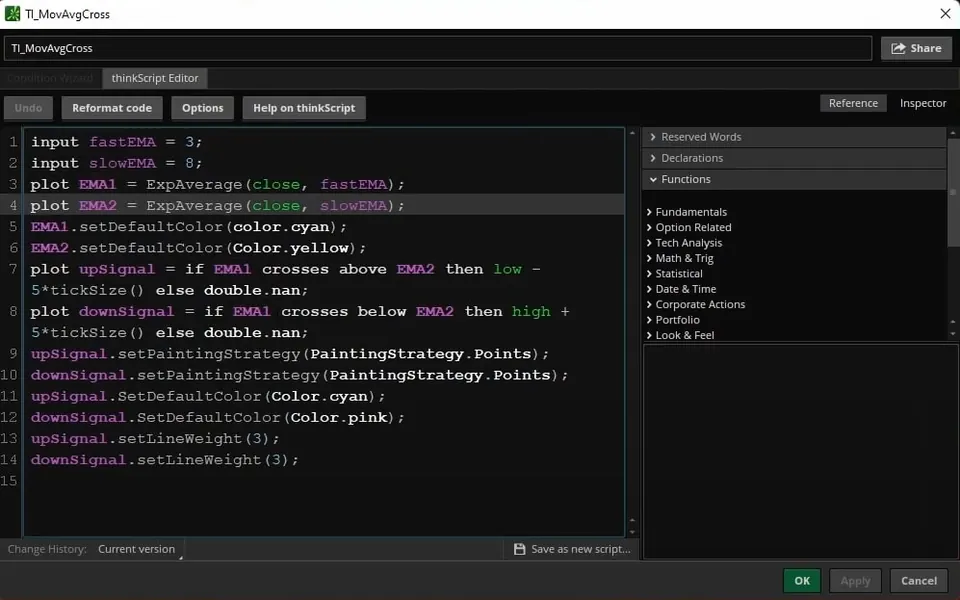
The Momentum Cross download plots the dots only, while the version I showed in the video also drew both EMAs as lines. The screenshot below shows that video version in the thinkScript editor.
| Part of the study | Video version | Download and Code tab |
|---|---|---|
| Name | TI_MovAvgCross (study name in the editor) | TI_MomentumCrossSTUDY.ts (download file) |
| EMA1 and EMA2 | Plotted as lines | Calculated with def, not drawn |
| EMA line colors | Cyan (3 EMA) and yellow (8 EMA) | Same two lines, commented out with # |
| Cross dots | Cyan below the low, pink above the high | Same |
To bring the lines back, change def to plot on the two EMA lines and delete the # in front of the two color lines. After the edit, those 4 lines of the Code tab read:
This step’s code is free with an account. Create one or sign in.
To hide the lines again without editing code, open the study's settings and turn off Show plot for each EMA, as I explain in the video. That keeps the chart clean and leaves the dots on.
The 4-Step Reversal Setup Behind the Signal
The Momentum Cross is the last of 4 steps in the short-term reversal setup I walk through in the video. The setup builds on the cup pattern from our V-Shaped Reversal course, and each step uses a different tool on the chart.
| Step | What I look for | Tool |
|---|---|---|
| 1. Context | The stock breaches the hourly and daily Volatility Box models and shows up on the Live Scanner's Overlap tab | Stock Volatility Box and its Live Scanner |
| 2. Stabilizing | Keltner Channel wedges plot on the way into the zone, then stop plotting | Keltner Channel Wedges |
| 3. Overbought or oversold | An Edge Signal arrow prints (green on a long setup) | Edge Signals |
| 4. Momentum | The 3 EMA crosses the 8 EMA in the direction of the bounce | Momentum Cross |
Step 1 is context. A breach of our Volatility Box models tells me price has stretched into a zone. From there I wait for price to stabilize and bounce away from the models.
Step 2 is the start of the V-shaped reversal. Keltner Channels are bands set a multiple of the average true range above and below a moving average. Our free Keltner Channel Wedges indicator prints a wedge while price is outside the 3.0 Keltner Channel. A run of wedges, 3 to 5 or more in a row, followed by bars with no wedge tells you price is trying to get back inside that band.
Step 3 is the overbought or oversold confirmation. In the video that's the green arrow from our members' Edge Signals indicator, which told me price was officially in oversold territory. If you don't have Edge Signals, ThinkOrSwim's built-in RSI study with its breakout signals turned on gives a similar read, with more signals and more noise.
Step 4 is the Momentum Cross. When the 3 EMA crosses above the 8 EMA after the first 3 steps, I expect momentum to shift and carry price away from the Volatility Box zone. Both examples in the video are long setups. For a short setup at the upper zones, the mirror trigger is a cross below, which prints the pink dot above the high.
Momentum Cross Examples: MasterCard and JPMorgan
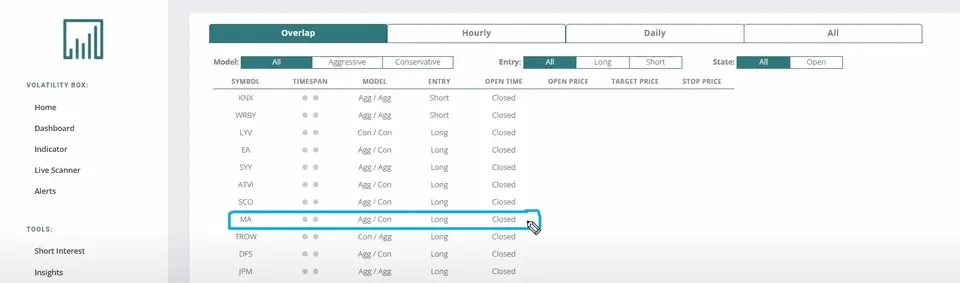
The Momentum Cross examples in the video are MasterCard (MA) and JPMorgan (JPM), two of the larger names on the Live Scanner's Overlap tab that day. Both had breached the hourly and daily models at the same time, and both are long setups.
MasterCard (MA)
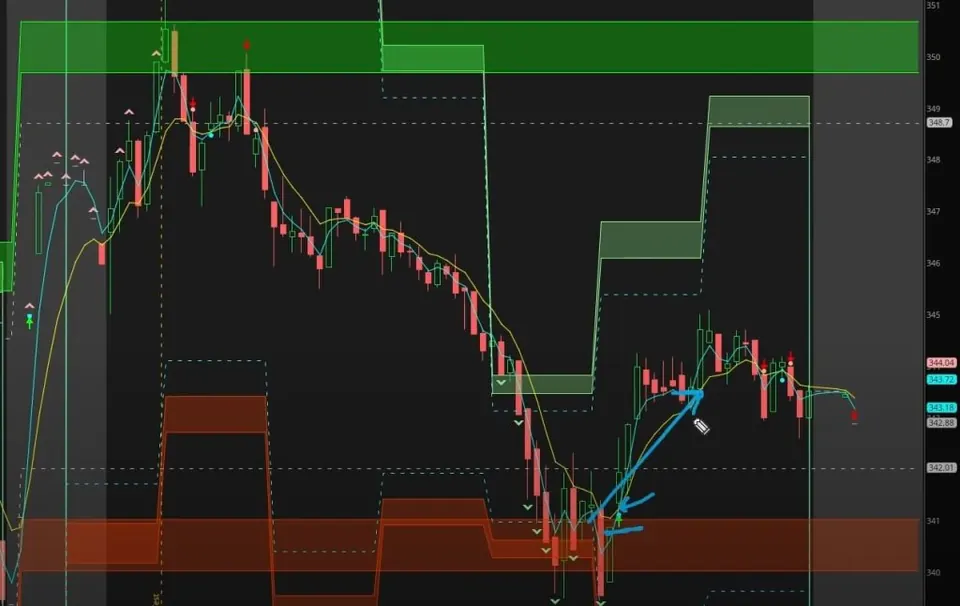
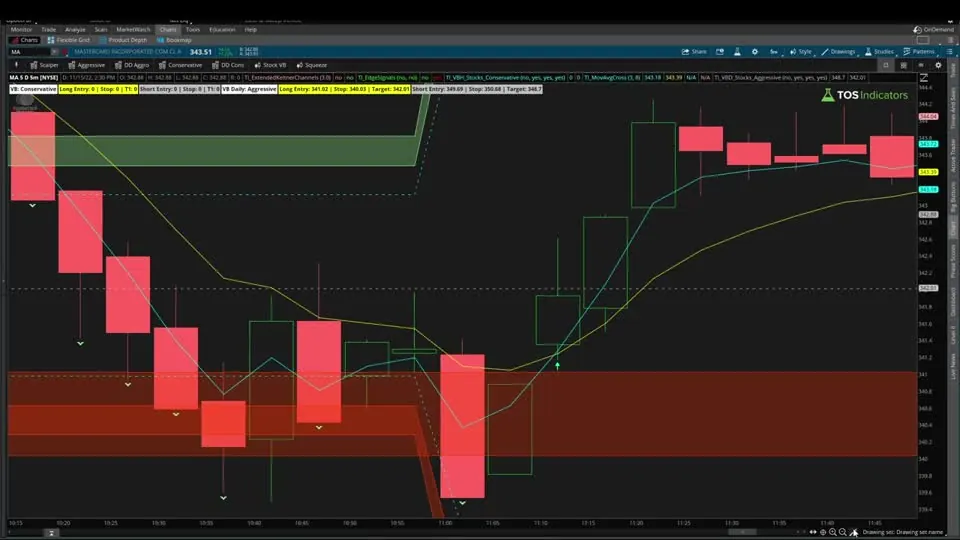
On the 5-minute chart, MA printed several Keltner Channel wedges on the way down, and then the wedges stopped. The Edge Signal printed its green arrow. On that same candle, the 3 EMA crossed above the 8 EMA and the Momentum Cross dot printed under the bar.
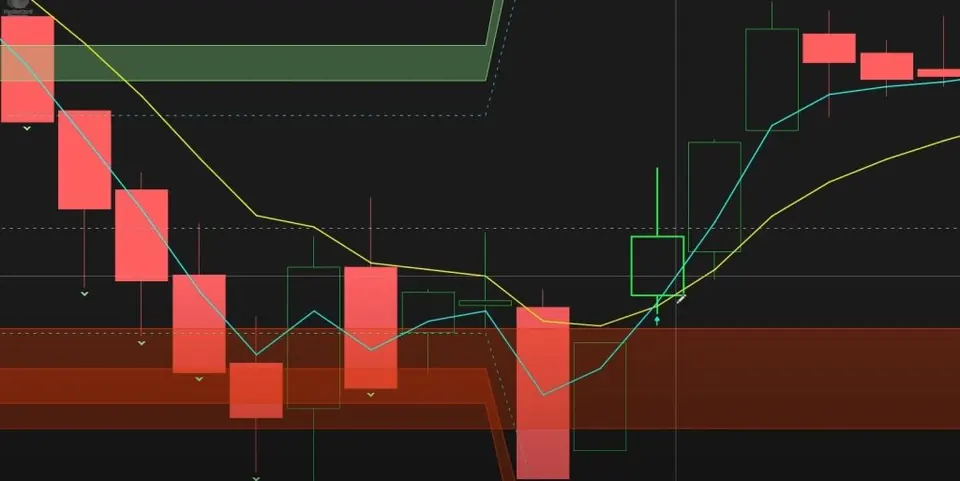
With all 4 steps in place, I was looking for momentum to carry MA away from the lower zone. In the video I point to the move that followed, with little heat against the trade.
JPMorgan (JPM)
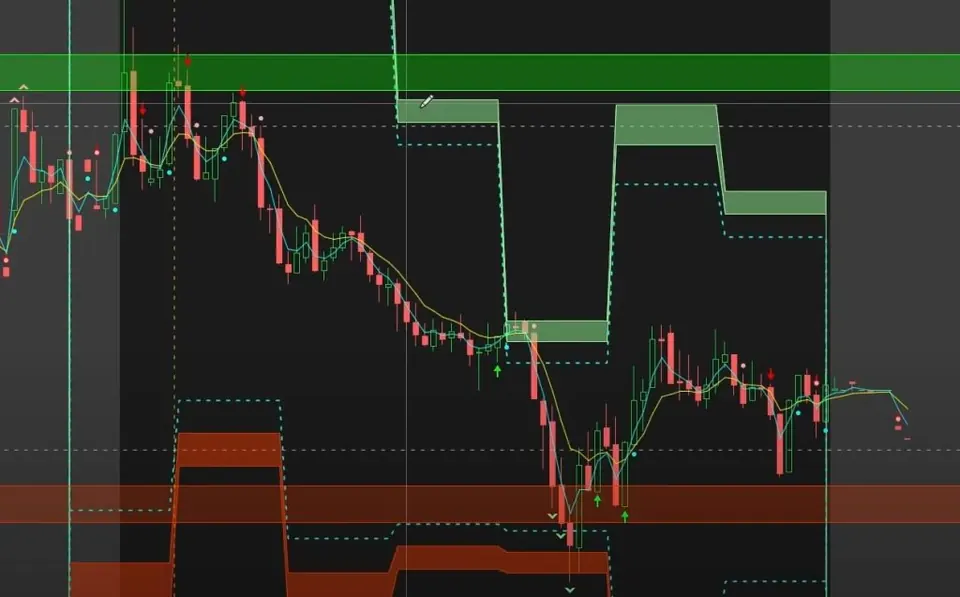
JPM followed the same 4 steps. It appeared on the Overlap tab with MasterCard, and on the chart it even touched the conservative Volatility Box models.
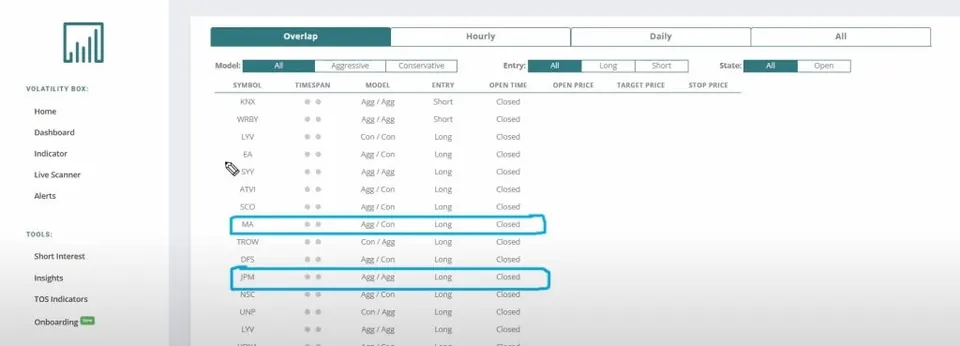
Keltner Channel wedges formed 3 times on the way down, then stopped. The Edge Signal confirmed oversold twice. Then the 3 EMA crossed above the 8 EMA, the sign that shorter-term momentum was changing, and JPM moved up and away from the zone from there.
Finding Momentum Cross Setups With the Live Scanner
The Live Scanner is the Stock Volatility Box members' tool where both Momentum Cross examples in the video started. It lists stocks that are breaching our Volatility Box models, and in the video I mention that it now updates in less than a second.
In the video I pull up the Overlap tab, which lists stocks breaching the hourly and daily models at the same time. MasterCard and JPMorgan were two of the larger names there that day. The Daily tab on its own had many more stocks and ETFs.
The scanner only supplies step 1. From its list I open each chart and wait for the wedges to stop, the Edge Signal arrow and then the Momentum Cross dot. The Live Scanner comes with a Stock Volatility Box membership and covers our hourly volatility models as well as the daily ones.
How I Use the Momentum Cross
The Momentum Cross comes last in the video's setup, after the breach, the wedges and the Edge Signal. On its own, a 3 and 8 EMA cross is a short-term read of momentum. The first 3 steps are what give the dot its context.
Before you take a trade on the dot, decide where your stop goes and size the position so a stop-out costs a small, fixed share of your account. A short-term cross can flip back a few bars later.
To test two EMAs crossing by themselves, our free Moving Average Crossover backtester gives P/L reports and trade recaps. Set its lengths to 3 and 8 to match this indicator. For more charts of the pattern, see our 3x8 EMA pattern for catching reversals. To place an order automatically on the cross, see automated trading with the Momentum Cross.
Customizing the Momentum Cross
The Momentum Cross code is short, so most changes come down to one number or one setting.
- Different lengths. Change
fastEMAandslowEMAin the study's settings. Longer lengths react more slowly, so the dots print less often. - Dot distance. Change the 5 in
5*tickSize()to move the dots closer to or farther from the bars. - Colors and size. Change the cyan and pink defaults in the study's settings, or edit
setLineWeight(3)for bigger or smaller dots. - No dots on screen. A dot prints only on the bar of a cross, so a quiet stretch may show none. Zoom out to find the last cross.
Momentum Cross on real charts
Drawn from real daily bars with the code on this page, through Oct 20, 2026. A cyan dot under the bar when the 3 EMA crosses above the 8, a pink dot over the bar when it crosses below. The video uses it intraday as the last of four steps; here it is on SPY's daily chart.
SPY since June
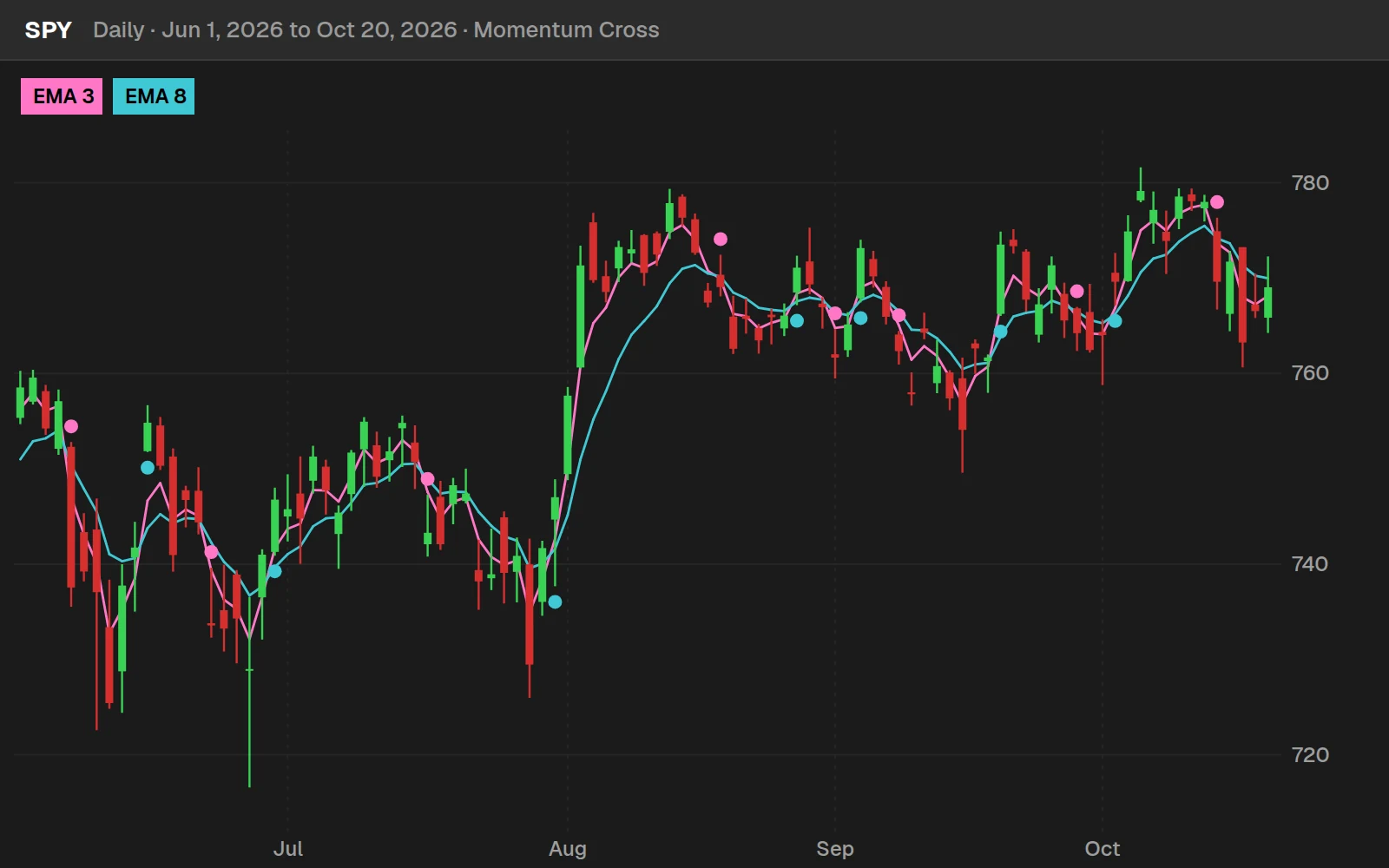
Between Jun 1, 2026 and Oct 20, 2026 the 3 EMA crossed above the 8 on SPY 7 times and below it 8 times. A fast pair of averages crosses often, which is why the setup in the video waits for three other conditions before the dot counts.
By the numbers
SPY daily, Jan 4, 2016 to Oct 20, 2026. On its own, a daily cyan dot on SPY was followed by a higher close 5 days later about as often as any day was. The dot is a trigger for a setup you already like, not a setup by itself.
Full thinkScript code
Create a free account or sign in to copy all 24 lines and download the file.
Download
Download the Momentum Cross indicator for ThinkOrSwim. The download is a .zip with one study file, TI_MomentumCrossSTUDY.ts, the same code as the Code tab on this page. It plots the 3/8 EMA cross dots only; the article shows the 4-line edit that turns on the EMA lines. If you haven't added a custom study before, here's how to import an indicator into your ThinkOrSwim platform.
Video: Simple Momentum Signal For Short-Term Reversals, built line by line
6 minutes on YouTube.
 Watch on YouTube
Questions
What is the Momentum Cross indicator?
The Momentum Cross is a free ThinkOrSwim study that marks each bar where the 3-period EMA crosses the 8-period EMA. A cyan dot below the bar marks a cross up and a pink dot above the bar marks a cross down. I use it as the momentum trigger at the end of a short-term reversal setup.
What do the cyan and pink dots mean on the Momentum Cross?
A cyan dot 5 ticks below the low means the 3 EMA crossed above the 8 EMA on that bar, a bullish shift in short-term momentum. A pink dot 5 ticks above the high means the 3 EMA crossed below the 8 EMA, a bearish shift. In the video I call them the blue dot and the red dot.
How do I add the Momentum Cross indicator to ThinkOrSwim?
Download the zip, which holds one file, TI_MomentumCrossSTUDY.ts, and import it from the Edit studies window. You can also click Create in Edit studies, paste the code from the Code tab on this page and click OK. Then add the study to any chart. In the MasterCard example I used a 5-minute chart.
Can I change the 3 and 8 EMA lengths?
Yes. Both lengths are inputs, fastEMA = 3 and slowEMA = 8, so you can change them in the study's settings without editing the code. Shorter lengths react to price sooner and longer lengths react later. I used 3 and 8 in both examples in the video.
Why doesn't the Momentum Cross show the EMA lines?
The download calculates both EMAs with def, which doesn't draw anything, and the two color lines are commented out. To see the lines, change def to plot on the EMA1 and EMA2 lines and remove the # from the two setDefaultColor lines. The 3 EMA then plots in cyan and the 8 EMA in yellow, as in the video.
How do I use a 3 and 8 EMA cross for short-term reversals?
Use it last. In the video, the stock first breaches the hourly and daily Volatility Box models, then Keltner Channel wedges plot and stop, then an Edge Signal arrow confirms oversold. The 3 EMA crossing above the 8 EMA is the final trigger that momentum is shifting away from the zone. Decide your stop before you enter.
What does the Overlap tab on the Live Scanner show?
The Overlap tab lists stocks that are breaching the hourly Stock Volatility Box models and the daily models at the same time. It's the tab I use in the video, and MasterCard and JPMorgan, the two examples, both came from it. The Daily tab lists many more stocks and ETFs. The Live Scanner comes with a Stock Volatility Box membership.
Can I backtest a 3 and 8 EMA crossover in ThinkOrSwim?
Yes. Our free Moving Average Crossover backtester tests one moving average crossing another and gives P/L reports and trade recaps in ThinkOrSwim. It uses exponential averages by default, so set its lengths to 3 and 8 to match the Momentum Cross. It tests the cross on its own, without the Volatility Box context from the video.
Goes with
Related tools
 Automated trading: Momentum Cross
 Price to Book Value Calculator
 Multiple Time Frame Moving Averages
 Bollinger Bands Reversal
 Super Bowl Indicator
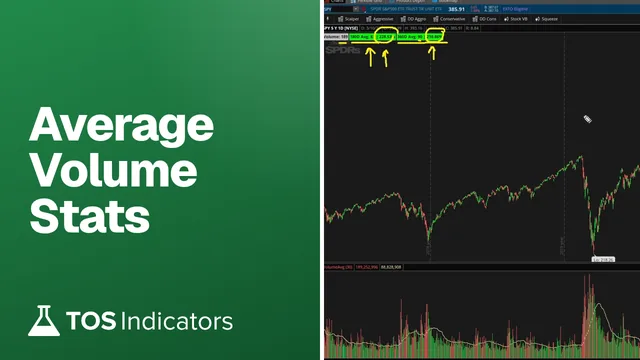 Average Volume Stats
Get each new indicator by email
One email on Sundays with the week's new tool and its code. A free account also unlocks every .txt download.
No credit card. Unsubscribe anytime.