
 Fair Value Gap
 False Breakout Scanner
 Heiken Ashi Trend
 Stock Volatility Box
 Futures Volatility Box
 ORB Setups
 Squeeze Setups
On this page
Overview
Introduction
Identifying relative strength during market turbulence helps traders spot resilient opportunities. This tutorial demonstrates how to use ThinkOrSwim's scan tab to find S&P 500 constituents making 52-week highs. The method combines price filters, volume thresholds, and proprietary squeeze indicators for actionable insights.
The Triple Squeeze Dashboard highlights stocks showing momentum compression before breakouts. By overlaying volatility analysis on new highs, traders gain an edge in anticipating directional moves. This approach filters noise while focusing on technically significant setups.
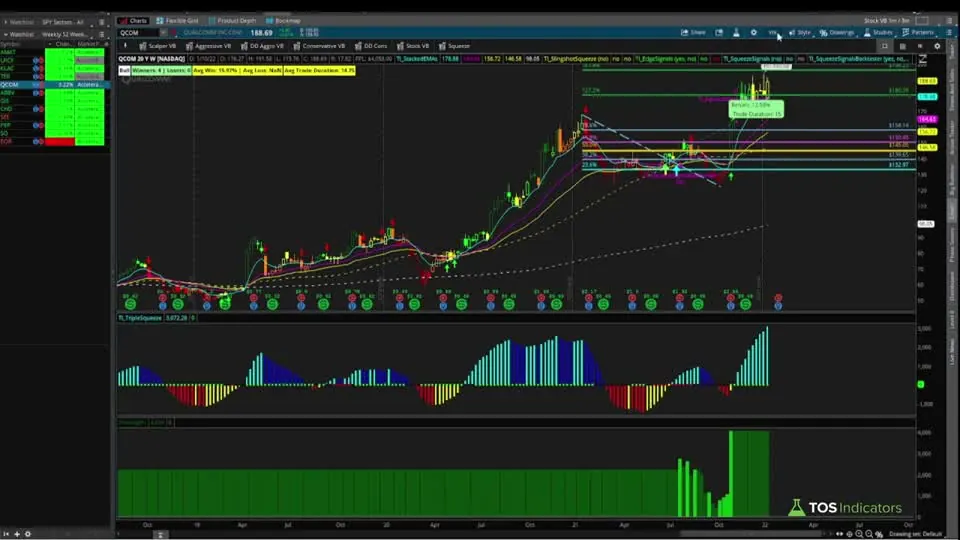
Qualcomm (QCOM) and Applied Materials (AMAT) serve as prime examples from the current scan results. The system identifies stocks outperforming peers during broad market selloffs. Traders receive specific entry triggers and profit targets through integrated backtesting tools.
Understanding the 52-Week High Scan
New 52-week highs indicate stocks demonstrating exceptional relative strength. The scan filters S&P 500 constituents with prices above $10 and daily volume exceeding 500,000 shares. These criteria ensure liquidity and eliminate penny stock volatility.
The custom study uses weekly aggregation to confirm genuine breakout momentum. Code compares current closing prices to the highest weekly close over 52 weeks. This method avoids false signals from intra-week spikes.
Recent scans revealed 78 qualifying stocks during January 2022's market decline. Names like PepsiCo (PEP) and General Mills (GIS) showed defensive sector leadership. Technology stocks like QCOM stood out despite Nasdaq weakness.
Key Components and Settings
The scan combines three core elements: index membership, liquidity filters, and technical conditions. S&P 500 focus ensures institutional interest while $10+ prices filter micro-caps. Volume thresholds eliminate illiquid candidates.
Custom code uses "plot signal = close >= Highest(close,52) weekly" logic. Weekly aggregation prevents false daily breakouts. Users can adjust length to 26 weeks for medium-term scans.
The Triple Squeeze Dashboard adds volatility analysis through histogram and dot systems. Red dots indicate active squeezes, while gray shows developing setups. QCOM displayed 26 red dots before its February breakout.
Step-by-Step Implementation
Open Scan Tab and select Stock Hacker. Set universe to SPX components using "Ticker" filter. Add price filter: Last >= 10 and Volume >= 500000.
Click Add Study > Custom and paste 52-week high code. Verify weekly aggregation period in study settings. Run scan and sort results by sector or market cap.
Add Triple Squeeze Dashboard via shared link from Volatility Box membership. Color-code watchlists by squeeze status. Prioritize stocks with 20+ consecutive dots for high-probability setups.
Trading Strategies
Combine 52-week highs with squeeze breakouts using the histogram cross above zero. QCOM's February setup showed 3.2% average gains in five days historically. Set profit targets using Fibonacci extensions from recent swings.
Apply Materials (AMAT) hit its daily target at +11.99% before approaching weekly targets. Use volatility-adjusted stops below consolidation ranges. Manage earnings risk by closing positions before reports.
Backtest signals using the Squeeze Signals Back Tester for historical performance metrics. Three QCOM trades since 2017 yielded 100% win rate. Compare weekly vs daily timeframes for confirmation.
Advanced Techniques
Layer volume profile to identify high-volume nodes near breakout levels. Compare institutional ownership changes using ThinkOrSwim's fundamentals tab. Track insider buying through SEC filings integration.
Use MarketWatch tables to monitor sector distribution of results. Energy stocks may dominate during oil rallies, while tech leads in growth environments. Adjust scans seasonally using sector rotation analysis.
Create custom alerts when squeeze dots change color. Set price alerts at Fibonacci 127.2% and 161.8% levels. Sync with mobile app for real-time notifications.
Common Pitfalls to Avoid
Don't ignore earnings calendars - QCOM's February 2nd report created event risk. Avoid trading breakouts without volume confirmation. False moves often show declining volume.
Weekly timeframes showed QCOM approaching Fibonacci exhaustion at 196.23. Daily charts suggested upside, creating divergence. Always cross-verify multiple timeframes.
Don't overtrade - the scan produced 78 stocks, but only 12 had active squeezes. Use secondary filters like RSI under 70 to avoid overbought conditions.
Best Practices
Update scans weekly every Friday at market close. Track results in custom watchlists with color-coded squeeze status. Document trades including entry rationale and outcome.
Combine with SPY analysis for market context. Avoid long setups when SPY trades below 200-day MA. Use sector ETF correlations for additional confirmation.
Review backtest reports quarterly. Compare actual performance to historical averages. Adjust profit targets based on changing market volatility.
The scan on real data
Drawn from real daily bars with the rule this page describes, through Oct 20, 2026. The scan in the write-up: weekly bars, the close at or above the highest weekly close of the last 52 weeks, a last price of $10 or more and daily volume of 500,000 shares or more. The video limits it to S&P 500 members; I ran it on our list of 644 stocks and ETFs, which has no index-membership data.
The scan on Oct 20, 2026
With the week of Oct 19, 2026 two sessions old, 30 symbols passed. By dollar volume the biggest were MRNA, LLY, BRK.B, V, XLV, MA, HLT, ABBV, CVX, PFE, GILD, ELV, and more. The weekly bar is still forming, so a name can drop off by Friday's close.
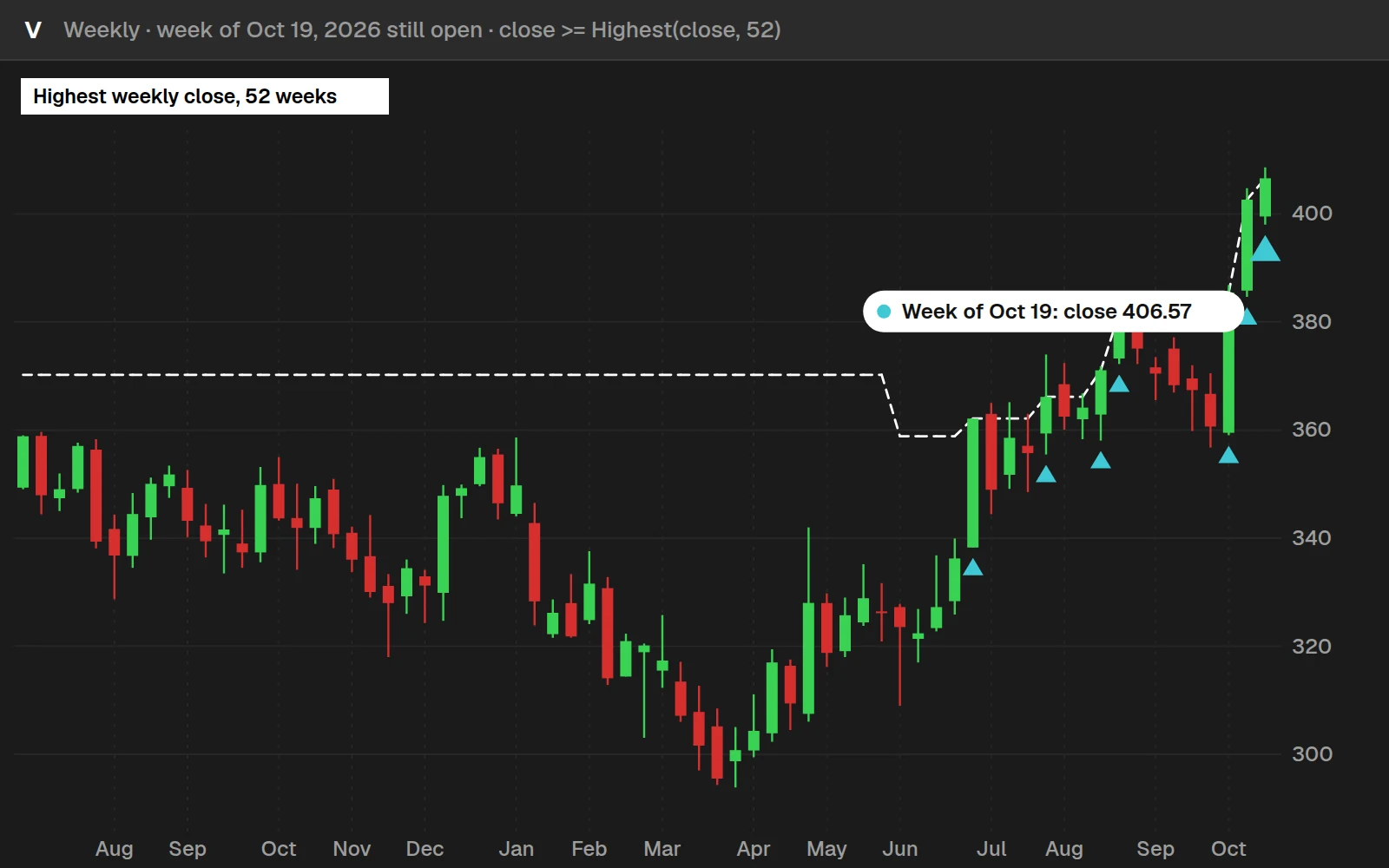
V printed 7 scan weeks in this window. A stock at a 52-week high usually stays near it for a while, so the same names come back week after week.
By the numbers
Weekly bars from Nov 7, 2016 to Oct 20, 2026, same symbols for both numbers. The 14 ETFs go back to 2016; most stocks only have a full 52 weeks from mid-2025.
Full thinkScript code
Create a free account or sign in to copy all 22 lines and download the file.
Download
Download the Which Stocks Made a New 52-Week High This Week? Indicator for ThinkOrSwim. The download contains a STUDY.ts file, which you can directly import into your ThinkOrSwim platform.
Video: Which Stocks Made a New 52-Week High This Week?, built line by line
7 minutes on YouTube.
 Watch on YouTube
Questions
How do I edit the 52-week high scanner for different timeframes?
Modify the '52' in Highest(close,52) to desired weeks. Change aggregation period in study settings - daily for short-term, monthly for long-term scans.
What's the optimal number of squeeze dots for trade entry?
Look for 20+ consecutive dots. QCOM had 26 red dots pre-breakout. Gray dots indicate developing squeezes needing confirmation.
Can I automate alerts for new 52-week high scan results?
Yes. Right-click scan results > Create Alert. Choose visual/sound alerts or email notifications through ThinkOrSwim platform settings.
How to handle earnings events when trading these signals?
Close positions 1-2 days before earnings. Use ThinkOrSwim's Earnings Calendar under Analyze tab to check dates for stocks like QCOM.
What's the difference between red and gray squeeze dots?
Red dots mark active squeezes with closed volatility bands. Gray dots show developing squeezes where bands haven't fully compressed yet.
Related tools
 How to Scan for Stocks That Hit YTD High on Dec. 31?thinkScript tutorial · Free
 High Short Interest Near 52 Week HighsScan · Free
 How to Track Percent Change From OpenthinkScript tutorial · Free
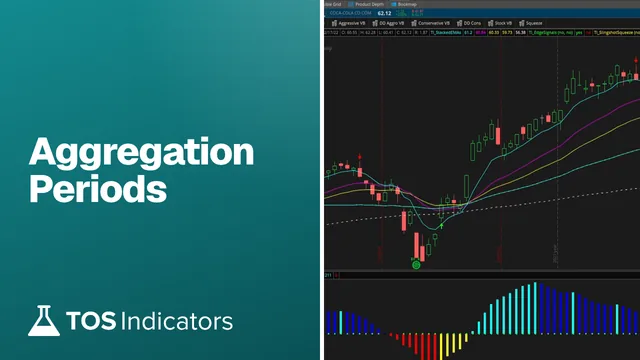 Aggregation Periods - How to Plot Larger Time Frame Indicators on Smaller Time FramesthinkScript tutorial · Free
 How to Fix Bugs in thinkScript CodethinkScript tutorial · Free
 How to Set Custom Hours in thinkScriptthinkScript tutorial · Free
Get each new indicator by email
One email on Sundays with the week's new tool and its code. A free account also unlocks every .txt download.
No credit card. Unsubscribe anytime.