
 Fair Value Gap
 False Breakout Scanner
 Heiken Ashi Trend
 Stock Volatility Box
 Futures Volatility Box
 ORB Setups
 Squeeze Setups
On this page
Overview
In this tutorial I show you how to turn a candlestick pattern into thinkScript code in ThinkOrSwim. The pattern is a two-candle reversal: a strong candle in the direction of the trend, then a candle that gaps the other way and closes past the first candle's extreme. We go from a visual observation to arrows on the chart in about 10 minutes.
The point of the lesson is the process, which works for any pattern you think you see. Once a pattern is code, you can test it across time frames and symbols, turn it into a scan, or build a backtester around it. It's a beginner-friendly lesson.
Key Takeaways
- Turning a candlestick pattern into thinkScript code starts with a plain-English checklist of what you see, split into rules for the current candle and rules for the previous candle.
- The bullish pattern in the video has 5 rules: the previous candle is red and closed in the bottom 1/6 of its range, and the current candle is green, opens above the previous close and closes above the previous high.
- "Closed near its low" becomes code by taking the previous candle's range (high minus low), dividing it by 6, and requiring the close to be at or below the low plus that sixth.
- The bearish side mirrors every rule. In the video, ChatGPT wrote the first draft of it, and I checked each condition by hand before using it.
- Both arrows are yellow on purpose, so the color doesn't bias you while you judge whether the pattern works.
Why Turn a Candlestick Pattern Into Code?
A candlestick pattern in code is something you can test instead of something you think you see. Once it's code, the same pattern becomes an indicator that marks every match, a scan that finds it across many symbols, and the entry condition for a backtester.
The real benefit is checking your eyes. Many of us have found candlestick patterns we think are very likely to work. Code lets you switch time frames and symbols in seconds and see if the pattern holds up or if your eyes are playing tricks on you.
This lesson is about the translation process. For a shorter build of a single custom pattern, including how to measure candle wicks and test with a 0/1 line, see our custom candlestick patterns tutorial.
The Pattern: A Strong Candle, Then a Gap Reversal
The pattern in this video is a two-candle reversal. I start with the bullish version. The previous candle is a strong bearish candle, in the direction of the trend that came before it. Then the current candle reverses that move with a gap and a strong close.
Here is what I pull out of the chart before writing any code:
- The previous candle closed below where it opened, so it's red.
- The previous candle closed near its lows. That's what makes it a strong bearish candle.
- The current candle opened above where the previous candle closed, so there's a small gap.
- The current candle closed above the previous candle's high, which tells us price is now moving in the bullish direction.
- The current candle, the reversal candle, should be in the direction of the new trend: green for a bullish reversal.
Step 1: Write the Rules as a Checklist
The checklist comes before any code. Open a new study (the Studies icon, then Create), delete the starter code, and type the rules as comments first, split into the current candle and the previous candle:
This step’s code is free with an account. Create one or sign in.
Splitting by candle keeps each variable small. Every rule on the current candle uses today's prices, and every rule on the previous candle uses prices with [1] after them, which means "one bar ago". Each rule is one comparison in code, as this table shows:
| Candle | Rule | thinkScript |
|---|---|---|
| Current | Green candle | close > open |
| Current | Closes above the previous high | close > high[1] |
| Current | Opens above the previous close (gap) | open > close[1] |
| Previous | Red candle | close[1] < open[1] |
| Previous | Closes in the bottom 1/6 of its range | close[1] <= low[1] + previousCandleRange / 6 |
Step 2: Translate Each Rule Into thinkScript
Each rule in the checklist becomes one comparison, and the comparisons for one candle are joined with and. Most rules are a word-for-word translation. One rule, "closed near its low", needs a way to measure it.
The Current Candle
This step’s code is free with an account. Create one or sign in.
The 3 checks read the way the checklist does: green, close above the previous candle's high, and open above the previous candle's close. In the video I copy parts of the checklist straight into the condition, since they're already written the way ThinkOrSwim reads them.
The Previous Candle and "Closed Near Its Low"
"Near its low" needs a measurement, and in the video I use a workaround for it. Take the previous candle's whole range and divide it into 6 equal chunks. A strong bearish candle should close in the bottom chunk:
This step’s code is free with an account. Create one or sign in.
previousCandleRange is the previous high minus the previous low. In the video I multiply it by 1/6, which is the same as dividing by 6. The close then has to be at or below the low plus one sixth of the range. For example, a candle with a $100 low and a $106 high has a $6 range, so it has to close at or below $101.
Step 3: Plot the Bullish Signal
The bullish signal is true only when both candle conditions are true. The signal is a Boolean, returning only 1 or 0, so the Boolean arrow painting strategy can mark it directly:
This step’s code is free with an account. Create one or sign in.
After applying, the arrows plotted where I expected, along with a few more. I checked those extra matches against the rules, and the code was capturing the gap-up pattern fairly well, so I kept it as it was. Then I made the arrows bigger with a line weight and set the color to yellow. The video doesn't say which line weight; 5 is what we use in the custom candlestick patterns study.
Step 4: Write the Bearish Side
The bearish version of the pattern mirrors every rule. Before writing it, I added "bull" to each bullish variable name (bullPreviousCandleRange, bullPreviousCandleCondition) so the two sides can live in one study without clashing.
For the first draft, I used ChatGPT. I pasted in the bullish code and asked it to write the bearish side. All I wanted was a starting point that saves typing.
Then I read every line myself, because the job of catching its mistakes is still yours. These are the checks the bearish code has to pass:
| Rule | Bullish | Bearish |
|---|---|---|
| Current candle color | Green: close > open | Red: close < open |
| Close past the previous candle | Above its high: close > high[1] | Below its low: close < low[1] |
| Gap at the open | Above its close: open > close[1] | Below its close: open < close[1] |
| Previous candle color | Red: close[1] < open[1] | Green: close[1] > open[1] |
| Previous close | Bottom 1/6 of its range | Top 1/6 of its range |
| Arrow | BOOLEAN_ARROW_UP, yellow | BOOLEAN_ARROW_DOWN, yellow |
The bearish code below is rebuilt from the conditions I read out on camera while checking ChatGPT's draft, so its variable names may differ from the ones on screen. Each check matches the table: the range is the same, and the close test subtracts one sixth from the high instead of adding it to the low.
This step’s code is free with an account. Create one or sign in.
ChatGPT gave its arrow a red color, and I changed it to yellow to match the bullish side.
Why Both Arrows Are Yellow
Yellow arrows on both sides are a deliberate choice for a candlestick pattern study. Green and red arrows nudge you to read every match as bullish or bearish before you've judged it, and I wanted no bias. While you're still testing whether a pattern works, the arrows should only mark where it occurs, and one neutral color does that.
How to Test Whether the Pattern Works
A pattern in code is ready to test the moment it plots. Switch the chart's time frame and the arrows recalculate. Type in a different symbol and you see every match on that chart too. That's how you find out whether the pattern works consistently or only looked good on the chart where you first spotted it.
The next step is to turn the code into a scan that finds the pattern when it occurs. Our increasing volume scan tutorial shows how custom thinkScript goes into a scan filter. To count the matches on a chart, wrap a signal in TotalSum and print the total in a label, as in our AddLabel tutorial.
A backtester takes more work. You'd need to add entry and exit rules that define the strategy, and then ThinkOrSwim can test whether the strategy is a good one or a bad one. Our moving average crossover backtester is an example of a strategy built that way, and the backtesters page has more.
How I Use a Coded Pattern
An arrow from this study marks a pattern, and the pattern still has to prove itself. Until you've tested it with entry and exit rules, treat each arrow as a chart to review. When you do trade one, decide the stop first and size the position so a stop-out costs a small, fixed share of your account.
The process in this video is manual: observations, code, then manual backtesting. To act on a candle condition automatically once you trust it, see our candlestick automated trading example. More lessons like this one are on the thinkScript tutorials page.
The pattern on real charts
Drawn from real daily bars with the code on this page, through Oct 20, 2026. The code's two patterns. Bullish: a red candle that closed in the bottom sixth of its range, then a green candle that opens above that close and closes above that candle's high. Bearish: the mirror image. Both arrows are yellow in the code, as here.
XLP, Oct 8, 2026: the bullish pattern
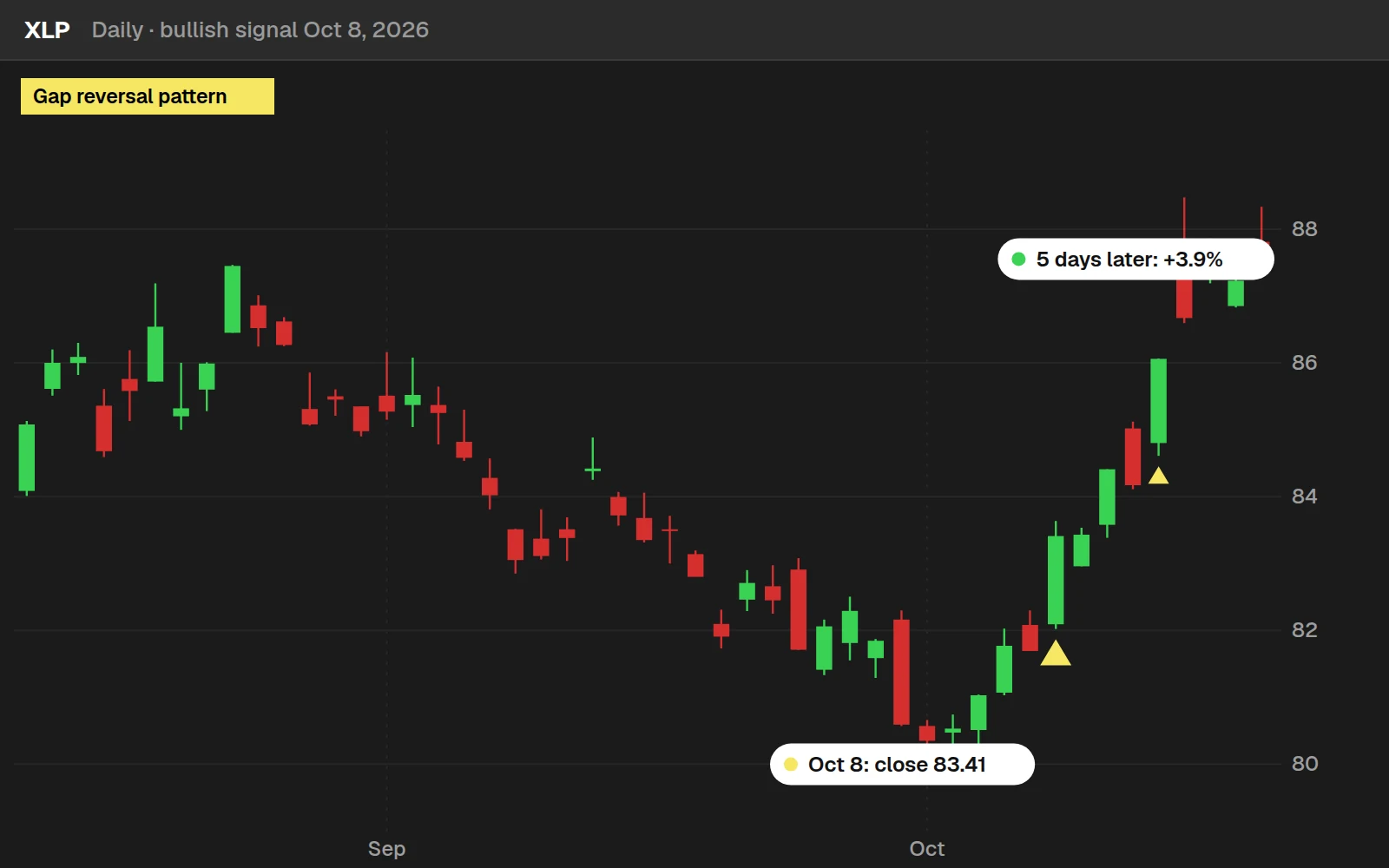
XLP closed at $83.41 on the signal and $86.67 5 trading days later, +3.9%. This is the most recent bullish signal on a well-known name that moved the way the pattern points. Most signals are less tidy: see the numbers below.
XLK, Oct 8, 2026: the bearish pattern
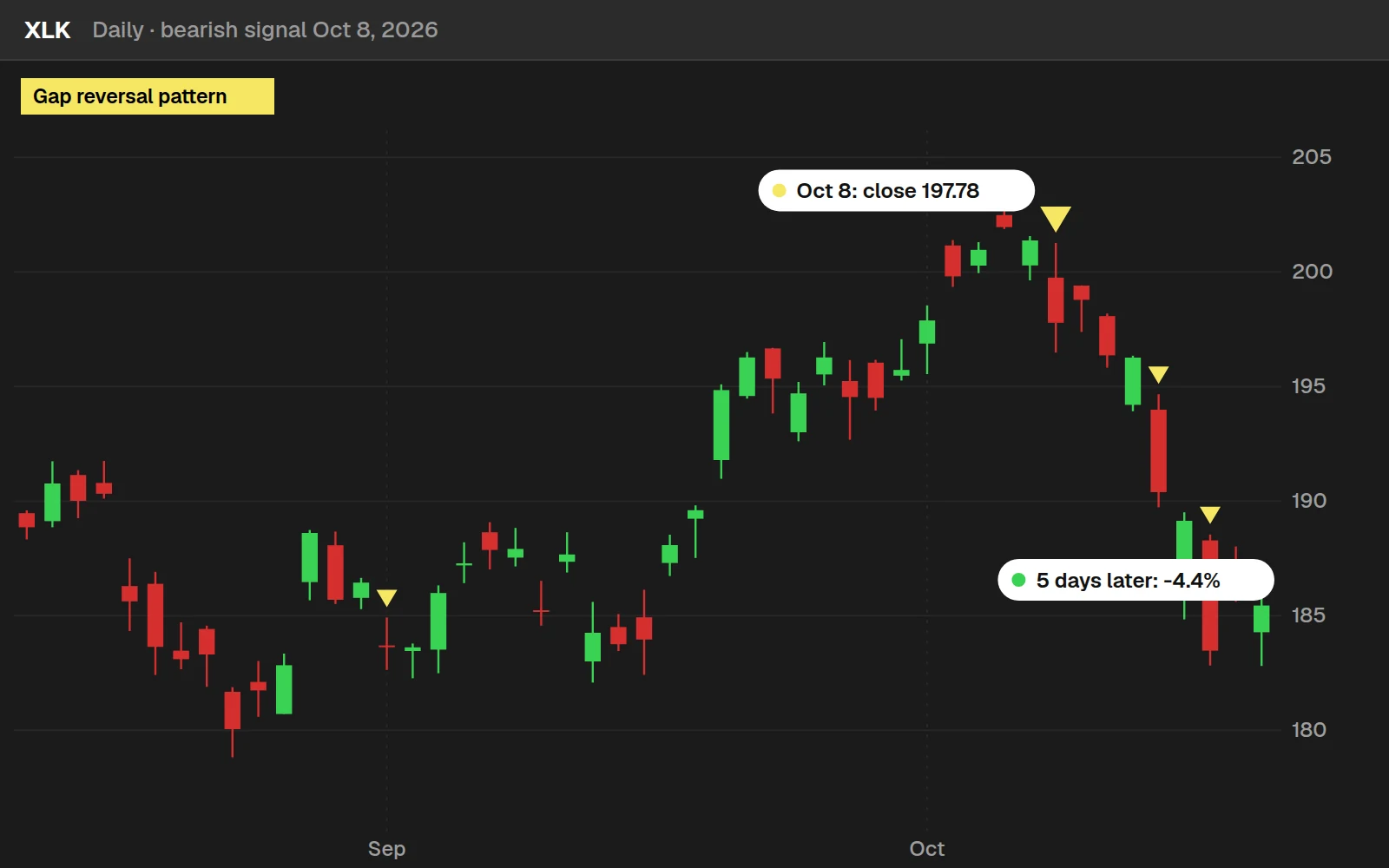
XLK closed at $197.78 on the signal and $189.14 5 trading days later, -4.4%. This is the most recent bearish signal on a well-known name that moved the way the pattern points. Most signals are less tidy: see the numbers below.
By the numbers
Every daily bar of our 648 stocks and ETFs from Nov 9, 2015 to Oct 20, 2026: the 14 ETFs from November 2015, most stocks from July 2024. "Any day" is every day in the same symbols. A pattern that does no better than that needs context from somewhere else on the chart.
Full thinkScript code
Create a free account or sign in to copy all 31 lines and download the file.
Download
Download How to Turn Candlestick Patterns into Code for ThinkOrSwim.
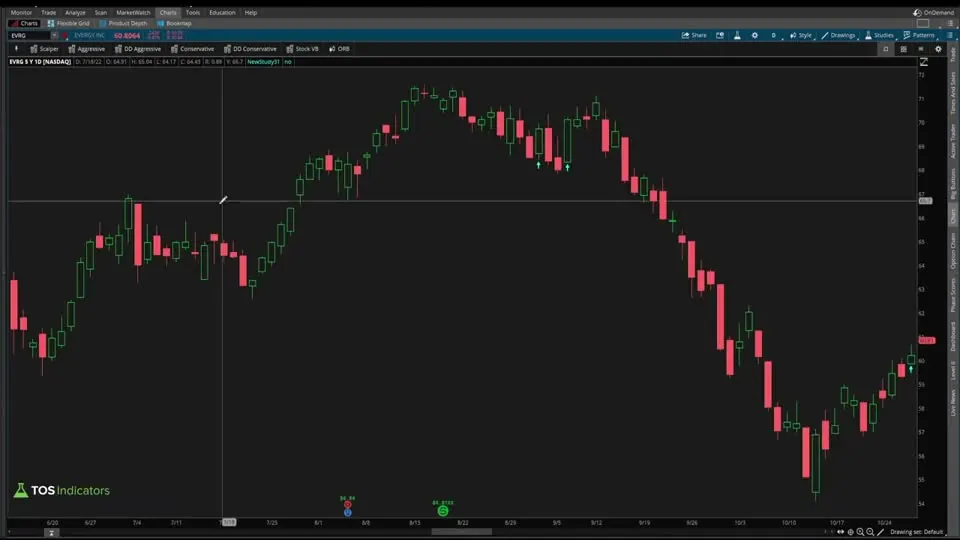
Video: How to Turn Candlestick Patterns into Code, built line by line
12 minutes on YouTube.
 Watch on YouTube
Questions
How do I turn a candlestick pattern into code in ThinkOrSwim?
Write down what you see as a checklist, split into rules for the current candle and the previous candle. Turn each rule into a comparison such as close > high[1], join one candle's rules with and, then plot the combined signal with PaintingStrategy.BOOLEAN_ARROW_UP so every match gets an arrow.
How do I check if a candle closed near its low in thinkScript?
Measure the candle's range as high minus low, divide it by 6, and require the close to be at or below the low plus that sixth. For the previous candle: def previousCandleRange = high[1] - low[1]; then require close[1] to be at or below low[1] + previousCandleRange / 6. That puts the close in the bottom 1/6 of the candle.
How do I code a gap up between two candles?
Compare the current open with the previous close: open > close[1]. That is the gap rule in this video. It checks that the current candle opened above where the previous candle closed. For a gap down, flip it to open below close[1], written in the code with the less-than sign.
What does [1] mean in thinkScript?
The number in brackets looks back that many bars. close[1] is the previous candle's close, high[1] is its high and low[1] its low. Prices without brackets belong to the current candle, which is why splitting a pattern into current-candle and previous-candle rules makes the code easy to write.
Can ChatGPT write thinkScript code?
It can give you a starting point. In the video, I pasted the bullish code into ChatGPT and asked it to write the bearish side. It saved typing, but I still checked every condition by hand: red candle, close below the previous low, open below the previous close, and a green previous candle.
Why are both arrows yellow in this study?
Yellow keeps the arrows neutral. Green and red would suggest bullish or bearish outcomes before you have tested the pattern. While you are judging whether it works, the arrows only need to mark where the pattern occurs, so both the bullish and bearish arrows use Color.YELLOW.
Can I turn this candlestick pattern into a scan or backtester?
Yes. The signal is one true/false variable, so it can drive a scan that finds the pattern across symbols. A backtester needs more: entry and exit rules that define the strategy. With those, ThinkOrSwim can test whether the strategy built on the pattern is a good one or a bad one.
How is this different from the custom candlestick patterns tutorial?
This lesson is about translating a pattern's rules into code, with a two-candle gap reversal, a bottom-1/6 close test and bullish and bearish sides. The custom candlestick patterns lesson builds a single bullish reversal candle and focuses on measuring wicks and testing each condition on a 0/1 line.
Related tools
 Automated trading: Candlestick ExampleAutomated trading · Free account
 Candle CounterIndicator · Free
 Custom Candlestick PatternsthinkScript tutorial · Free
 Automated trading: "Buy the Dip" ScriptthinkScript tutorial · Free
 Create a TTM Squeeze Watchlist in SecondsthinkScript tutorial · Free account
 Automated trading: Entering a Squeeze On a PullbackthinkScript tutorial · Members
Get each new indicator by email
One email on Sundays with the week's new tool and its code. A free account also unlocks every .txt download.
No credit card. Unsubscribe anytime.