
 Fair Value Gap
 False Breakout Scanner
 Heiken Ashi Trend
 Stock Volatility Box
 Futures Volatility Box
 ORB Setups
 Squeeze Setups
On this page
Overview
In this tutorial I build two average true range scans in ThinkOrSwim. The first finds stocks whose ATR is above its own 50-bar average. The second uses ATR to find stocks in a tight 10-bar range near the 50-period simple moving average while their moving averages still slope up.
The first scan shows how to reference ATR in a custom scan filter. The second, which I think is the more useful one, uses ATR as one piece of a bigger scan. Both are free as ThinkOrSwim shared links, for traders who want a short list of compressing stocks to study.
Key Takeaways
- ThinkOrSwim's built-in ATR study uses a 14-bar length and Wilder's average by default.
ATR()pulls it into a scan in one line, andATR(20, AverageType.EXPONENTIAL)changes both settings. - Scan 1 flags stocks whose current ATR is above its 50-bar average. On daily bars in the video, it returned 246 of 6,123 stocks, with Nvidia at the top.
- Scan 2 calls a 10-bar range compressed when the highest high minus the lowest low is no more than 2 times the ATR. That condition alone returned 25 stocks in the video.
- Adding 8 EMA above 34 EMA above 50 SMA cut the list to 7. Requiring the close within 5% of the 50 SMA cut it to 4: Micron Technology, T-Mobile, Roku and Antero Midstream.
- In the video, both scans ran with 2 stock filters: a price of at least $10 and average volume above 2 million shares. The download is a .txt file with 2 ThinkOrSwim shared links.
What Is Average True Range?
Average true range (ATR) measures how far price moves per bar, in dollars and cents, without regard to direction. J. Welles Wilder Jr. introduced it in 1978 in his book New Concepts in Technical Trading Systems.
True range is the largest of 3 distances: the bar's high minus its low, the distance from the high to the previous close, and the distance from the low to the previous close. Using the previous close counts a gap as movement. ATR is a moving average of true range.
ThinkOrSwim's ATR study averages true range over 14 bars with Wilder's smoothing unless you change it. A rising ATR means the bars are getting wider, and a falling ATR means the stock is quieting down. Scan 1 builds on that: it looks for ATR above its own 50-bar average.
The Two ATR Scans at a Glance
The two average true range scans use ATR in different ways. Scan 1 is the simpler one: it compares ATR with its own history. Scan 2 uses ATR as a yardstick for a tight range and adds moving average filters.
| Scan 1: High ATR | Scan 2: Compressing near the 50 SMA | |
|---|---|---|
| Main condition | ATR above its 50-bar average | 10-bar range no wider than 2 ATRs |
| Other conditions | None | 8 EMA above 34 EMA above 50 SMA, close within 5% of the 50 SMA |
| Aggregation in the video | Daily | Daily |
| Results in the video | 246 stocks, Nvidia at the top | 4 stocks: Micron Technology, T-Mobile, Roku, Antero Midstream |
| What it teaches | Referencing ATR directly | ATR as one piece of a larger scan |
How to Set Up an ATR Scan in ThinkOrSwim
The ATR scans start from 2 liquidity filters and one custom study filter. These are the steps from the video:
- Open the Scan tab and add a Stock filter for a minimum price of $10.
- Add a second Stock filter for average volume above 2 million shares. I started at 1 million and raised it to 2 million to stay clear of ThinkOrSwim's execution timeout error.
- Add a Study filter, choose Custom, open the thinkScript Editor tab and delete the code inside.
- Type in the scan code, keep the aggregation on daily bars, click OK and run the scan.
I wrote the code snippets on this page out from the video. The shared links in the download are the original scans.
Two Ways to Reference ATR in a Scan
ThinkOrSwim lets you reference ATR in a scan in one line or by copying the study's code. The one-liner is the shortcut:
This step’s code is free with an account. Create one or sign in.
With empty parentheses, ATR uses its defaults: a length of 14 and Wilder's average. To change them, put the values inside. ATR(20) uses a 20-bar length, and ATR(20, AverageType.EXPONENTIAL) uses a 20-bar exponential average instead of Wilder's.
The longer way is to open the ATR study from a chart, view its code, and paste its first 3 lines into the scan. Both give you the ATR. I prefer the one-liner because it's faster, and I kept the defaults for both scans.
Scan 1: Stocks With ATR Above Its 50-Bar Average
The high ATR scan compares the current bar's ATR with the mean of the last 50 ATR values. On daily bars, that's the last 50 days.
This step’s code is free with an account. Create one or sign in.
Average is ThinkOrSwim's basic mean. The plot is true when ATR is above that average, which means the stock's bars have been wider than usual lately.
Out of 6,123 stocks, the scan left 246, with Nvidia at the top. To check the results, I plotted the same code as a lower study on the chart, with ATR and its average as two lines. On Nvidia and on Ford, the current bar's ATR was above its average, as the scan said.
Scan 2: Stocks Compressing Near the 50 SMA
The ATR compression scan looks for the pattern I showed on Micron Technology's daily chart: price pressed into a tight range right at the 50-period simple moving average, with moving averages that still slope up.
On that chart, the cyan line is the 8 EMA, magenta the 21 EMA, gold the 34 EMA, the dashed line the 50 SMA and the white dashed line the 200 SMA. The averages weren't fully stacked, which is what our stacked moving averages scan looks for. Still, the 8 EMA was above the 34 EMA and the 34 EMA was above the 50 SMA.
From that chart I wrote 4 requirements for the scan:
- The previous 10 bars sit in a tight range, measured with ATR.
- Price is within a set percent of the 50 SMA. I used 5% as the example.
- The 8 EMA is above the 34 EMA.
- The 34 EMA is above the 50 SMA.
Step 1: Define a Compressed Range With ATR
The range compression check takes the highest high and lowest low of the last 10 bars, and their difference is the 10-bar range. The range counts as compressed when it's no wider than 2 times the ATR. I added the multiplier of 2 to make sure the scan found some stocks.
This step’s code is free with an account. Create one or sign in.
With range compression as the only condition on daily bars, the scan returned 25 stocks.
Micron Technology was at the top of those 25, and GameStop and Robinhood were on the list too. ATR does the work here: one line defines "tight" against each stock's own normal movement.
Step 2: Moving Average Structure
This step’s code is free with an account. Create one or sign in.
This condition keeps the slight upward slope from the Micron chart. Adding it to range compression cut the list from 25 stocks to 7.
Step 3: Price Within 5% of the 50 SMA
The last condition uses a percent input, which I started at 5. The close has to be at or above the 50 SMA times 1 minus the percent, and at or below the 50 SMA times 1 plus the percent. At 5%, that's a band from 95% to 105% of the 50 SMA.
The video doesn't show whether the 5 gets divided by 100, so the lines below are not written out from the video. They are one way to finish scan 2 if you type it yourself: the percent stays a whole number, and the input line goes at the top of the scan.
This step’s code is free with an account. Create one or sign in.
The plot line joins the 3 conditions with and, so a stock has to pass all of them.
All 3 conditions together cut the list from 7 to 4 in the video: Micron Technology, T-Mobile, Roku and Antero Midstream (AM). The scan 2 link in the download is the shared copy of the scan.
What the Compression Scan Found in the Video
The ATR compression scan returned 4 stocks, and I looked at 3 of them in the video. These are from the day I recorded, so your list will differ.
- Micron Technology. Exactly the type of pattern the scan is built for: a tight range at the 50 SMA with the averages sloping up.
- Roku. It met every condition, but the 200 SMA sat above the price, so it didn't fit the pattern as well. That suggested one more filter.
- T-Mobile. It was within 5% of the 50 SMA but a bit of a way from it, which suggested a tighter band.
So I tightened the band from 5% to 3% and added the 200 SMA, with the 50 SMA required to be above it. The new maCondition line replaces the one from Step 2:
This step’s code is free with an account. Create one or sign in.
With both changes, the rerun returned 2 stocks.
Getting More or Fewer Results
The ATR compression scan is built from separate conditions, so you can remove any of them for a bigger list. Range compression alone was enough for 25 results in the video, a good starting list if you want stocks that are compressing. Some of them may even be in a Squeeze worth a closer look, and our free Squeeze scanner finds those directly.
| Setting | In the video | To get more results |
|---|---|---|
| ATR multiplier | 2 | Raise it to allow a wider 10-bar range |
| Percent band around the 50 SMA | 5%, then 3% | Widen it |
| Moving average condition | 8 EMA above 34 EMA above 50 SMA, later 50 SMA above 200 SMA | Drop the 200 SMA part, or the whole condition |
| Volume filter | Average volume above 2 million shares | Lower it, keeping the execution timeout in mind |
How I Use the ATR Scans
The ATR scans build a watchlist. Scan 2 tells you a stock is coiled near its 50 SMA with its averages sloping up, and it doesn't tell you when the move starts. On the Micron chart, I'd wait for the green arrow on our Edge Signals indicator, which Volatility Box members have, as confirmation that momentum is getting going in the bullish direction.
A tight range can break either way. Decide where your stop goes before you enter, and size the trade so a stop-out costs a small, fixed share of your account. For a way to put ATR to work in entries on futures, see our research on an ES futures strategy with ATR-based entries.
The ATR scans on real data
Drawn from real daily bars with the code on this page, through Oct 20, 2026. Both scans use ThinkOrSwim's ATR defaults (14 bars, Wilder's average) and the two stock filters from the video: a price of at least $10 and average volume above 2 million shares, which I measured as the 50-day average. Scan 1 wants ATR above its own 50-bar average. Scan 2 wants a 10-bar range no wider than 2 ATRs, the 8 EMA above the 34 EMA above the 50 SMA, and the close within 5% of the 50 SMA.
The scans on Oct 20, 2026
Across 648 stocks and ETFs, scan 1 returned 191 symbols. Scan 2 returned 2: IBIT, BITO, biggest dollar volume first.
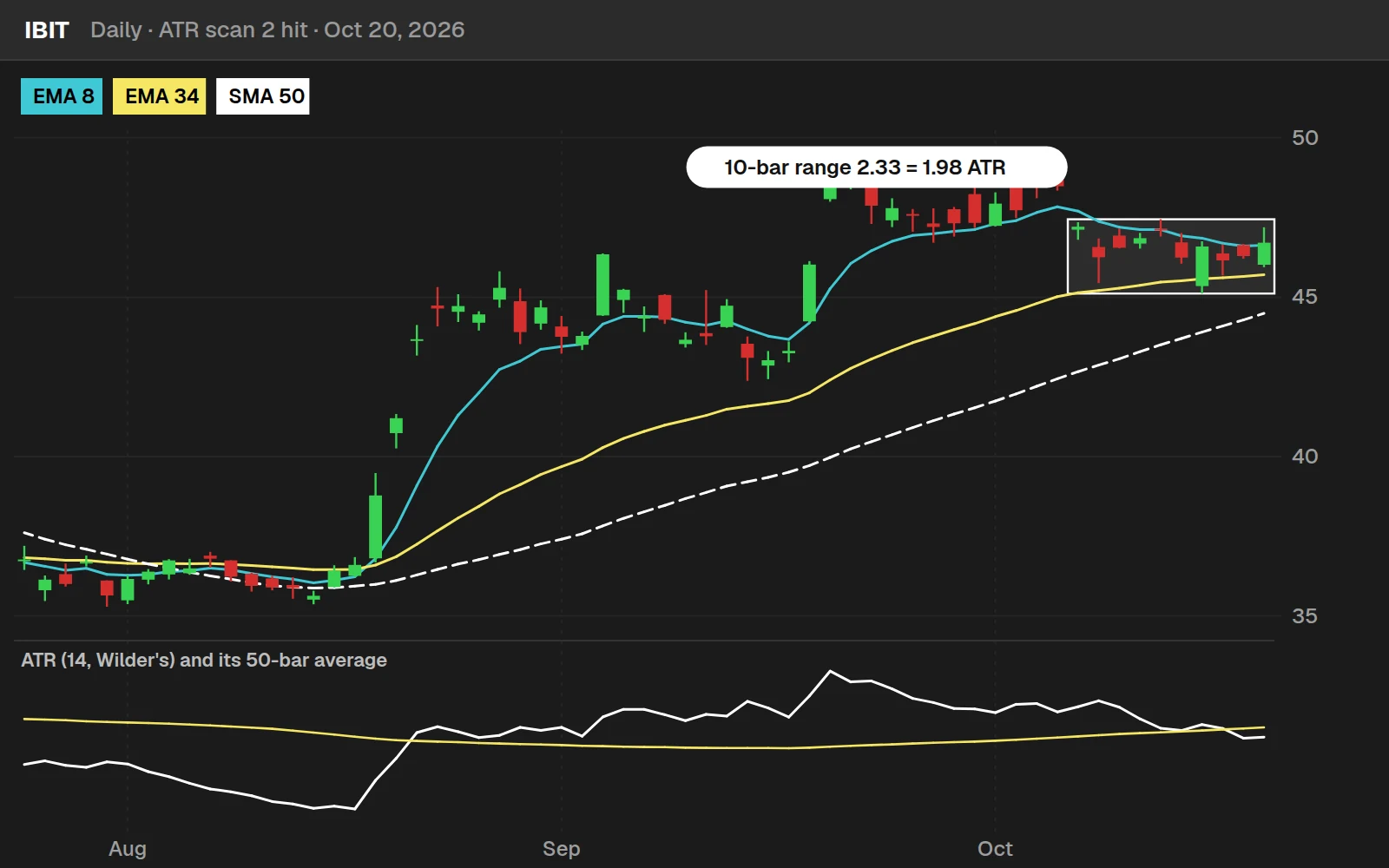
IBIT closed at $46.71, +5.0% from its 50 SMA, with a 10-bar range of $2.33 against an ATR of $1.18.
What came after scan 2 hits
Daily bars for 648 stocks and ETFs, Mar 1, 2016 to Oct 20, 2026; hits and the yardstick both use the price and volume filters. A run of hits on back-to-back days counts once. On any filtered day, ATR 20 days later was a median 0.99x the day's ATR, so a hit did not widen out more than usual. Scan 2 is a list of quiet, orderly names to study, not a call on direction.
Download
Download the Average True Range Scans for ThinkOrSwim. The download is a .txt file with 2 ThinkOrSwim shared links: Scan #1, Stocks With High ATR, and Scan #2, Stocks Compressing Near 50 SMA. In ThinkOrSwim, click Setup in the top right corner, choose Open shared item, and paste in a link. If you haven't imported a shared item before, here's how to import into your ThinkOrSwim platform.
Questions
What is average true range?
Average true range (ATR) is a moving average of true range, a measure of how far price moves per bar. True range is the largest of the high minus the low, the distance from the high to the previous close, and the distance from the low to the previous close. J. Welles Wilder Jr. introduced ATR in 1978. ThinkOrSwim's ATR study defaults to 14 bars and Wilder's average.
How do I scan for high ATR stocks in ThinkOrSwim?
Add a custom study filter in the Scan tab with 3 lines: def ATR = ATR(); def averageATR = Average(ATR, 50); plot signal = ATR > averageATR; It finds stocks whose current ATR is above its 50-bar average. In the video, on daily bars with a $10 price filter and a 2 million share volume filter, it left 246 stocks out of a starting list of 6,123.
How do I change the ATR length in a ThinkOrSwim scan?
Put the values inside the parentheses. ATR() uses the defaults of 14 bars and Wilder's average. ATR(20) uses 20 bars, and ATR(20, AverageType.EXPONENTIAL) uses a 20-bar exponential average. You can also paste the first 3 lines of the built-in ATR study into the scan, but the one-liner is faster.
What are the default ATR settings in ThinkOrSwim?
The built-in ATR study uses a length of 14 bars and Wilder's average, the smoothing J. Welles Wilder Jr. used when he introduced ATR. Calling ATR() with empty parentheses in a scan uses those same defaults. I kept them for both scans in the video.
How does the ATR compression scan define a tight range?
It takes the highest high minus the lowest low of the last 10 bars and calls the range compressed when it is no wider than 2 times the ATR. Because the test uses each stock's own ATR, tight means tight for that stock. On its own, this condition returned 25 stocks on daily bars in the video.
What moving averages does the ATR compression scan use?
The 8 EMA, 34 EMA and 50 SMA. The scan requires the 8 EMA above the 34 EMA and the 34 EMA above the 50 SMA, plus a close within 5% of the 50 SMA. In the video I then tightened the band to 3% and added a 200 SMA with the 50 SMA above it, which cut the results from 4 stocks to 2.
Why use price and volume filters with an ATR scan?
They remove cheap and thinly traded stocks before the ATR condition runs. I used a minimum price of $10 and average volume above 2 million shares. I raised the volume filter from 1 million to 2 million to stay clear of ThinkOrSwim's execution timeout error.
How do I import the ATR scans into ThinkOrSwim?
The download is a .txt file with 2 shared links, one for the high ATR scan and one for the compression scan. In ThinkOrSwim, click Setup in the top right corner, choose Open shared item, paste in a link and save the scan. Repeat with the second link.
Related tools
 Keltner Channel Wedges
 Monthly Watchlist Scan
 TTM Squeeze Scanner
 Stacked Moving Averages
 Upcoming Earnings Scan
Get each new indicator by email
One email on Sundays with the week's new tool and its code. A free account also unlocks every .txt download.
No credit card. Unsubscribe anytime.